> ## Documentation Index
> Fetch the complete documentation index at: https://www.integrate.io/docs/llms.txt
> Use this file to discover all available pages before exploring further.

# Google Cloud SQL PostgreSQL source for ELT & CDC

> How to configure Google Cloud SQL for PostgreSQL as a CDC source in Integrate.io ELT & CDC, including logical decoding and role setup.

### Enable Logical Replication

<Steps>
  <Step>
    Go to Google Cloud Console and select the project that contains the Cloud SQL instance for which you want to set a database flag.
  </Step>

  <Step>
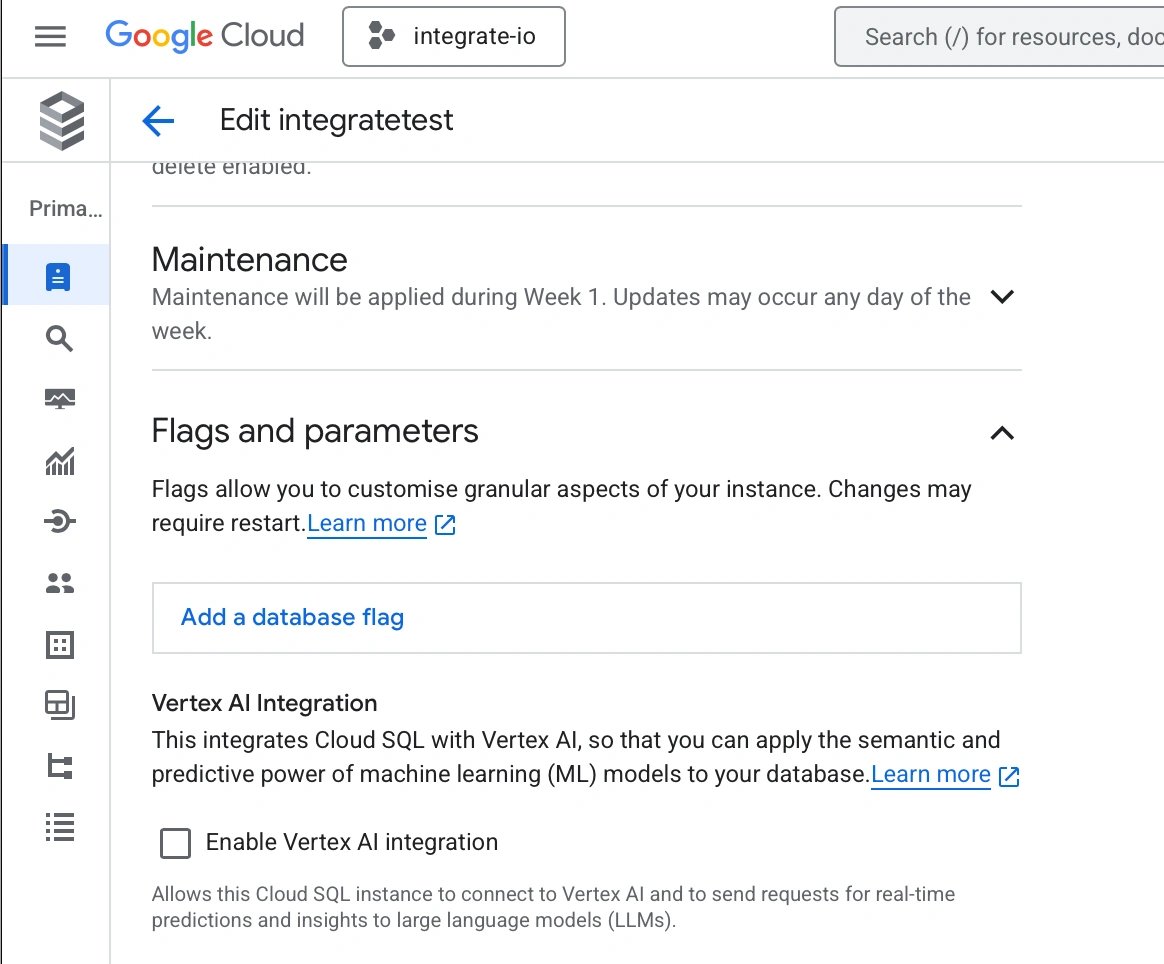
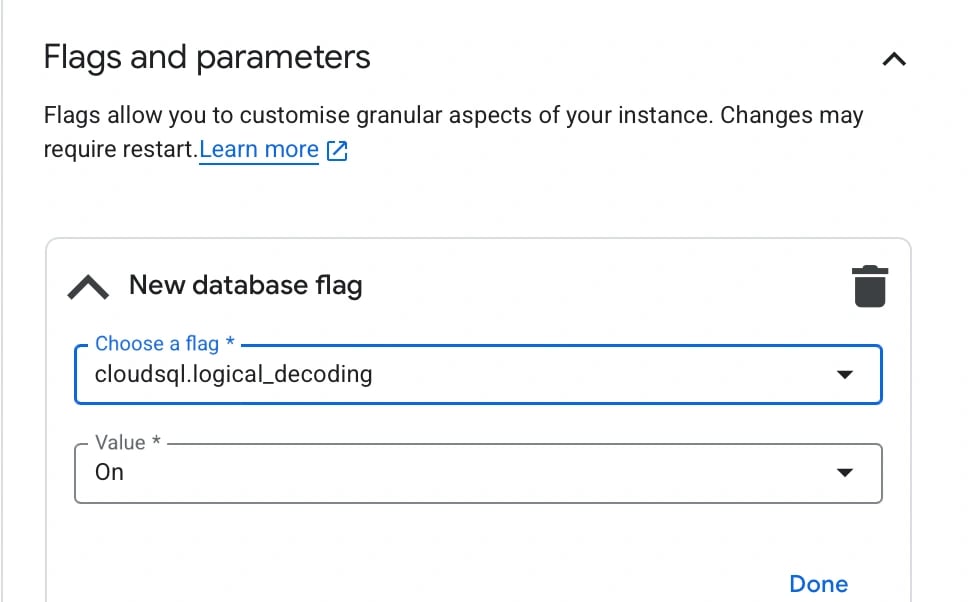
    Edit the instance and go to the Flags section. Add item > `cloudsql.logical_decoding` and set to `ON` then save your changes

    <Frame>
      <img src="https://mintcdn.com/integrateio/SIDFEDRgXpxG0yrn/images/cdc/sources/image-87.png?fit=max&auto=format&n=SIDFEDRgXpxG0yrn&q=85&s=6568ac1f9eac7880697f5c9aa65ef2a6" alt="Adding cloudsql.logical_decoding flag set to ON in Cloud SQL instance" width="1164" height="964" data-path="images/cdc/sources/image-87.png" />
    </Frame>

    <br />

    <Frame>
      <img src="https://mintcdn.com/integrateio/SIDFEDRgXpxG0yrn/images/cdc/sources/image-88.png?fit=max&auto=format&n=SIDFEDRgXpxG0yrn&q=85&s=eb89a5cafb0653410acc4321ae100670" alt="Saving the logical decoding flag changes in Cloud SQL instance settings" width="972" height="602" data-path="images/cdc/sources/image-88.png" />
    </Frame>

    This change will require your instance to restart

    <Frame>
      <img src="https://mintcdn.com/integrateio/SIDFEDRgXpxG0yrn/images/cdc/sources/image-89.png?fit=max&auto=format&n=SIDFEDRgXpxG0yrn&q=85&s=f1745fc5d164bdce0efd7c89626e59d9" alt="Cloud SQL instance restart prompt after flag changes" width="1200" height="121" data-path="images/cdc/sources/image-89.png" />
    </Frame>
  </Step>
</Steps>

Confirm your changes under Flags on the Overview page or by checking the replication status,

```bash theme={null}
show cloudsql.logical_decoding;
```

### Create role for sync

Create a sync user for ELT & CDC by executing,

```bash theme={null}
CREATE ROLE integrateio WITH PASSWORD '<your password>' LOGIN;
```

Assign the replication role to the user:

```bash theme={null}
ALTER ROLE integrateio WITH REPLICATION;
```

### Grant necessary privileges

Grant the privileges for the database and schema by running the following queries,

```bash theme={null}
GRANT CREATE ON SCHEMA <enter schema> TO integrateio;
GRANT USAGE ON SCHEMA <enter schema> TO integrateio;
GRANT CREATE ON DATABASE <enter database> TO integrateio;
GRANT SELECT ON ALL TABLES IN SCHEMA <enter schema> TO integrateio;
GRANT REFERENCES ON ALL TABLES IN SCHEMA <enter schema> TO integrateio;
```

### Assign table ownership

Create a replication group role which will allow for shared ownership of the tables by the original owner as well as the `integrateio` user.

```bash theme={null}
CREATE ROLE replication_group;
```

Add `integrateio` user to `replication_group`.

```bash theme={null}
GRANT replication_group to integrateio;
```

Then, create the following function which adds the existing table owners in a given schema to the `replication_group` role. This lets the original users **retain ownership of the tables**.

```sql expandable theme={null}
CREATE OR REPLACE FUNCTION public.add_existing_owners_to_replication_group(
    newowner text,
    pschem text)
    RETURNS TABLE
            (
                added_users text
            )
AS
$BODY$
DECLARE
    tblnames CURSOR FOR
        SELECT DISTINCT tableowner
        FROM pg_tables
        WHERE schemaname = pschem
          AND tableowner <> newowner;
    is_already_member boolean;
    added_users       text[] := array []::text[];
BEGIN
    FOR stmt IN tblnames
        LOOP
            EXECUTE $$SELECT * from pg_has_role('$$ || stmt.tableowner || $$', '$$ || newowner ||
                    $$', 'member');$$ INTO is_already_member;
            IF NOT is_already_member THEN
                EXECUTE 'GRANT ' || newowner || ' TO ' || stmt.tableowner || ';';
                EXECUTE 'ALTER DEFAULT PRIVILEGES FOR ROLE ' || stmt.tableowner || ' IN SCHEMA ' || pschem ||
                        ' GRANT SELECT ON TABLES TO ' || newowner || ';';
                EXECUTE 'ALTER DEFAULT PRIVILEGES FOR ROLE ' || stmt.tableowner || ' IN SCHEMA ' || pschem ||
                        ' GRANT REFERENCES ON TABLES TO ' || newowner || ';';
                added_users = array_append(added_users, stmt.tableowner::text);
            END IF;
        END LOOP;

    RETURN QUERY SELECT unnest(added_users::text[]);
END
$BODY$
    LANGUAGE plpgsql VOLATILE
                     COST 100;
```

Execute the function,

```sql theme={null}
SELECT public.add_existing_owners_to_replication_group('replication_group', '<schema_name>');
```

Now create the function which will change the owners of all tables in a given schema to `replication_group`,

```sql expandable theme={null}
CREATE OR REPLACE FUNCTION public.change_schema_tables_owner_to_replication_group(
    newowner text,
    pschem text, numtables int default 999999)
    RETURNS TABLE
            (
                changed_tables text
            )
AS
$BODY$
DECLARE
    changed_tables text[] := array []::text[];
    tblnames CURSOR FOR
        SELECT tablename
        FROM pg_tables
        WHERE schemaname = pschem
          and tableowner <> newowner
        limit numtables;
BEGIN
    FOR stmt IN tblnames
        LOOP
            EXECUTE 'alter table ' || pschem || '.' || stmt.tablename || ' owner to ' || newowner || ';';
            changed_tables = array_append(changed_tables, stmt.tablename::text);
        END LOOP;
    RETURN QUERY SELECT unnest(changed_tables::text[]);
END
$BODY$
    LANGUAGE plpgsql VOLATILE
                     COST 100;
```

The function accepts an optional third parameter which specifies the number of tables to change ownership of. You can use this parameter to change ownership in batches if the number of tables is very high.

Execute the function,

```sql theme={null}
SELECT public.change_schema_tables_owner_to_replication_group('replication_group', '<schema_name>');
```

Or batch it (10 tables in the example below),

```sql theme={null}
SELECT public.change_schema_tables_owner_to_replication_group('replication_group', '<schema_name>', 10);
```