> ## Documentation Index
> Fetch the complete documentation index at: https://www.integrate.io/docs/llms.txt
> Use this file to discover all available pages before exploring further.
# ETL: Custom Roles
> Create custom roles in Integrate.io ETL with a tailored permission set and scope them to specific package groups or connection groups.
Custom roles let account admins define their own permission sets and limit access to specific package groups or connection groups. Use a custom role when the predefined roles (Owner, Admin, Operator, Editor, Reader) grant either too much or too little access for a team.
Custom roles are an opt-in feature. If you do not see the **Roles** tab under **Settings > User Management**, contact Support to enable them on your account.
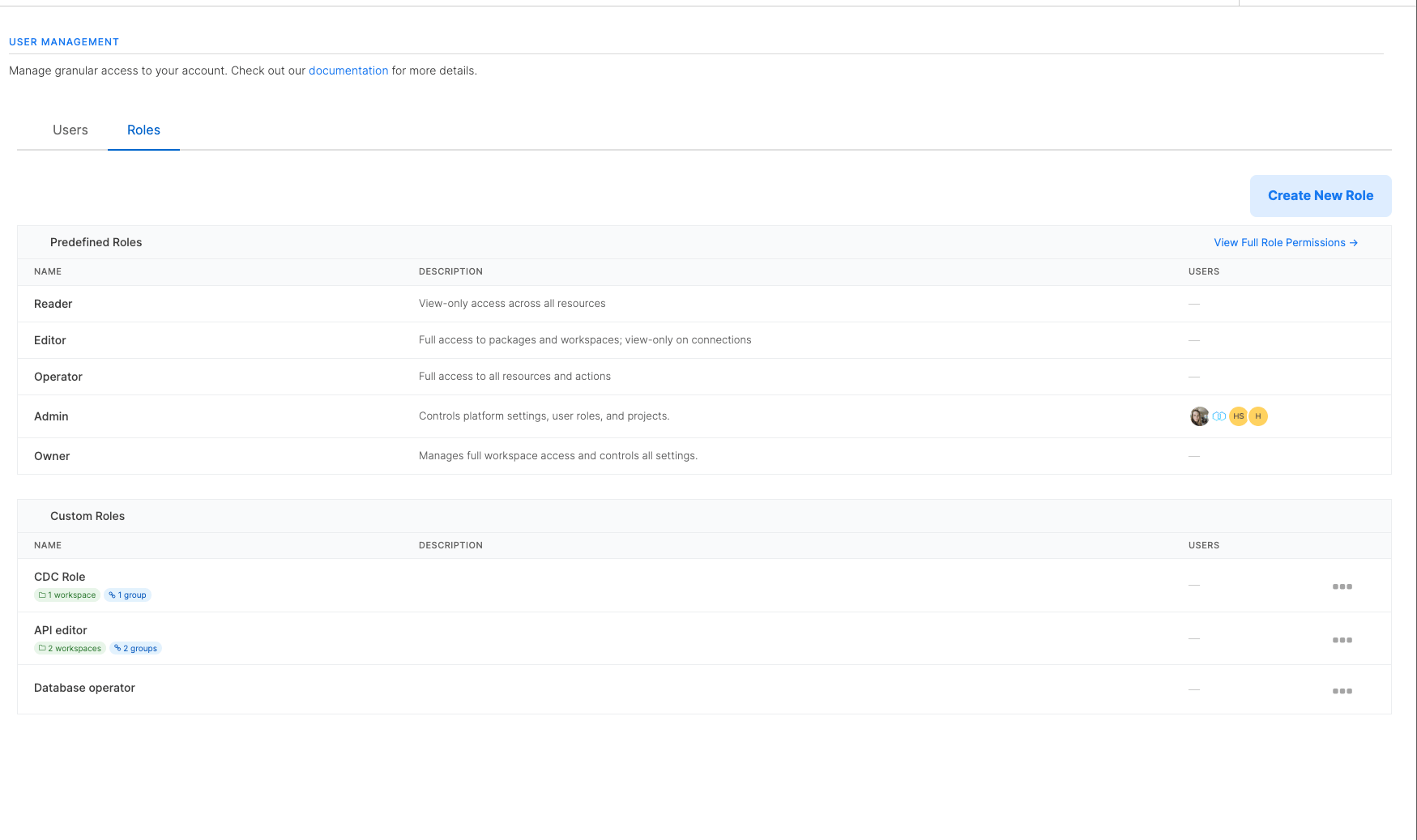 ## How custom roles work
A custom role has three parts:
* **Permissions**: the list of actions members assigned to the role can perform (for example, view packages, create connections, run jobs).
* **Package group scope**: which package groups the role applies to.
* **Connection group scope**: which connection groups the role applies to.
Package groups were previously called **workspaces**. The role-creation form, the API field names (`workspace_scope`, `workspace_ids`), and the workspace-domain permission keys (`viewWorkspace`, `createWorkspace`, and so on) still use the legacy term. They refer to the same thing.
Each scope accepts one of three values:
| Scope | Effect |
| :--------------------------------------------------- | :-------------------------------------------------------------------------------------------------------------------------------------------------------------------------------------------------------------------------------------------------------------------- |
| All package groups / All connection groups | The role applies to every package group or connection group in the account, including ones created after the role was saved. |
| Specific package groups / Specific connection groups | The role applies **only** to the package groups or connection groups you select. Resources outside that selection are invisible to the role. |
| No package groups / No connection groups | The role grants no access in that domain. Members assigned to the role see no resources in that domain at all, including resources that have no group assigned (orphans). Permissions tied to that domain are also hidden from the member's effective permission set. |
Scopes are strict: choosing **Specific** means the role grants access to only those resources. Resources without a package group or connection group (orphans) are not included.
Package-group-scoped permissions cover package groups, packages, jobs, schedules, and package templates. Connection-group-scoped permissions cover connections and connection groups. Account-level permissions (clusters, hooks, members, billing, global variables) are not affected by resource scope and are configured under **Global Permissions** instead.
### How scope affects related resources
The package group scope and connection group scope also control visibility of the resources that belong to those groups:
* **Packages**: a package is visible only when it belongs to a package group the role allows. Packages outside the role's scope are hidden from the packages list, designer, and search.
* **Jobs**: a job is visible only when its package belongs to a package group the role allows. Jobs whose package is outside the role's scope are hidden, even from the jobs list.
* **Schedules**: a schedule is visible only when **every** package it triggers is in scope. If a schedule references at least one package the user cannot see, the entire schedule is hidden so the scope does not leak the existence of out-of-scope packages.
* **Connections**: a connection is visible only when it belongs to a connection group the role allows. Connections without a connection group are not visible to a scoped role.
When the scope is **No package groups**, members assigned to the role cannot see any package, job, schedule, or package group, even ones with no package group assigned. The same rule applies to connections under **No connection groups**.
## How custom roles combine with predefined roles
A member can be assigned a predefined role, one or more custom roles, or both. The two interact as follows:
| Member's roles | Effective permissions |
| :---------------------------------- | :------------------------------------------------------------------------------------------------------------------------------------------------------------------------------------------------------------------------------- |
| Predefined role only | The predefined role's permissions, unchanged. |
| Custom role(s) only | The union of every assigned custom role. |
| Predefined role plus custom role(s) | The union of the predefined role's permissions and every assigned custom role (**additive**). The predefined role's account-wide grants still apply, so adding a custom role can only ever grant more access, never restrict it. |
Use a custom role on its own when you want to restrict a member to a specific set of package groups or connection groups. Combine a predefined role with a custom role when you want the predefined role's defaults plus some extra permissions (for example, an Editor who also needs to create clusters).
## Access Level presets
When you create a role, the **Access Level** section offers four presets that pre-fill the permission checkboxes:
| Preset | Use when |
| :----------- | :------------------------------------------------------------------------------------------------------- |
| **Reader** | Read-only access. The role can list and view resources in its scope but cannot make changes. |
| **Editor** | View and edit. The role can update packages and package groups in scope. Connection access is view-only. |
| **Operator** | Edit, run, and manage. The role adds connection management and the ability to run jobs on top of Editor. |
| **Custom** | Pick individual permissions. The checkboxes become editable so you can build any combination. |
Reader, Editor, and Operator presets lock the checkboxes to make the intent explicit. Switch to **Custom** to edit individual permissions.
## How custom roles work
A custom role has three parts:
* **Permissions**: the list of actions members assigned to the role can perform (for example, view packages, create connections, run jobs).
* **Package group scope**: which package groups the role applies to.
* **Connection group scope**: which connection groups the role applies to.
Package groups were previously called **workspaces**. The role-creation form, the API field names (`workspace_scope`, `workspace_ids`), and the workspace-domain permission keys (`viewWorkspace`, `createWorkspace`, and so on) still use the legacy term. They refer to the same thing.
Each scope accepts one of three values:
| Scope | Effect |
| :--------------------------------------------------- | :-------------------------------------------------------------------------------------------------------------------------------------------------------------------------------------------------------------------------------------------------------------------- |
| All package groups / All connection groups | The role applies to every package group or connection group in the account, including ones created after the role was saved. |
| Specific package groups / Specific connection groups | The role applies **only** to the package groups or connection groups you select. Resources outside that selection are invisible to the role. |
| No package groups / No connection groups | The role grants no access in that domain. Members assigned to the role see no resources in that domain at all, including resources that have no group assigned (orphans). Permissions tied to that domain are also hidden from the member's effective permission set. |
Scopes are strict: choosing **Specific** means the role grants access to only those resources. Resources without a package group or connection group (orphans) are not included.
Package-group-scoped permissions cover package groups, packages, jobs, schedules, and package templates. Connection-group-scoped permissions cover connections and connection groups. Account-level permissions (clusters, hooks, members, billing, global variables) are not affected by resource scope and are configured under **Global Permissions** instead.
### How scope affects related resources
The package group scope and connection group scope also control visibility of the resources that belong to those groups:
* **Packages**: a package is visible only when it belongs to a package group the role allows. Packages outside the role's scope are hidden from the packages list, designer, and search.
* **Jobs**: a job is visible only when its package belongs to a package group the role allows. Jobs whose package is outside the role's scope are hidden, even from the jobs list.
* **Schedules**: a schedule is visible only when **every** package it triggers is in scope. If a schedule references at least one package the user cannot see, the entire schedule is hidden so the scope does not leak the existence of out-of-scope packages.
* **Connections**: a connection is visible only when it belongs to a connection group the role allows. Connections without a connection group are not visible to a scoped role.
When the scope is **No package groups**, members assigned to the role cannot see any package, job, schedule, or package group, even ones with no package group assigned. The same rule applies to connections under **No connection groups**.
## How custom roles combine with predefined roles
A member can be assigned a predefined role, one or more custom roles, or both. The two interact as follows:
| Member's roles | Effective permissions |
| :---------------------------------- | :------------------------------------------------------------------------------------------------------------------------------------------------------------------------------------------------------------------------------- |
| Predefined role only | The predefined role's permissions, unchanged. |
| Custom role(s) only | The union of every assigned custom role. |
| Predefined role plus custom role(s) | The union of the predefined role's permissions and every assigned custom role (**additive**). The predefined role's account-wide grants still apply, so adding a custom role can only ever grant more access, never restrict it. |
Use a custom role on its own when you want to restrict a member to a specific set of package groups or connection groups. Combine a predefined role with a custom role when you want the predefined role's defaults plus some extra permissions (for example, an Editor who also needs to create clusters).
## Access Level presets
When you create a role, the **Access Level** section offers four presets that pre-fill the permission checkboxes:
| Preset | Use when |
| :----------- | :------------------------------------------------------------------------------------------------------- |
| **Reader** | Read-only access. The role can list and view resources in its scope but cannot make changes. |
| **Editor** | View and edit. The role can update packages and package groups in scope. Connection access is view-only. |
| **Operator** | Edit, run, and manage. The role adds connection management and the ability to run jobs on top of Editor. |
| **Custom** | Pick individual permissions. The checkboxes become editable so you can build any combination. |
Reader, Editor, and Operator presets lock the checkboxes to make the intent explicit. Switch to **Custom** to edit individual permissions.
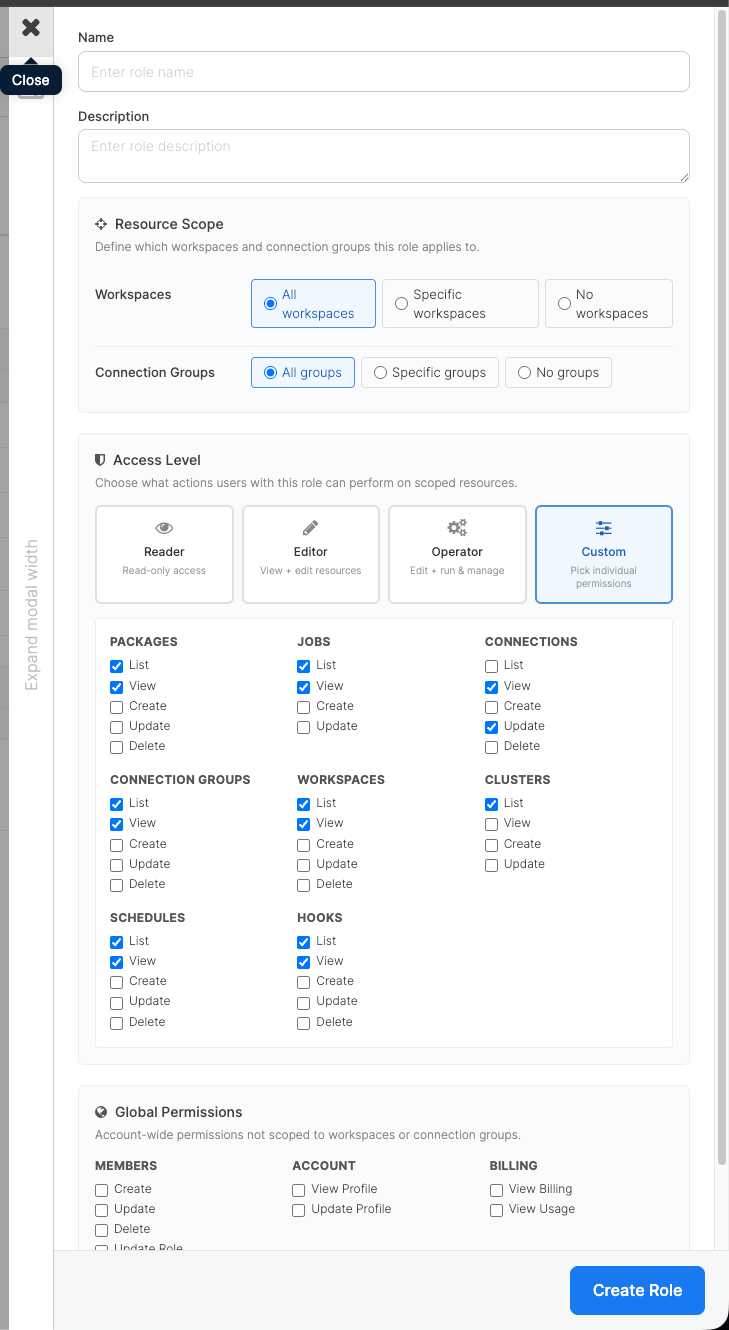 ## Creating a custom role
Prerequisites:
* You must be an Owner or Admin on the account.
* Custom roles must be enabled for your account.
On the left menu, open **Settings**, then **User Management**, and switch to the **Roles** tab.
Click **Create New Role**.
Enter a **Name** and an optional **Description**. Both appear in the Roles list and in the Assigned Roles picker when inviting members.
In **Resource Scope**, choose a package group scope and a connection group scope. Pick **All**, **Specific** (then add the package groups or connection groups), or **No**. The role-creation form labels the package group axis as "Workspaces" (legacy term), but the meaning is the same.
In **Access Level**, pick **Reader**, **Editor**, **Operator**, or **Custom**. With **Custom**, tick individual permissions in the resource grid below.
Optionally expand **Global Permissions** and grant account-wide capabilities (managing members, viewing the account profile, viewing billing).
## Creating a custom role
Prerequisites:
* You must be an Owner or Admin on the account.
* Custom roles must be enabled for your account.
On the left menu, open **Settings**, then **User Management**, and switch to the **Roles** tab.
Click **Create New Role**.
Enter a **Name** and an optional **Description**. Both appear in the Roles list and in the Assigned Roles picker when inviting members.
In **Resource Scope**, choose a package group scope and a connection group scope. Pick **All**, **Specific** (then add the package groups or connection groups), or **No**. The role-creation form labels the package group axis as "Workspaces" (legacy term), but the meaning is the same.
In **Access Level**, pick **Reader**, **Editor**, **Operator**, or **Custom**. With **Custom**, tick individual permissions in the resource grid below.
Optionally expand **Global Permissions** and grant account-wide capabilities (managing members, viewing the account profile, viewing billing).
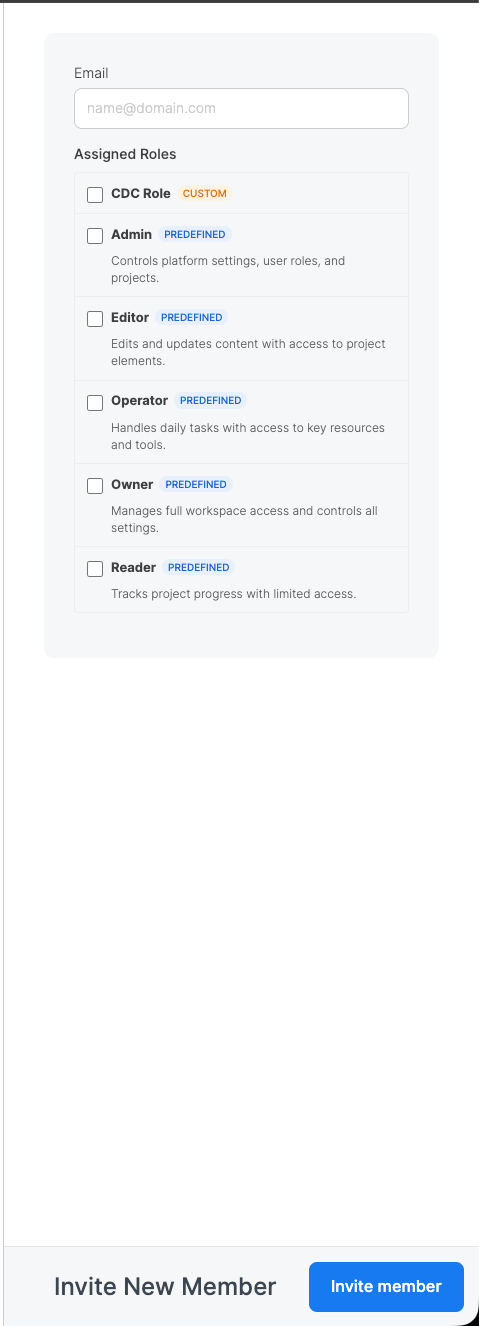 Click **Create Role**.
## Assigning a custom role to a member
Go to **Settings > User Management**, then switch to the **Users** tab.
Open the member you want to update, or click **Invite New Member** to add a new one.
Under **Assigned Roles**, tick one or more roles. Each role is labeled **PREDEFINED** or **CUSTOM** so you can tell them apart at a glance. You can combine a predefined role with one or more custom roles, or assign multiple custom roles together.
Click **Create Role**.
## Assigning a custom role to a member
Go to **Settings > User Management**, then switch to the **Users** tab.
Open the member you want to update, or click **Invite New Member** to add a new one.
Under **Assigned Roles**, tick one or more roles. Each role is labeled **PREDEFINED** or **CUSTOM** so you can tell them apart at a glance. You can combine a predefined role with one or more custom roles, or assign multiple custom roles together.
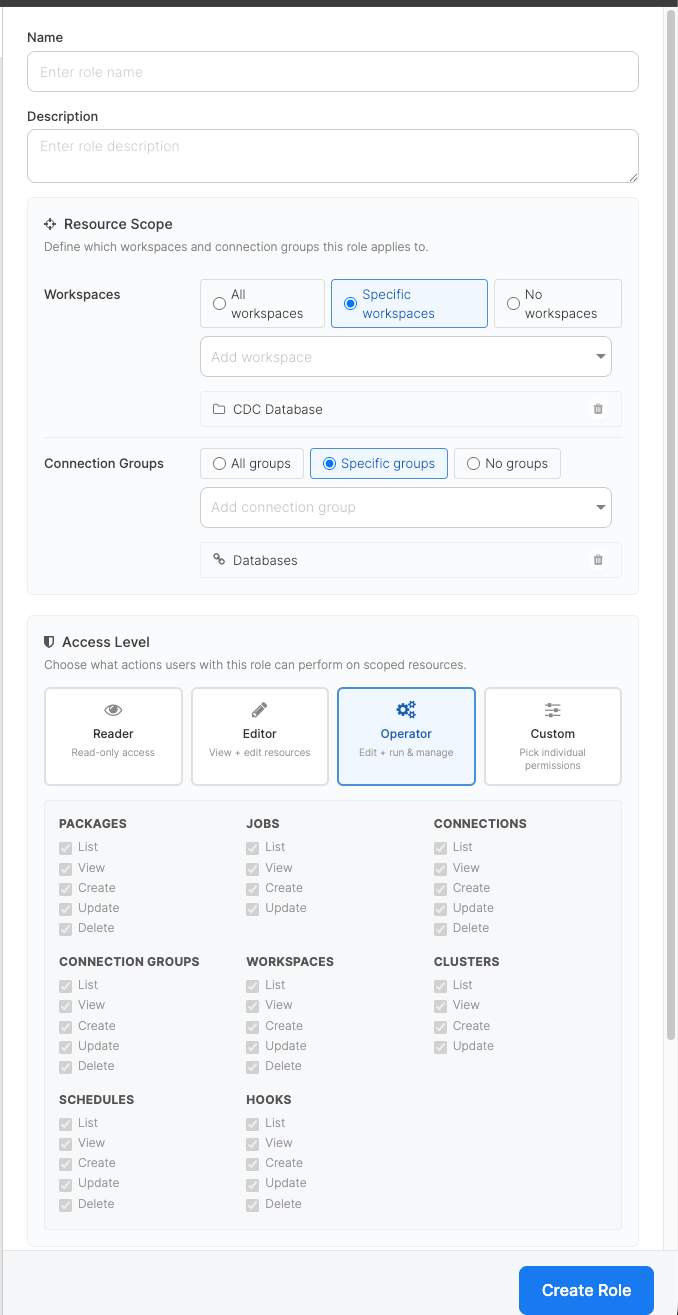 Click **Invite member** (or **Save** when editing an existing member).
A member's effective permissions are the union of every role they have assigned. If they hold a predefined role, that role's account-wide grants stay in effect alongside any custom role.
### Assigning users from the role
You can also manage a role's assignees from the role itself instead of editing every member individually. Use this path when you need to add or remove several users on the same role in one step.
Go to **Settings > User Management**, then switch to the **Roles** tab.
Open the **Assign Users** dialog for the role using any of these entry points:
* Click the role's name.
* Click the **Users** column on the role's row.
* Open the row's action menu (**⋮**) and select **Assign users**.
Tick the members who should hold the role and untick anyone who should no longer hold it. Use the search box to filter by name or email.
Click **Save**. The role's assignee list is replaced with your selection: newly ticked members are added, unticked members are removed.
Predefined roles are read-only in this dialog. To change a member's predefined role, edit the member from the **Users** tab.
### Filtering users by role
On the **Users** tab, use the role dropdown next to **Invite New Member** to filter the list by role. The dropdown groups roles into **Predefined** and **Custom**. Selecting a role narrows the list to members assigned to it; selecting **All roles** clears the filter.
## Editing or deleting a role
* Predefined roles cannot be modified or deleted.
* Custom roles can be edited at any time. Changes apply immediately to every member assigned to the role; you do not need to re-invite anyone.
* A custom role can be deleted only after every member has been unassigned from it. If you try to delete a role that still has assignees, the UI returns an error listing how many members still use the role.
## API reference
The custom roles API is exposed under `/api/v2/custom_roles`. All endpoints require an account-scoped API key for an Owner or Admin.
### List roles
```bash theme={null}
curl -u API_KEY: \
-H "Accept: application/vnd.xplenty+json; version=2" \
-H "X-Account-Id: ACCOUNT_ID" \
https://api.integrate.io/api/v2/custom_roles
```
The response includes both the global predefined roles and any custom roles defined on the account, so the same payload powers the Roles list page and the Assigned Roles picker.
### Create a custom role
This example creates a package-group-scoped editor for a single package group, with no connection access. The API still uses the legacy `workspace_scope` / `workspace_ids` field names and the `*Workspace` permission keys:
```bash theme={null}
curl -u API_KEY: \
-H "Accept: application/vnd.xplenty+json; version=2" \
-H "Content-Type: application/json" \
-H "X-Account-Id: ACCOUNT_ID" \
-X POST \
-d '{
"name": "Analytics editor",
"description": "Edit packages and run jobs in the analytics package group",
"permissions": [
"listWorkspaces", "viewWorkspace",
"listPackages", "viewPackage", "updatePackage", "validatePackage",
"listJobs", "viewJob", "createJob"
],
"workspace_scope": "specific",
"workspace_ids": [123],
"connection_group_scope": "none"
}' \
https://api.integrate.io/api/v2/custom_roles
```
The scope fields accept `all`, `specific`, or `none`. When the scope is `specific`, the matching `workspace_ids` or `connection_group_ids` array lists the resource IDs to grant access to.
### Update a custom role
```bash theme={null}
curl -u API_KEY: \
-H "Accept: application/vnd.xplenty+json; version=2" \
-H "Content-Type: application/json" \
-H "X-Account-Id: ACCOUNT_ID" \
-X PUT \
-d '{ "permissions": ["listPackages", "viewPackage"] }' \
https://api.integrate.io/api/v2/custom_roles/ROLE_ID
```
### Delete a custom role
```bash theme={null}
curl -u API_KEY: \
-H "Accept: application/vnd.xplenty+json; version=2" \
-H "X-Account-Id: ACCOUNT_ID" \
-X DELETE \
https://api.integrate.io/api/v2/custom_roles/ROLE_ID
```
Returns 422 if any member is still assigned to the role; unassign them first and retry.
### Assign custom roles to a member
Pass `custom_role_ids` to the members endpoint when inviting or updating a member:
```bash theme={null}
curl -u API_KEY: \
-H "Accept: application/vnd.xplenty+json; version=2" \
-H "Content-Type: application/json" \
-H "X-Account-Id: ACCOUNT_ID" \
-X PUT \
-d '{ "custom_role_ids": [42, 57] }' \
https://api.integrate.io/api/v2/members/MEMBER_ID
```
Passing an empty array clears every custom role from the member; their predefined role (if any) continues to apply on its own.
You can also invite a new member with **only** a custom role by sending `role: "base"` alongside a non-empty `custom_role_ids` array. The invitee's permissions come entirely from the assigned custom roles. No predefined-role grants apply.
```bash theme={null}
curl -u API_KEY: \
-H "Accept: application/vnd.xplenty+json; version=2" \
-H "Content-Type: application/json" \
-H "X-Account-Id: ACCOUNT_ID" \
-X POST \
-d '{
"email": "teammate@example.com",
"role": "base",
"custom_role_ids": [42]
}' \
https://api.integrate.io/api/v2/members
```
### Assign members to a role in bulk
Use the role-level members endpoint when you want to manage a role's assignees from the role itself rather than editing every member individually. It replaces the role's current assignees with the supplied `user_ids` list. Missing IDs are added and IDs no longer in the list are removed.
```bash theme={null}
curl -u API_KEY: \
-H "Accept: application/vnd.xplenty+json; version=2" \
-H "Content-Type: application/json" \
-H "X-Account-Id: ACCOUNT_ID" \
-X PUT \
-d '{ "user_ids": [101, 102, 103] }' \
https://api.integrate.io/api/v2/custom_roles/ROLE_ID/members
```
Behavior:
* The request is idempotent. Sending the same `user_ids` list twice is a no-op.
* Passing an empty array unassigns every member from the role.
* IDs that do not belong to the account are silently ignored, so a stale ID cannot leak members from another account into the role.
* The endpoint is available only for account-scoped custom roles. Attempting to change the assignees of a predefined role returns 422.
* The caller needs the `manage_member_roles` permission (Owner or Admin, or a custom role that grants it).
### Filter members by role
`GET /api/v2/members` accepts two optional filters that compose with AND semantics:
| Parameter | Filters by |
| :--------------- | :------------------------------------------------------------- |
| `role` | Predefined role name (`admin`, `member`, `viewer`, and so on). |
| `custom_role_id` | The numeric ID of a custom role. |
Send `custom_role_id` on its own to list every member assigned to that custom role. Send both to list members who hold the given predefined role **and** the given custom role.
```bash theme={null}
curl -u API_KEY: \
-H "Accept: application/vnd.xplenty+json; version=2" \
-H "X-Account-Id: ACCOUNT_ID" \
"https://api.integrate.io/api/v2/members?custom_role_id=42"
```
## Permission reference
The permission keys you can include when building a custom role, grouped by domain:
| Domain | Permissions |
| :-------------------------- | :------------------------------------------------------------------------------------------------------------------------------------ |
| Package groups (workspaces) | `listWorkspaces`, `viewWorkspace`, `createWorkspace`, `updateWorkspace`, `deleteWorkspace` |
| Packages | `listPackages`, `viewPackage`, `createPackage`, `updatePackage`, `deletePackage`, `validatePackage`, `listPackageTemplates` |
| Jobs | `listJobs`, `viewJob`, `createJob`, `updateJob` |
| Schedules | `listSchedules`, `viewSchedule`, `createSchedule`, `updateSchedule`, `deleteSchedule` |
| Connections | `listConnections`, `viewConnection`, `createConnection`, `testConnection`, `importConnection`, `updateConnection`, `deleteConnection` |
| Connection groups | `listConnectionGroups`, `viewConnectionGroup`, `createConnectionGroup`, `updateConnectionGroup`, `deleteConnectionGroup` |
| Clusters | `listClusters`, `viewCluster`, `createCluster`, `updateCluster`, `deleteCluster` |
| Members | `listMembers`, `viewMember`, `createMember`, `updateMember`, `deleteMember`, `updateMemberRole` |
| Hooks | `listHooks`, `viewHook`, `createHook`, `updateHook`, `deleteHook` |
| Global variables | `viewGlobalVariables`, `updateGlobalVariables`, `viewGlobalSecrets`, `updateGlobalSecrets` |
| Account | `viewProfile`, `updateProfile`, `viewUsage`, `manageConnectionAccess` |
| Billing | `viewBilling` |
| Developer | `viewApiKey`, `regenerateApiKey`, `listConnectedApplications`, `manageConnectedApplications` |
A few permissions are easy to confuse:
* `createJob` is the permission to **run an existing package** (start a new job run). It does not grant the ability to edit the package.
* `updatePackage` is the permission to **edit a package's flow**. Grant both `createJob` and `updatePackage` when an editor also needs to trigger runs.
* `createPackage` is the permission to **create a new package**. It does not imply `updatePackage` on packages someone else created.
* `manageConnectionAccess` is the account-level permission to **bind a package group to specific connection groups** (see [Restricting a Package Group to specific Connection Groups](/docs/etl/package-groups#restricting-a-package-group-to-specific-connection-groups)). `updateWorkspace` alone does not grant it, so a package-group editor cannot change which connections the group's members can reach.
## FAQ
**Why don't I see the Roles tab?**
Custom roles are opt-in. If the Roles tab is missing from **Settings > User Management**, contact Support to enable them on your account.
**Can I edit a predefined role?**
No. Predefined roles (Owner, Admin, Operator, Editor, Reader) are fixed. If you need a variation, build a custom role with the permissions you want.
**What happens if I remove a permission from a role that's already assigned to members?**
The change applies immediately. Members assigned to the role lose the removed permission on their next request. You do not need to re-invite anyone.
**Can a member be in more than one custom role?**
Yes. Effective permissions are the union of every custom role the member is assigned, plus their predefined role (if any).
**What if I assign a custom role that covers fewer permissions than the member's predefined role?**
The predefined role keeps applying. Custom roles only add permissions; they never subtract. To restrict a member, lower their predefined role first (for example, set it to Reader), then assign the custom role.
**Why can't I delete a role?**
A role can be deleted only after every member is unassigned from it. Open the role's row, remove its assignees, and retry the delete.
## Related
Click **Invite member** (or **Save** when editing an existing member).
A member's effective permissions are the union of every role they have assigned. If they hold a predefined role, that role's account-wide grants stay in effect alongside any custom role.
### Assigning users from the role
You can also manage a role's assignees from the role itself instead of editing every member individually. Use this path when you need to add or remove several users on the same role in one step.
Go to **Settings > User Management**, then switch to the **Roles** tab.
Open the **Assign Users** dialog for the role using any of these entry points:
* Click the role's name.
* Click the **Users** column on the role's row.
* Open the row's action menu (**⋮**) and select **Assign users**.
Tick the members who should hold the role and untick anyone who should no longer hold it. Use the search box to filter by name or email.
Click **Save**. The role's assignee list is replaced with your selection: newly ticked members are added, unticked members are removed.
Predefined roles are read-only in this dialog. To change a member's predefined role, edit the member from the **Users** tab.
### Filtering users by role
On the **Users** tab, use the role dropdown next to **Invite New Member** to filter the list by role. The dropdown groups roles into **Predefined** and **Custom**. Selecting a role narrows the list to members assigned to it; selecting **All roles** clears the filter.
## Editing or deleting a role
* Predefined roles cannot be modified or deleted.
* Custom roles can be edited at any time. Changes apply immediately to every member assigned to the role; you do not need to re-invite anyone.
* A custom role can be deleted only after every member has been unassigned from it. If you try to delete a role that still has assignees, the UI returns an error listing how many members still use the role.
## API reference
The custom roles API is exposed under `/api/v2/custom_roles`. All endpoints require an account-scoped API key for an Owner or Admin.
### List roles
```bash theme={null}
curl -u API_KEY: \
-H "Accept: application/vnd.xplenty+json; version=2" \
-H "X-Account-Id: ACCOUNT_ID" \
https://api.integrate.io/api/v2/custom_roles
```
The response includes both the global predefined roles and any custom roles defined on the account, so the same payload powers the Roles list page and the Assigned Roles picker.
### Create a custom role
This example creates a package-group-scoped editor for a single package group, with no connection access. The API still uses the legacy `workspace_scope` / `workspace_ids` field names and the `*Workspace` permission keys:
```bash theme={null}
curl -u API_KEY: \
-H "Accept: application/vnd.xplenty+json; version=2" \
-H "Content-Type: application/json" \
-H "X-Account-Id: ACCOUNT_ID" \
-X POST \
-d '{
"name": "Analytics editor",
"description": "Edit packages and run jobs in the analytics package group",
"permissions": [
"listWorkspaces", "viewWorkspace",
"listPackages", "viewPackage", "updatePackage", "validatePackage",
"listJobs", "viewJob", "createJob"
],
"workspace_scope": "specific",
"workspace_ids": [123],
"connection_group_scope": "none"
}' \
https://api.integrate.io/api/v2/custom_roles
```
The scope fields accept `all`, `specific`, or `none`. When the scope is `specific`, the matching `workspace_ids` or `connection_group_ids` array lists the resource IDs to grant access to.
### Update a custom role
```bash theme={null}
curl -u API_KEY: \
-H "Accept: application/vnd.xplenty+json; version=2" \
-H "Content-Type: application/json" \
-H "X-Account-Id: ACCOUNT_ID" \
-X PUT \
-d '{ "permissions": ["listPackages", "viewPackage"] }' \
https://api.integrate.io/api/v2/custom_roles/ROLE_ID
```
### Delete a custom role
```bash theme={null}
curl -u API_KEY: \
-H "Accept: application/vnd.xplenty+json; version=2" \
-H "X-Account-Id: ACCOUNT_ID" \
-X DELETE \
https://api.integrate.io/api/v2/custom_roles/ROLE_ID
```
Returns 422 if any member is still assigned to the role; unassign them first and retry.
### Assign custom roles to a member
Pass `custom_role_ids` to the members endpoint when inviting or updating a member:
```bash theme={null}
curl -u API_KEY: \
-H "Accept: application/vnd.xplenty+json; version=2" \
-H "Content-Type: application/json" \
-H "X-Account-Id: ACCOUNT_ID" \
-X PUT \
-d '{ "custom_role_ids": [42, 57] }' \
https://api.integrate.io/api/v2/members/MEMBER_ID
```
Passing an empty array clears every custom role from the member; their predefined role (if any) continues to apply on its own.
You can also invite a new member with **only** a custom role by sending `role: "base"` alongside a non-empty `custom_role_ids` array. The invitee's permissions come entirely from the assigned custom roles. No predefined-role grants apply.
```bash theme={null}
curl -u API_KEY: \
-H "Accept: application/vnd.xplenty+json; version=2" \
-H "Content-Type: application/json" \
-H "X-Account-Id: ACCOUNT_ID" \
-X POST \
-d '{
"email": "teammate@example.com",
"role": "base",
"custom_role_ids": [42]
}' \
https://api.integrate.io/api/v2/members
```
### Assign members to a role in bulk
Use the role-level members endpoint when you want to manage a role's assignees from the role itself rather than editing every member individually. It replaces the role's current assignees with the supplied `user_ids` list. Missing IDs are added and IDs no longer in the list are removed.
```bash theme={null}
curl -u API_KEY: \
-H "Accept: application/vnd.xplenty+json; version=2" \
-H "Content-Type: application/json" \
-H "X-Account-Id: ACCOUNT_ID" \
-X PUT \
-d '{ "user_ids": [101, 102, 103] }' \
https://api.integrate.io/api/v2/custom_roles/ROLE_ID/members
```
Behavior:
* The request is idempotent. Sending the same `user_ids` list twice is a no-op.
* Passing an empty array unassigns every member from the role.
* IDs that do not belong to the account are silently ignored, so a stale ID cannot leak members from another account into the role.
* The endpoint is available only for account-scoped custom roles. Attempting to change the assignees of a predefined role returns 422.
* The caller needs the `manage_member_roles` permission (Owner or Admin, or a custom role that grants it).
### Filter members by role
`GET /api/v2/members` accepts two optional filters that compose with AND semantics:
| Parameter | Filters by |
| :--------------- | :------------------------------------------------------------- |
| `role` | Predefined role name (`admin`, `member`, `viewer`, and so on). |
| `custom_role_id` | The numeric ID of a custom role. |
Send `custom_role_id` on its own to list every member assigned to that custom role. Send both to list members who hold the given predefined role **and** the given custom role.
```bash theme={null}
curl -u API_KEY: \
-H "Accept: application/vnd.xplenty+json; version=2" \
-H "X-Account-Id: ACCOUNT_ID" \
"https://api.integrate.io/api/v2/members?custom_role_id=42"
```
## Permission reference
The permission keys you can include when building a custom role, grouped by domain:
| Domain | Permissions |
| :-------------------------- | :------------------------------------------------------------------------------------------------------------------------------------ |
| Package groups (workspaces) | `listWorkspaces`, `viewWorkspace`, `createWorkspace`, `updateWorkspace`, `deleteWorkspace` |
| Packages | `listPackages`, `viewPackage`, `createPackage`, `updatePackage`, `deletePackage`, `validatePackage`, `listPackageTemplates` |
| Jobs | `listJobs`, `viewJob`, `createJob`, `updateJob` |
| Schedules | `listSchedules`, `viewSchedule`, `createSchedule`, `updateSchedule`, `deleteSchedule` |
| Connections | `listConnections`, `viewConnection`, `createConnection`, `testConnection`, `importConnection`, `updateConnection`, `deleteConnection` |
| Connection groups | `listConnectionGroups`, `viewConnectionGroup`, `createConnectionGroup`, `updateConnectionGroup`, `deleteConnectionGroup` |
| Clusters | `listClusters`, `viewCluster`, `createCluster`, `updateCluster`, `deleteCluster` |
| Members | `listMembers`, `viewMember`, `createMember`, `updateMember`, `deleteMember`, `updateMemberRole` |
| Hooks | `listHooks`, `viewHook`, `createHook`, `updateHook`, `deleteHook` |
| Global variables | `viewGlobalVariables`, `updateGlobalVariables`, `viewGlobalSecrets`, `updateGlobalSecrets` |
| Account | `viewProfile`, `updateProfile`, `viewUsage`, `manageConnectionAccess` |
| Billing | `viewBilling` |
| Developer | `viewApiKey`, `regenerateApiKey`, `listConnectedApplications`, `manageConnectedApplications` |
A few permissions are easy to confuse:
* `createJob` is the permission to **run an existing package** (start a new job run). It does not grant the ability to edit the package.
* `updatePackage` is the permission to **edit a package's flow**. Grant both `createJob` and `updatePackage` when an editor also needs to trigger runs.
* `createPackage` is the permission to **create a new package**. It does not imply `updatePackage` on packages someone else created.
* `manageConnectionAccess` is the account-level permission to **bind a package group to specific connection groups** (see [Restricting a Package Group to specific Connection Groups](/docs/etl/package-groups#restricting-a-package-group-to-specific-connection-groups)). `updateWorkspace` alone does not grant it, so a package-group editor cannot change which connections the group's members can reach.
## FAQ
**Why don't I see the Roles tab?**
Custom roles are opt-in. If the Roles tab is missing from **Settings > User Management**, contact Support to enable them on your account.
**Can I edit a predefined role?**
No. Predefined roles (Owner, Admin, Operator, Editor, Reader) are fixed. If you need a variation, build a custom role with the permissions you want.
**What happens if I remove a permission from a role that's already assigned to members?**
The change applies immediately. Members assigned to the role lose the removed permission on their next request. You do not need to re-invite anyone.
**Can a member be in more than one custom role?**
Yes. Effective permissions are the union of every custom role the member is assigned, plus their predefined role (if any).
**What if I assign a custom role that covers fewer permissions than the member's predefined role?**
The predefined role keeps applying. Custom roles only add permissions; they never subtract. To restrict a member, lower their predefined role first (for example, set it to Reader), then assign the custom role.
**Why can't I delete a role?**
A role can be deleted only after every member is unassigned from it. Open the role's row, remove its assignees, and retry the delete.
## Related