> ## Documentation Index
> Fetch the complete documentation index at: https://www.integrate.io/docs/llms.txt
> Use this file to discover all available pages before exploring further.
# ETL: Encrypt
> AES-encrypt a string using a specified AWS KMS key ARN and encryption context. Use ENCRYPT for protecting sensitive fields in ETL data pipelines.
## Description
AES encrypt a string using the specified AWS KMS key ARN and encryption context.
### Symmetric Key Envelope Encryption
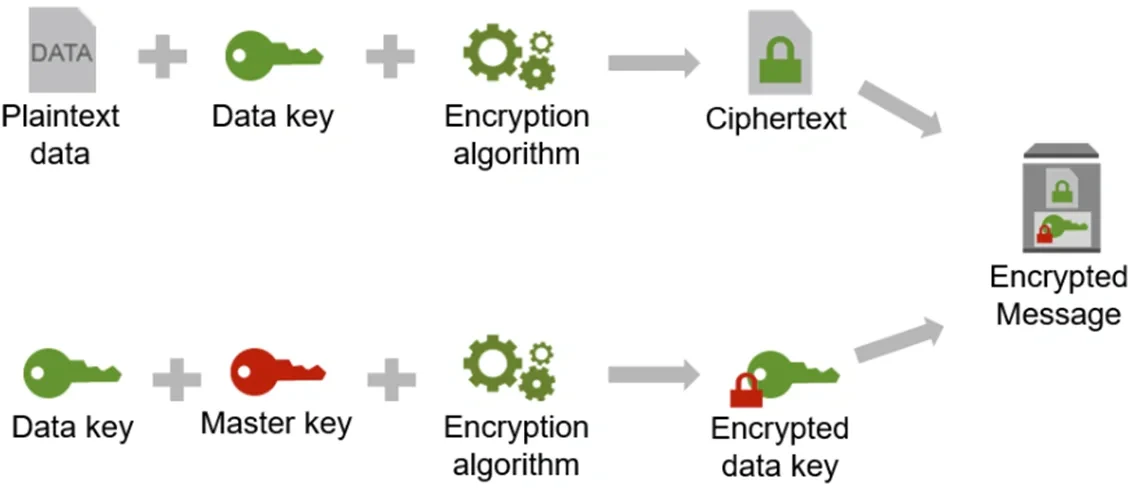 Reference: [How the AWS Encryption SDK Works](https://docs.aws.amazon.com/encryption-sdk/latest/developer-guide/how-it-works.html "Link: https://docs.aws.amazon.com/encryption-sdk/latest/developer-guide/how-it-works.html")
## Syntax
`Encrypt(‘plaintext_data’, ‘keyARN’ [, TOMAP('key1','val1')[, ‘encryption_strength’]])`
## Arguments
*plaintext\_data* (string) - plaintext data to encrypt.
*keyARN* (string) - Customer’s AWS KMS keyARN, used to call KMS for a data key.
*encryption\_context* (map of key values) - TOMAP('key1', 'val1', 'key2', 'val2'....)
*encryption\_strength* (string) - AES256 (default), AES192 or AES128.
## Examples
`Encrypt(‘my plaintext string’, ‘keyARN’, TOMAP('key1','val1'),‘AES192’)` returns the encrypted message
## Return value datatype
string containing the encrypted message (ciphertext + encrypted data key).
**Note**:
*Encrypt is a premium Integrate.io ETL function, please contact your Integrate.io ETL Account Manager or email [hello@integrate.io](mailto:hello@integrate.io) to have this feature added to your account.*
Reference: [How the AWS Encryption SDK Works](https://docs.aws.amazon.com/encryption-sdk/latest/developer-guide/how-it-works.html "Link: https://docs.aws.amazon.com/encryption-sdk/latest/developer-guide/how-it-works.html")
## Syntax
`Encrypt(‘plaintext_data’, ‘keyARN’ [, TOMAP('key1','val1')[, ‘encryption_strength’]])`
## Arguments
*plaintext\_data* (string) - plaintext data to encrypt.
*keyARN* (string) - Customer’s AWS KMS keyARN, used to call KMS for a data key.
*encryption\_context* (map of key values) - TOMAP('key1', 'val1', 'key2', 'val2'....)
*encryption\_strength* (string) - AES256 (default), AES192 or AES128.
## Examples
`Encrypt(‘my plaintext string’, ‘keyARN’, TOMAP('key1','val1'),‘AES192’)` returns the encrypted message
## Return value datatype
string containing the encrypted message (ciphertext + encrypted data key).
**Note**:
*Encrypt is a premium Integrate.io ETL function, please contact your Integrate.io ETL Account Manager or email [hello@integrate.io](mailto:hello@integrate.io) to have this feature added to your account.*