> ## Documentation Index
> Fetch the complete documentation index at: https://www.integrate.io/docs/llms.txt
> Use this file to discover all available pages before exploring further.
# ETL: Global Secrets
> Define and manage encrypted, account-level secrets in Integrate.io ETL and reuse them securely across all packages in your account.
## Overview
Global secrets are encrypted, account-level values (such as API keys, tokens, and passwords) that you define once and reuse across every package in your account. They behave like [secret variables](/docs/etl/using-and-setting-variables-in-your-packages/), but they are managed centrally in Account Settings instead of inside a single package.
Use a global secret when the same sensitive value is needed by multiple packages and you do not want to re-enter or duplicate it in each one.
| | Global Secret | [Global Variable](/docs/etl/global-variables-account-level/) | Package Secret Variable |
| :-------------------- | :--------------- | :------------------------------------------------------ | :---------------------- |
| Scope | Whole account | Whole account | Single package |
| Encrypted at rest | Yes | No | Yes |
| Masked in UI and logs | Yes | No | Yes |
| Accepts expressions | No (string only) | Yes | No (string only) |
## How It Works
* **Encrypted at rest.** Values are stored with AES-256-GCM encryption and are never persisted in plaintext.
* **Masked everywhere.** After you save a secret, the value is masked in the UI and in API responses (the masked form shows bullet characters followed by the last 4 characters of the value). You cannot view the original value again.
* **String values only.** Unlike global variables, global secrets do not accept expressions. The value is treated as a literal string.
* **Referenced like any other variable.** Use `$secret_name` in component fields and expressions, exactly as you would with a regular package variable or secret variable.
Global secrets are encrypted at rest and masked in the API, but at runtime their values are substituted into the job (for example into Pig scripts). Treat them like any other package secret value.
### Permissions
Access to global secrets is role based:
| Role | View | Add / Update / Delete |
| :-------------------- | :--- | :-------------------- |
| Owner | Yes | Yes |
| Admin | Yes | Yes |
| Operator | Yes | Yes |
| Member | Yes | No |
| Editor | Yes | No |
| Collaborator / Reader | No | No |
The **Global Secrets** sidebar item only appears for users with view permission.
## Configuration
### Managing global secrets
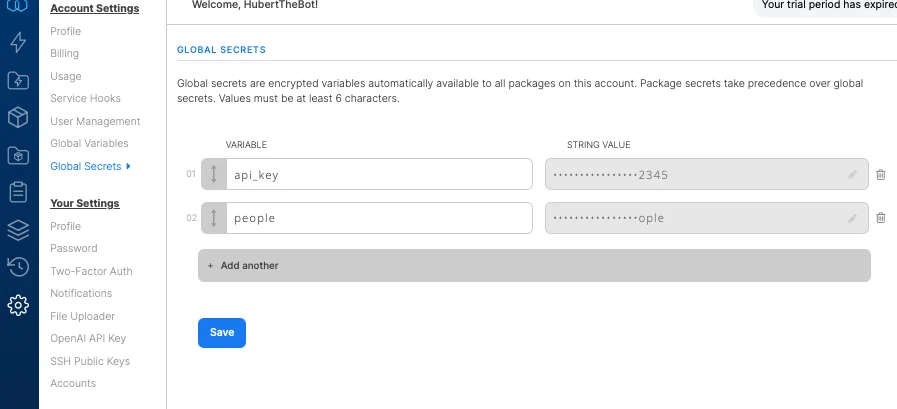 Go to **Account Settings -> Global Secrets** (listed below Global Variables in the sidebar).
Enter a **name** and a **value** for the secret. Values must be at least 6 characters.
Click **Save**. The value is masked immediately after saving.
To **change** a secret, enter a new value and save: leaving the masked value untouched keeps the existing secret. To **delete** a secret, remove it and save.
Once saved, a global secret's value cannot be viewed again. To change it, enter a new value and save.
### Using global secrets in packages
Reference a global secret in any component field or expression with `$secret_name`, the same way you reference a package variable. Because the value is substituted as a string, enclose it in single quotes where a string is expected, for example `'$api_key'`.
In the package variables editor, a read-only **Global Secrets** tab lists the secrets available to the package (masked). To edit them, follow the link to the Global Secrets settings page.
### Precedence
If a package defines a secret variable with the same name as a global secret, the **package secret variable takes precedence**. This lets a package override an account-level value when needed.
## FAQ
**Q: What is the difference between a global secret and a global variable?**
A global variable stores a plaintext, account-level value that can be an expression. A global secret stores an encrypted, masked, string-only value intended for sensitive data like API keys and passwords.
**Q: Can I view a global secret's value after saving it?**
No. Values are masked and cannot be retrieved. To change a secret, enter a new value and save.
**Q: Why is my secret rejected when I save it?**
Global secret values must be at least 6 characters long.
**Q: What happens if a package has a secret variable with the same name as a global secret?**
The package's own secret variable wins. Package secret variables take precedence over global secrets of the same name.
**Q: Who can manage global secrets?**
Owners, admins, and operators can add, update, and delete global secrets. Members and editors can view them. Collaborators and readers have no access.
## Related
Go to **Account Settings -> Global Secrets** (listed below Global Variables in the sidebar).
Enter a **name** and a **value** for the secret. Values must be at least 6 characters.
Click **Save**. The value is masked immediately after saving.
To **change** a secret, enter a new value and save: leaving the masked value untouched keeps the existing secret. To **delete** a secret, remove it and save.
Once saved, a global secret's value cannot be viewed again. To change it, enter a new value and save.
### Using global secrets in packages
Reference a global secret in any component field or expression with `$secret_name`, the same way you reference a package variable. Because the value is substituted as a string, enclose it in single quotes where a string is expected, for example `'$api_key'`.
In the package variables editor, a read-only **Global Secrets** tab lists the secrets available to the package (masked). To edit them, follow the link to the Global Secrets settings page.
### Precedence
If a package defines a secret variable with the same name as a global secret, the **package secret variable takes precedence**. This lets a package override an account-level value when needed.
## FAQ
**Q: What is the difference between a global secret and a global variable?**
A global variable stores a plaintext, account-level value that can be an expression. A global secret stores an encrypted, masked, string-only value intended for sensitive data like API keys and passwords.
**Q: Can I view a global secret's value after saving it?**
No. Values are masked and cannot be retrieved. To change a secret, enter a new value and save.
**Q: Why is my secret rejected when I save it?**
Global secret values must be at least 6 characters long.
**Q: What happens if a package has a secret variable with the same name as a global secret?**
The package's own secret variable wins. Package secret variables take precedence over global secrets of the same name.
**Q: Who can manage global secrets?**
Owners, admins, and operators can add, update, and delete global secrets. Members and editors can view them. Collaborators and readers have no access.
## Related