> ## Documentation Index
> Fetch the complete documentation index at: https://www.integrate.io/docs/llms.txt
> Use this file to discover all available pages before exploring further.
# ETL: User Management
> Overview of user roles and permissions in Integrate.io ETL. Understand admin, member, and viewer access levels for team and account management.
### Roles and Permissions
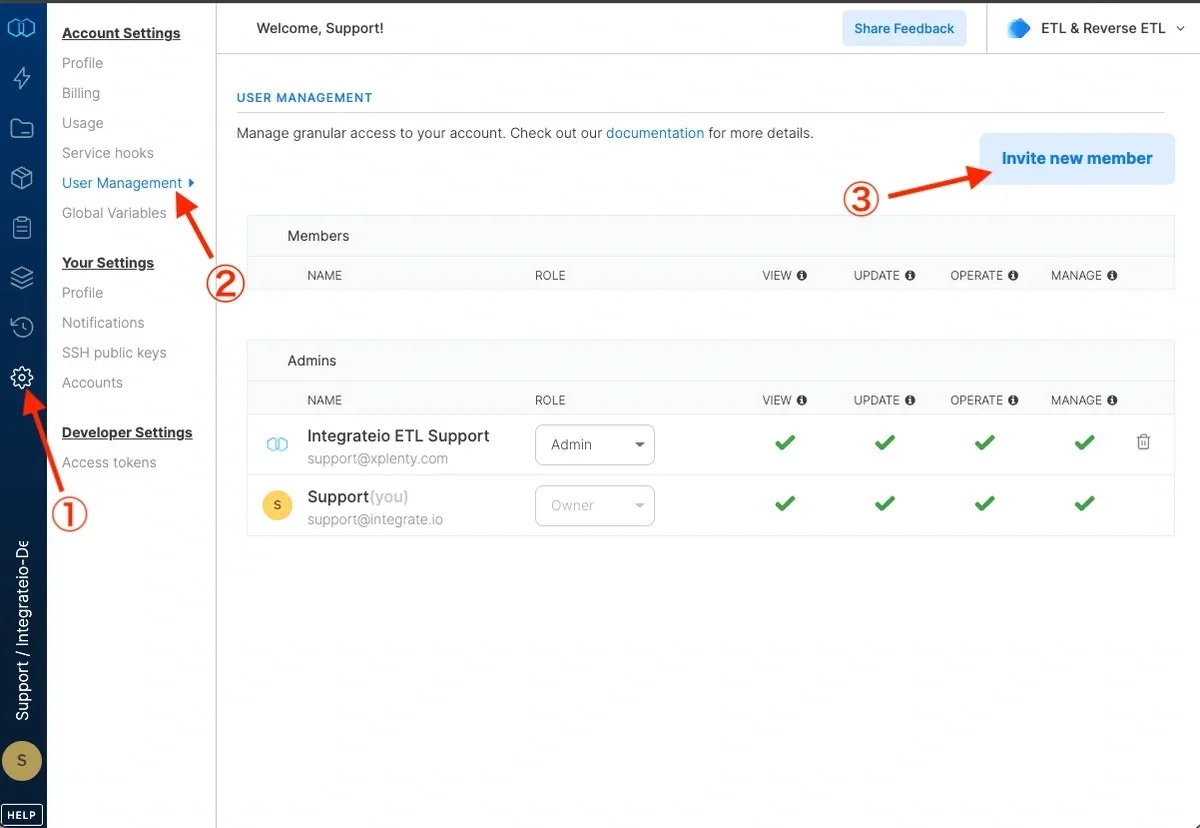
Our user management layer gives teams the ability to assign varying levels of access and capabilities to their account's users. Below is an outline of the various roles and their associated account permissions and capabilities.
 #### Roles
Each user in the ETL & Reverse ETL product has one of the following roles:
* Owner
* Admin
* Operator
* Editor
* Reader
By default, the Owner is the person who set up the account. The Owner role can only be updated by submitting a ticket to our Support team (in-product live chat or [support@integrate.io](mailto:support@integrate.io)).
#### Roles
Each user in the ETL & Reverse ETL product has one of the following roles:
* Owner
* Admin
* Operator
* Editor
* Reader
By default, the Owner is the person who set up the account. The Owner role can only be updated by submitting a ticket to our Support team (in-product live chat or [support@integrate.io](mailto:support@integrate.io)).
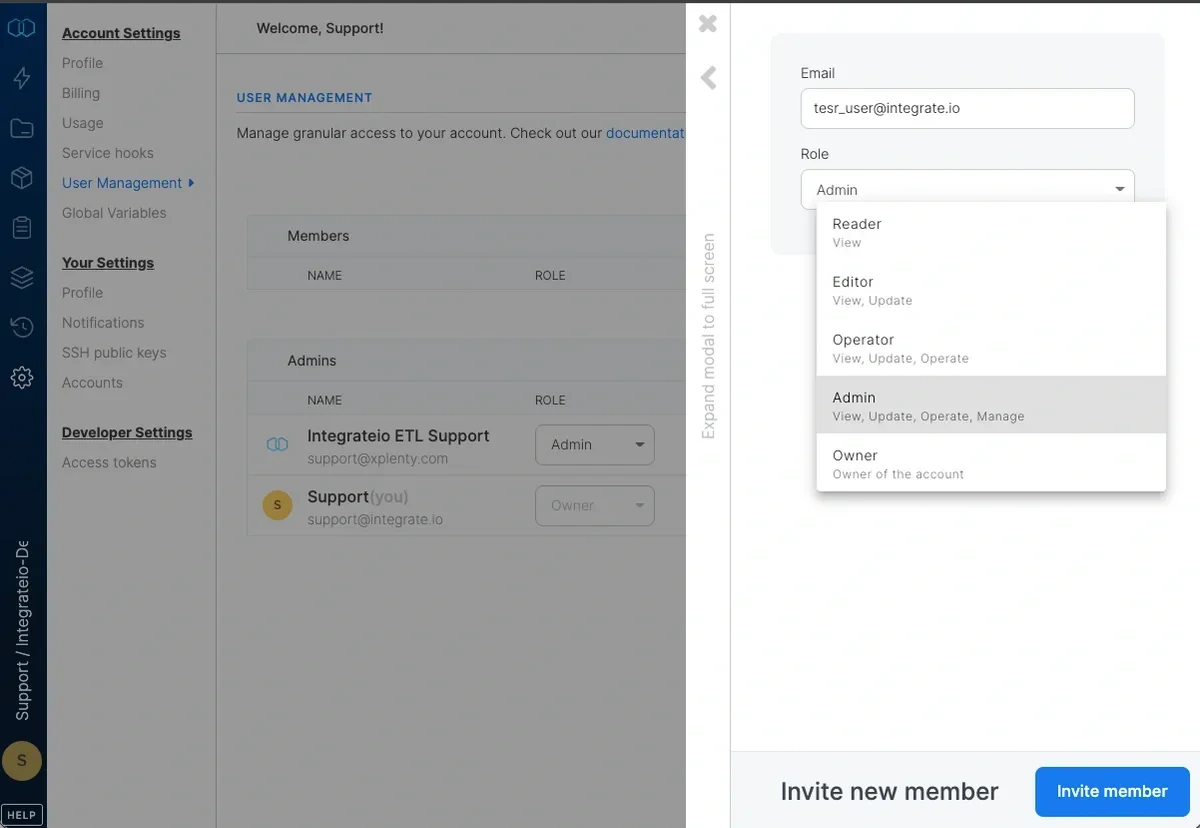 Admin or Owner role is needed to add, remove, or update other users and their roles.
#### Permissions
Each role has a combination of the below permissions depending on the level of access:
**Manage**
Manage Account Settings (Members, Global Variables, Usage, Service Hooks, Account Profile)
**Operate**
Manage (create/update/delete) connectors and schedules
**Update**
Update packages, execute jobs, and manage (create/update/delete) clusters
**View**
View packages, package groups, clusters, jobs, and schedules
#### Role & Permissions Table Summary
Below is a table summarizing the account roles and their assigned permissions.
| **Role** | **Permissions** |
| :------- | :------------------------------------- |
| Owner | Billing, Manage, Operate, Update, View |
| Admin | Manage, Operate, Update, View |
| Operator | Operate, Update, View |
| Editor | Update, View |
| Reader | View |
### Custom roles
Accounts can also define [custom roles](/docs/etl/custom-roles) with their own permission sets and scope them to specific package groups or connection groups. Custom roles work alongside the standard roles above and are an opt-in feature; contact Support to enable them on your account.
If you have any questions or need some advice on structuring your user management, just contact our Support team (in-product live chat or [support@integrate.io](mailto:support@integrate.io)).
Admin or Owner role is needed to add, remove, or update other users and their roles.
#### Permissions
Each role has a combination of the below permissions depending on the level of access:
**Manage**
Manage Account Settings (Members, Global Variables, Usage, Service Hooks, Account Profile)
**Operate**
Manage (create/update/delete) connectors and schedules
**Update**
Update packages, execute jobs, and manage (create/update/delete) clusters
**View**
View packages, package groups, clusters, jobs, and schedules
#### Role & Permissions Table Summary
Below is a table summarizing the account roles and their assigned permissions.
| **Role** | **Permissions** |
| :------- | :------------------------------------- |
| Owner | Billing, Manage, Operate, Update, View |
| Admin | Manage, Operate, Update, View |
| Operator | Operate, Update, View |
| Editor | Update, View |
| Reader | View |
### Custom roles
Accounts can also define [custom roles](/docs/etl/custom-roles) with their own permission sets and scope them to specific package groups or connection groups. Custom roles work alongside the standard roles above and are an opt-in feature; contact Support to enable them on your account.
If you have any questions or need some advice on structuring your user management, just contact our Support team (in-product live chat or [support@integrate.io](mailto:support@integrate.io)).