> ## Documentation Index
> Fetch the complete documentation index at: https://www.integrate.io/docs/llms.txt
> Use this file to discover all available pages before exploring further.
# ETL: Filter Transformation
> Use the Filter transformation to include or exclude records based on conditional expressions. Define rules to control data flow in pipelines.
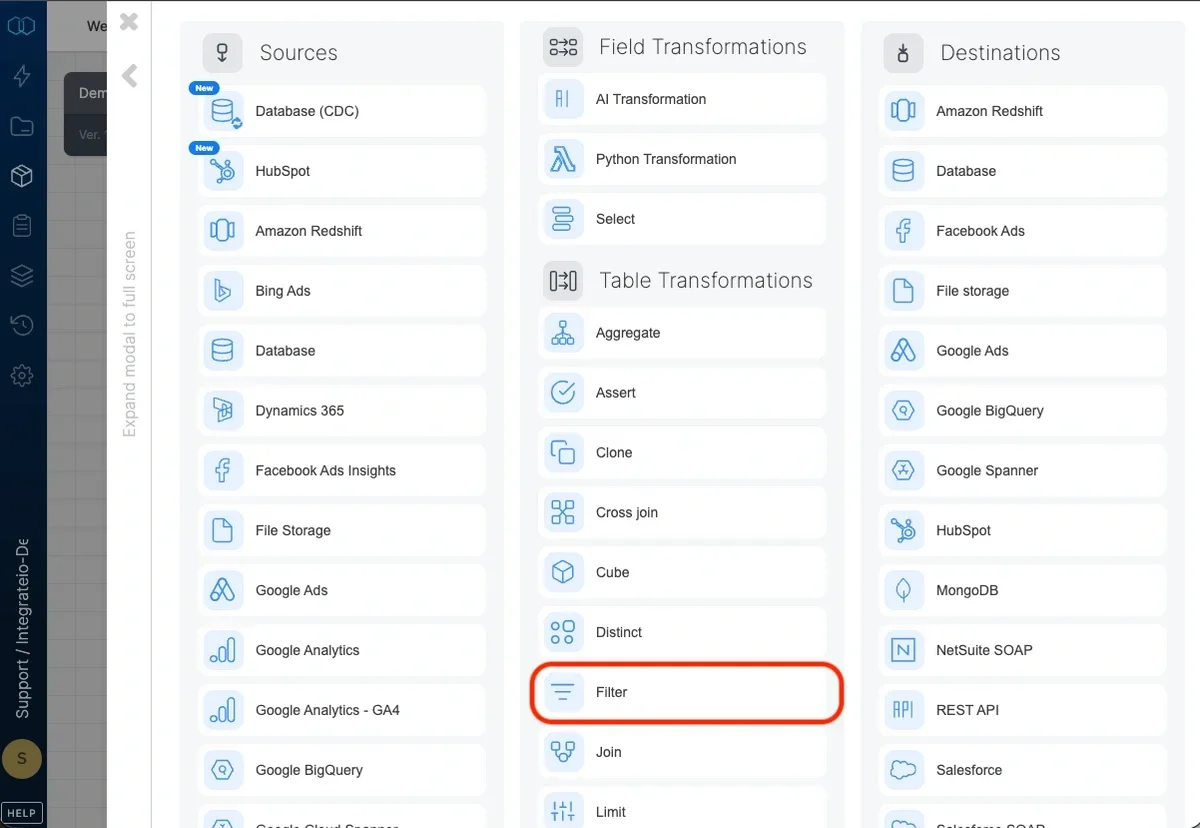 ## Conditions
### Logical operator
By default, a record must match all the conditions.
## Conditions
### Logical operator
By default, a record must match all the conditions.
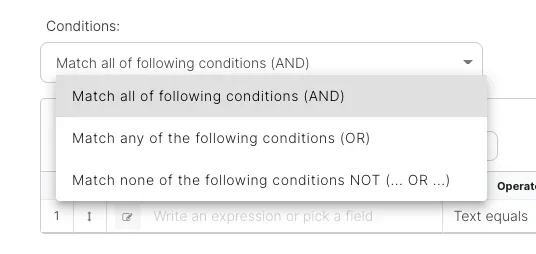 * **Match all of the following conditions (AND)** - selects records with values that meet all conditions specified (logical "AND")
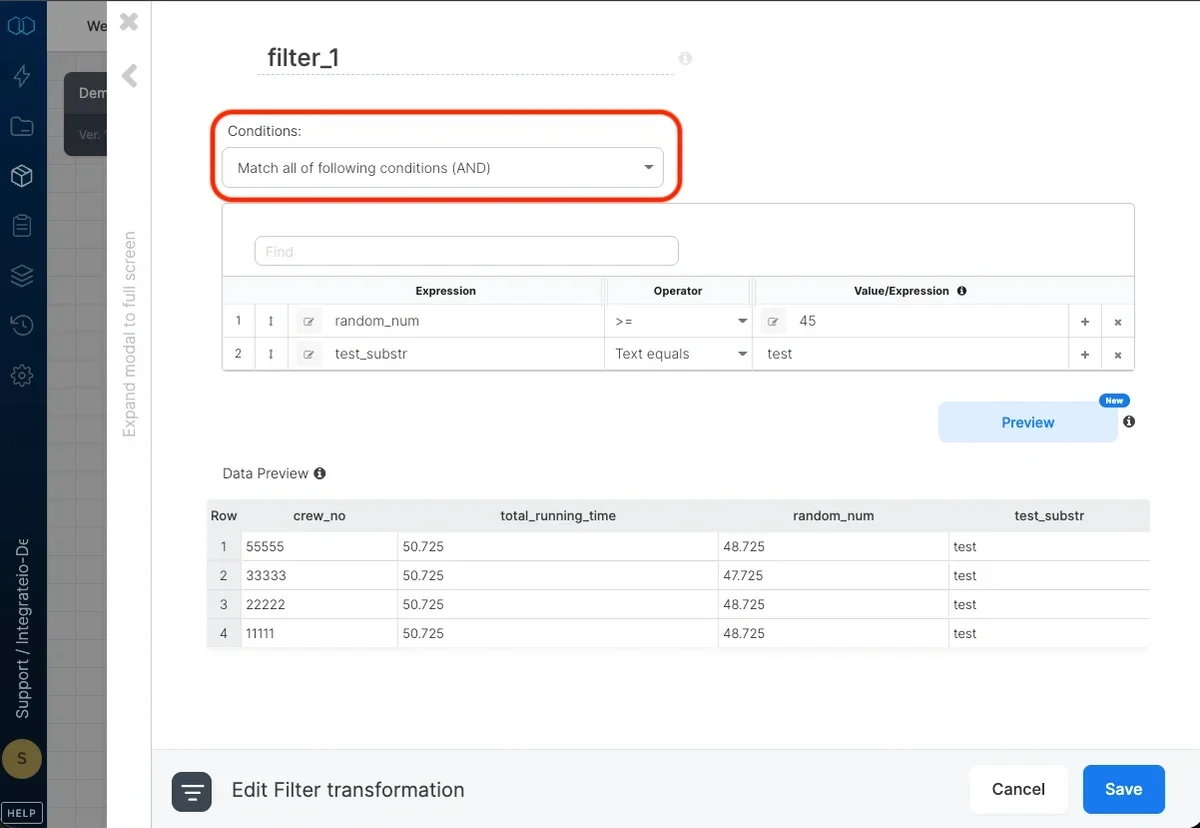 * **Match any of the following conditions (OR)** - selects records with values that meet at least one of the conditions specified (logical "OR")
 * **Match none of the following conditions (NOT)** - selects records with values that doesn't meet any of the conditions specified (NOT ( ... OR ... ))
### Specifying conditions
Each condition comprises of an expression (or field), a comparison operator, and possibly another value or expression to compare with (depending on the operator).
* **Expression (left-hand)** - In the dropdown list on the left, select a field or edit an expression. (You can read more about [expressions](/docs/etl/using-expressions-in-integrateio-etl/) and [functions](/docs/etl/integrateio-etl-functions/))
* **Operator** - Select the operator from the following list:
| Operator | Description |
| :---------------- | :-------------------------------------------------------------------------------------------------------------------------------------------------------------------------------------------------------------------------------------------------------------------------- |
| text equals | The expression on the left must be equal to the string value on the right. The text should not be enclosed in quotes or escaped. |
| text not equals | The expression on the left must not be equal to the string value on the right. The text should not be enclosed in quotes or escaped. |
| text matches | The expression on the left must match the regular expression string value on the right. The text should not be enclosed in quotes or escaped. For example, matching a string field with .\*dog.\* would pass any string that contains the string dog: dog, dogs, adogmatic. |
| text is empty | The expression on the left must be empty. |
| text is not empty | The expression on the left must not be empty. |
| = | The expression on the left must be equal to the expression on the right. |
| != | The expression on the left must not be equal to the expression on the right. |
| > | The expression on the left must be greater than the expression on the right. |
| >= | The expression on the left must be greater than or equal to the expression on the right. |
| `<` | The expression on the left must be less than the expression on the right. |
| `<=` | The expression on the left must be less than or equal to the expression on the right. |
| is null | The expression on the left must be null. |
| is not null | The expression on the left must not be null. |
| is true | The expression on the left must true - especially useful when left hand side is a complex expression. |
* **Value/Expression** - with text operators, type the text or pattern to compare to. With other operators, pick a field or edit an expression.
## Related
* **Match none of the following conditions (NOT)** - selects records with values that doesn't meet any of the conditions specified (NOT ( ... OR ... ))
### Specifying conditions
Each condition comprises of an expression (or field), a comparison operator, and possibly another value or expression to compare with (depending on the operator).
* **Expression (left-hand)** - In the dropdown list on the left, select a field or edit an expression. (You can read more about [expressions](/docs/etl/using-expressions-in-integrateio-etl/) and [functions](/docs/etl/integrateio-etl-functions/))
* **Operator** - Select the operator from the following list:
| Operator | Description |
| :---------------- | :-------------------------------------------------------------------------------------------------------------------------------------------------------------------------------------------------------------------------------------------------------------------------- |
| text equals | The expression on the left must be equal to the string value on the right. The text should not be enclosed in quotes or escaped. |
| text not equals | The expression on the left must not be equal to the string value on the right. The text should not be enclosed in quotes or escaped. |
| text matches | The expression on the left must match the regular expression string value on the right. The text should not be enclosed in quotes or escaped. For example, matching a string field with .\*dog.\* would pass any string that contains the string dog: dog, dogs, adogmatic. |
| text is empty | The expression on the left must be empty. |
| text is not empty | The expression on the left must not be empty. |
| = | The expression on the left must be equal to the expression on the right. |
| != | The expression on the left must not be equal to the expression on the right. |
| > | The expression on the left must be greater than the expression on the right. |
| >= | The expression on the left must be greater than or equal to the expression on the right. |
| `<` | The expression on the left must be less than the expression on the right. |
| `<=` | The expression on the left must be less than or equal to the expression on the right. |
| is null | The expression on the left must be null. |
| is not null | The expression on the left must not be null. |
| is true | The expression on the left must true - especially useful when left hand side is a complex expression. |
* **Value/Expression** - with text operators, type the text or pattern to compare to. With other operators, pick a field or edit an expression.
## Related