> ## Documentation Index
> Fetch the complete documentation index at: https://www.integrate.io/docs/llms.txt
> Use this file to discover all available pages before exploring further.
# ETL: Limit Transformation
> Use the Limit transformation to cap output records globally or per partition. Get top-N items, remove duplicates, or subset data for testing.
 ## Data partitioning
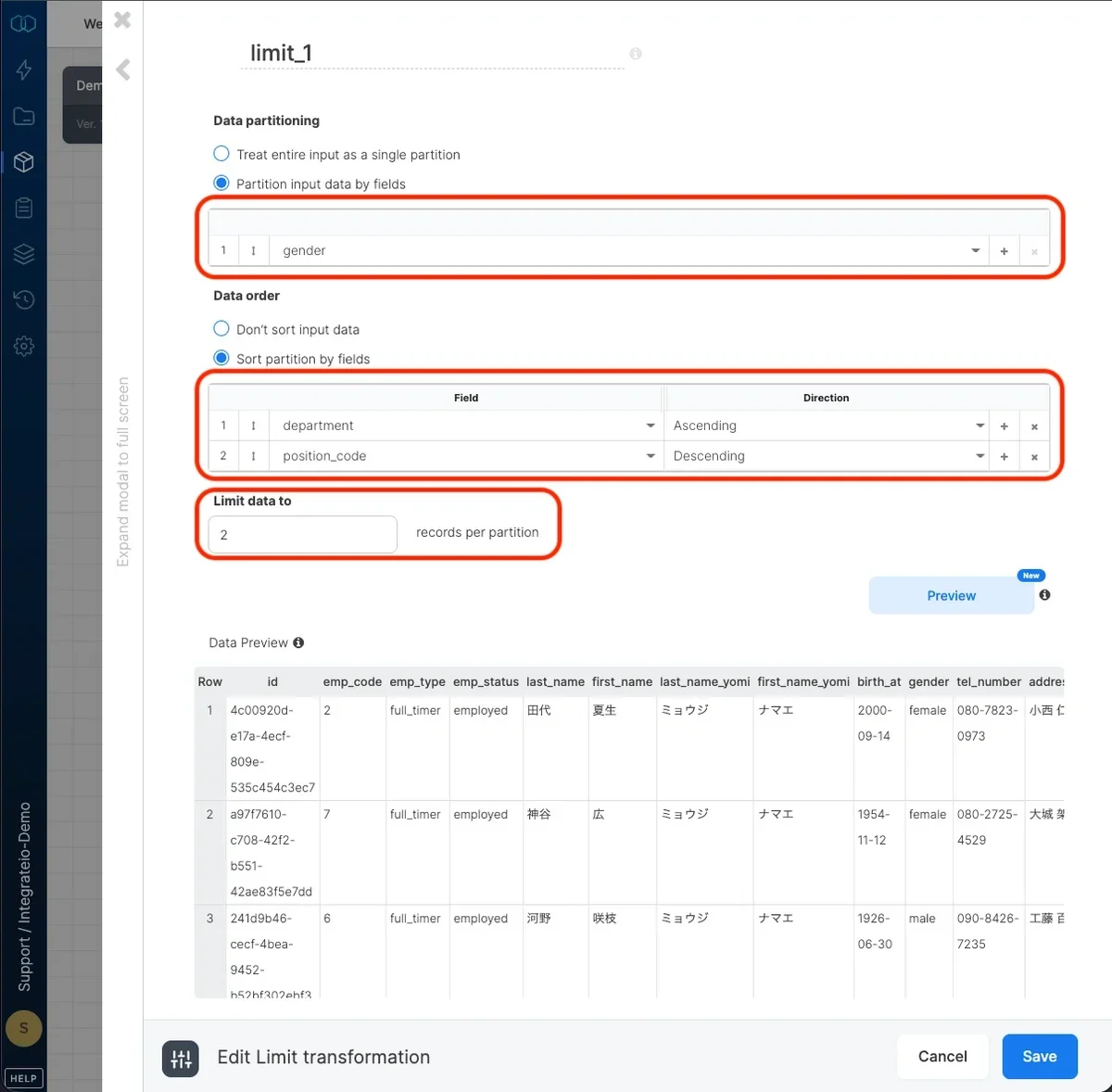
Select `treat the entire input as a single partition` to limit the output of the entire input. Select `partition data by fields` to limit the output per group of records in the input with identical values in selected fields.
## Data order
Select `don't sort input data` if you'd like to output arbitrarily selected records per partition. Select `sort partition by fields` to select fields to sort each partition by and the direction (ascending or descending).
## Limit data
Finally, select the number of output records per partition.
## Data partitioning
Select `treat the entire input as a single partition` to limit the output of the entire input. Select `partition data by fields` to limit the output per group of records in the input with identical values in selected fields.
## Data order
Select `don't sort input data` if you'd like to output arbitrarily selected records per partition. Select `sort partition by fields` to select fields to sort each partition by and the direction (ascending or descending).
## Limit data
Finally, select the number of output records per partition.