> ## Documentation Index
> Fetch the complete documentation index at: https://www.integrate.io/docs/llms.txt
> Use this file to discover all available pages before exploring further.
# ETL: SharePoint Source
> Configure the SharePoint source component in Integrate.io ETL to read documents and list items from Microsoft SharePoint into your data pipelines.
This article explains how to use the Sharepoint source component and its elements.
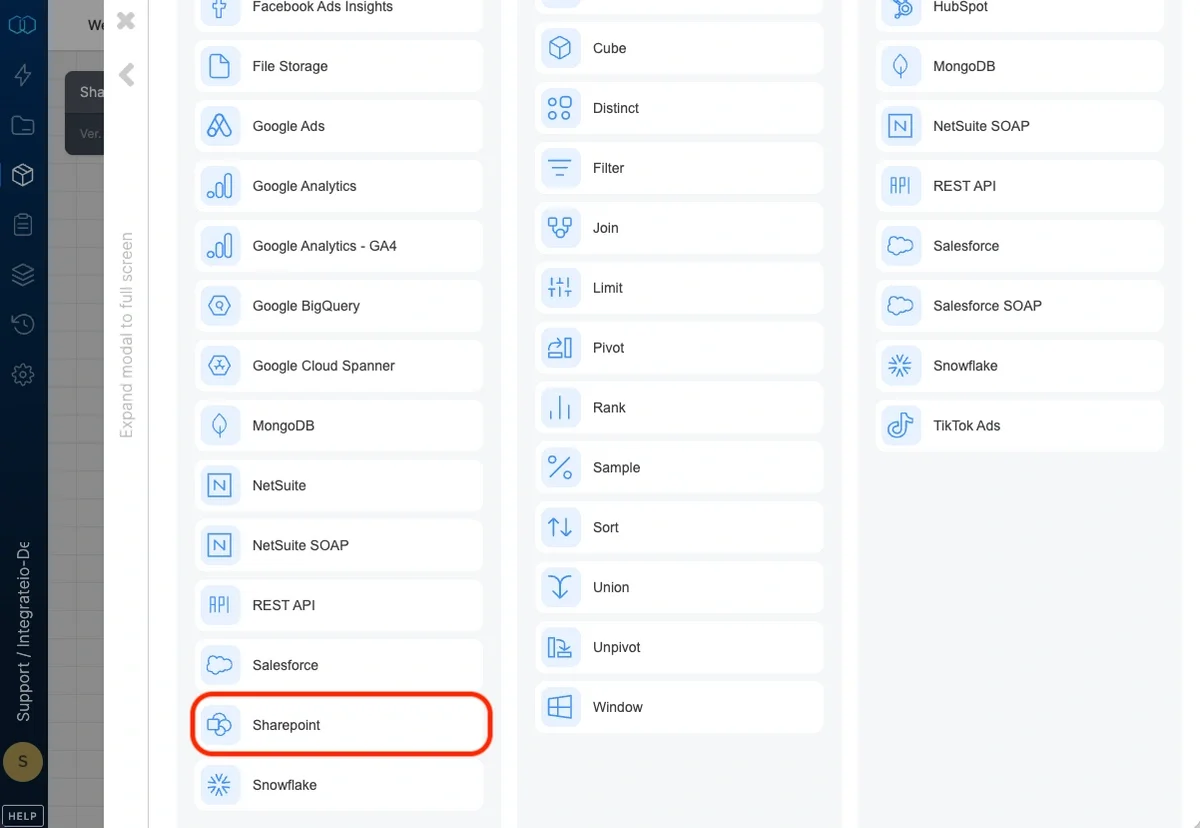
 ### Choose input connection
Select a valid Sharepoint connection from the connections list.
### Source Properties
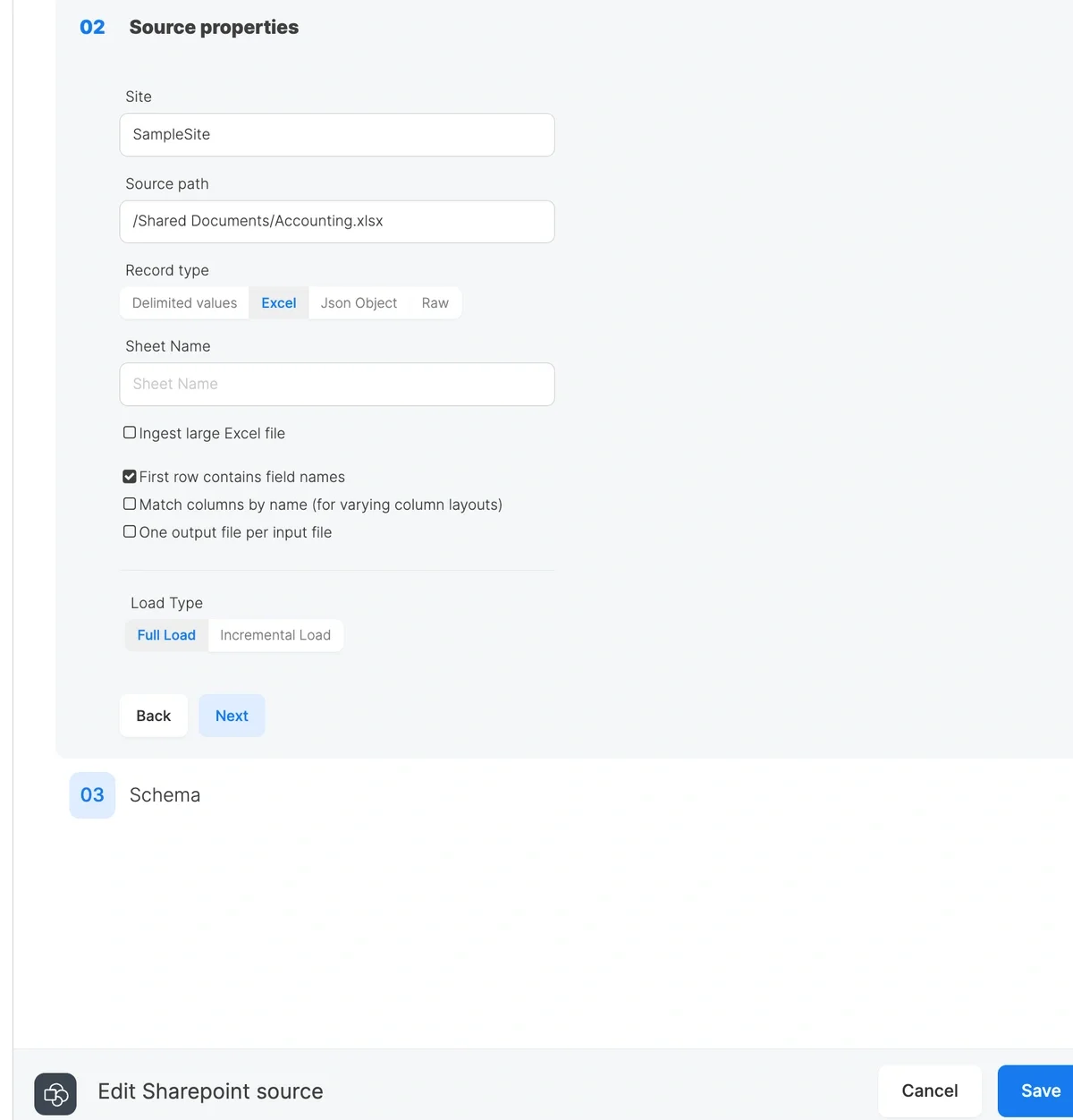
* **Site** - property indicates a Sharepoint site which contains needed files. You can find the current site in your browser's URL. It should have the following format: **https\://\.sharepoint.com/sites/\.** Only the site name should be specified in the related input. **https\://\.sharepoint.com** was already specified in the Sharepoint connection.
* **Source path** - property holds a path to a file/files. It can point to a concrete file or a number of files that can be matched with path patterns.
* If a concrete file should be matched, source input must have the following format: **/\/\/\.\**.
* If there are multiple files that have the same schema they can be merged and loaded using the following special characters:
* \* - matches any number of any characters, including none. For example, \*.csv matches all files ending in .csv. Any part of file path might be replaced with **\***.
* \*\* - matches any number of directories recursively. For example if file is located in /Shared Library/dir1/dir2/dir3/data.csv it can be matched like /Share Library/\*\*/data.csv or \*\*/data.csv.
* **Record type** - defines a file type that should be loaded.
* **Delimited values** - the files like csv, tsv or with any custom delimiter
* **Excel** - Microsoft excel files. Specify a **Sheet Name** to read a single sheet, or leave it blank to combine all sheets (all sheets must share the same schema). Enable **Ingest large Excel file** to use streaming mode for large workbooks.
* **Json Object** - files with json data
* **Raw** - any format, but should be further parsed with Integrate.io available functions
* **Load Type** - indicates how to load records:
* **Full Load** - loads all the data that source files have
* **Incremental Load** - loads files newer/older than specified date
### Header detection
For delimited and Excel files with a header row, you can enable **Detect header by name** to locate the header dynamically by matching your schema column names. Use this when the header isn't always on row 1 (for example, files with a leading title or blank rows).
* For delimited files, the full schema header must still appear in column order in each file.
* For Excel files, the option also matches columns by name, so the header can be on any row and the columns can be in any order. Schema preview reads from the file specified in **Schema file path**.
Enable **Match columns by name** on Excel sources to map workbook columns to your schema by header name instead of by position when the header is on row 1 but column order varies.
### Schema
Represents a view of sample data and properties parsed from the specified files. You can select needed properties and data types for further processing.
When streaming with a sheet name (**Ingest large Excel file** enabled and **Sheet Name** set), date cells come through as Excel serial numbers (e.g. `45306`) instead of formatted dates. Declare those columns as `int` or `decimal` in your schema, or transform them downstream.
### Choose input connection
Select a valid Sharepoint connection from the connections list.
### Source Properties
* **Site** - property indicates a Sharepoint site which contains needed files. You can find the current site in your browser's URL. It should have the following format: **https\://\.sharepoint.com/sites/\.** Only the site name should be specified in the related input. **https\://\.sharepoint.com** was already specified in the Sharepoint connection.
* **Source path** - property holds a path to a file/files. It can point to a concrete file or a number of files that can be matched with path patterns.
* If a concrete file should be matched, source input must have the following format: **/\/\/\.\**.
* If there are multiple files that have the same schema they can be merged and loaded using the following special characters:
* \* - matches any number of any characters, including none. For example, \*.csv matches all files ending in .csv. Any part of file path might be replaced with **\***.
* \*\* - matches any number of directories recursively. For example if file is located in /Shared Library/dir1/dir2/dir3/data.csv it can be matched like /Share Library/\*\*/data.csv or \*\*/data.csv.
* **Record type** - defines a file type that should be loaded.
* **Delimited values** - the files like csv, tsv or with any custom delimiter
* **Excel** - Microsoft excel files. Specify a **Sheet Name** to read a single sheet, or leave it blank to combine all sheets (all sheets must share the same schema). Enable **Ingest large Excel file** to use streaming mode for large workbooks.
* **Json Object** - files with json data
* **Raw** - any format, but should be further parsed with Integrate.io available functions
* **Load Type** - indicates how to load records:
* **Full Load** - loads all the data that source files have
* **Incremental Load** - loads files newer/older than specified date
### Header detection
For delimited and Excel files with a header row, you can enable **Detect header by name** to locate the header dynamically by matching your schema column names. Use this when the header isn't always on row 1 (for example, files with a leading title or blank rows).
* For delimited files, the full schema header must still appear in column order in each file.
* For Excel files, the option also matches columns by name, so the header can be on any row and the columns can be in any order. Schema preview reads from the file specified in **Schema file path**.
Enable **Match columns by name** on Excel sources to map workbook columns to your schema by header name instead of by position when the header is on row 1 but column order varies.
### Schema
Represents a view of sample data and properties parsed from the specified files. You can select needed properties and data types for further processing.
When streaming with a sheet name (**Ingest large Excel file** enabled and **Sheet Name** set), date cells come through as Excel serial numbers (e.g. `45306`) instead of formatted dates. Declare those columns as `int` or `decimal` in your schema, or transform them downstream.