"저희 Salesforce 팀은 이제 데이터를 준비하고 로드하는 파이프라인을 직접 구축하여 Salesforce 데이터 통합을 완전히 자동화할 수 있습니다. 더 이상 IT가 필요 없으며, 팀이 무척 만족하고 있습니다."

Adam Hooper
중앙 플랫폼 책임자, DPD UK
Integrate.io takes your client's legacy HCM and payroll exports as they are and converts them into Dayforce-ready data.

Failed rows come back to you or your client with a reason
Integrate.io로 수백만 건의 IT 티켓을 절감하는 1,100개 이상의 데이터 및 운영 팀이 신뢰합니다








Preparing a single load can take two to three weeks of spreadsheet work. On a fixed-fee implementation, every week over plan comes out of your margin.
The people who can run the export don't know the data, and the payroll team who does has to check every column. Each round trip on the template adds another week.
Job, department, org unit, and pay group codes that are missing or inactive turn up late, at load time.
Each load starts from a fresh client export, so the same fixes get made by hand again.
Most Dayforce implementations load the client's data at least three times, with client review in between. Every load runs through the same pipeline, so a fix made once carries into the next load.
Legal entity, org and site, employee, and address data go into a test environment for the client to review and sign off.
A fresh snapshot of live payroll data loads so the client can run parallel payroll and compare it against legacy.
At cutover, the final export runs through the logic the client already signed off, so the blackout window stays short.
After go-live, the same pipeline can keep ongoing loads running into Dayforce if the client needs them.
Build the conversion once, check it against Dayforce, and run it again for each load and each client.
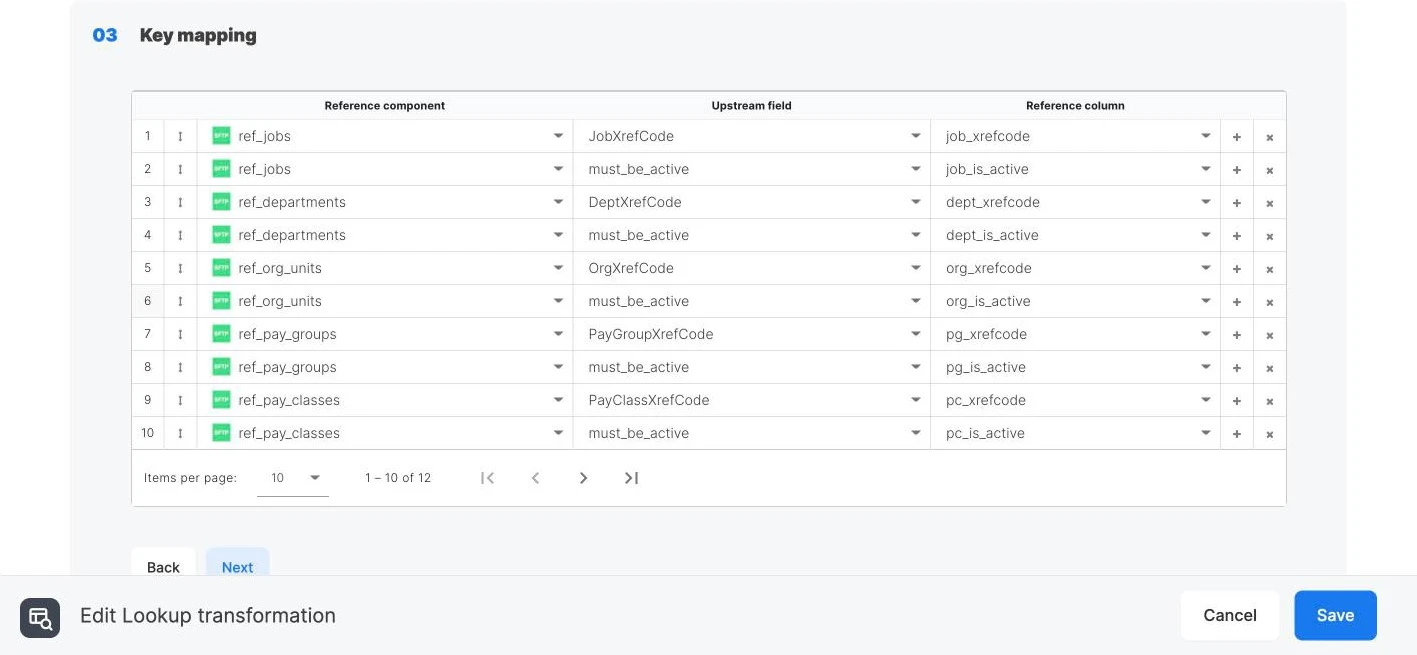

Save the mappings, rules, and lookups as a template. Clone it for the next Dayforce client and change only what differs.

Check every job, department, org unit, pay group, pay class, and employment status against the codes active in Dayforce.

Catch missing IDs, duplicates, bad dates, and out-of-range pay. Every rejected row lands in a report with the reason.

Write Activate templates or HR Import XML for each load, and deliver HR Import files straight to the Dayforce SFTP.
분석가, 운영팀, 엔지니어가 필요한 파이프라인을 만들고, IT는 액세스, 표준, 가시성을 유지할 수 있습니다.
데이터 작업이 늘어나도 예측 가능한 요금제입니다. 행, 동기화, 커넥터, 클라이언트마다 예산이 달라지지 않습니다.
어떤 방식으로 만든 파이프라인이든 동일한 역할 기반 액세스와 감사 추적으로 실행되므로, IT는 누가 무엇을 변경했는지 확인할 수 있습니다.
전담 솔루션 엔지니어가 연중무휴 지원팀과 함께 구현과 프로덕션 작업을 안내합니다.
Integrate.io를 데이터 관리를 위한 엔드투엔드 데이터 파이프라인 플랫폼으로 사용하거나, 팀이 이미 선호하는 스택에 모듈형 구성 요소로 연결할 수 있습니다.
“Integrate.io 플랫폼은 훌륭한 ETL 및 데이터 변환 솔루션입니다! Salesforce, HubSpot, Google Analytics, Facebook Ads 등을 연결하는 것이 이보다 더 쉬울 수 없었습니다.”

Meir Gold
그로스 | 애널리틱스 매니저
“훌륭한 ELT 도구. 노코드 도구로 설정과 사용이 쉽고, 스케줄도 좋고, 가격 균형도 뛰어납니다!”

Diego Polo
비즈니스 인텔리전스 아키텍트
“역대 최고의 고객 서비스! 외부 벤더 중 제가 함께 일해 본 최고의 고객 서비스 팀입니다. 항상 매우 빠르게 응대하고, 문제 해결이나 제품 안내에 있어 기대 이상으로 노력합니다.”

Matthew Pratt
애널리틱스 매니저
관리형 소스와 대상, 맞춤형 시스템을 위한 범용 API 커넥터, 그리고 요청에 따라 24~48시간 안에 구축되는 신규 커넥터.
Book a demo and we'll run a sample client export through to a Dayforce load file.
데모 예약To build, run, and monitor the data pipelines they depend on, across SaaS apps, databases, files, APIs, and warehouses, without waiting in an engineering queue for every change.
Only if you want to. Build point-and-click with 220+ transformations, describe the pipeline to Helm, work through MCP, or drop into SQL and Python when the logic needs it.
Role-based access, version history, run logs, alerts, and audit trails let IT set the guardrails while the people closest to the data do the day-to-day work.
Every plan includes a dedicated Solution Engineer who helps design, build, and troubleshoot pipelines, plus 24/7 support.
A fixed fee, so costs stay predictable as you add pipelines, sources, and data volume.
이 웹사이트 운영에는 필수 쿠키를 사용합니다. 동의하시면 분석, 광고, 소셜 미디어, 채팅 같은 기능을 위한 쿠키도 사용합니다. 선택 사항은 언제든지 쿠키 설정에서 변경할 수 있습니다. 쿠키 정책 읽기