HCM Data Migration and Payroll Conversion
Migrating clients to Dayforce, Workday, or another HCM? Integrate.io turns each client's legacy HR or payroll export, in whatever format they send, into load files the new system accepts, sends failed rows back with a reason, and saves the work as a template you reuse for the next client.
데모 예약
Integrate.io로 수백만 건의 IT 티켓을 절감하는 1,100개 이상의 데이터 및 운영 팀이 신뢰합니다

May, 2023

July, 2018

August, 2019

August, 2017

August, 2021

August, 2025

August, 2017

August, 2022
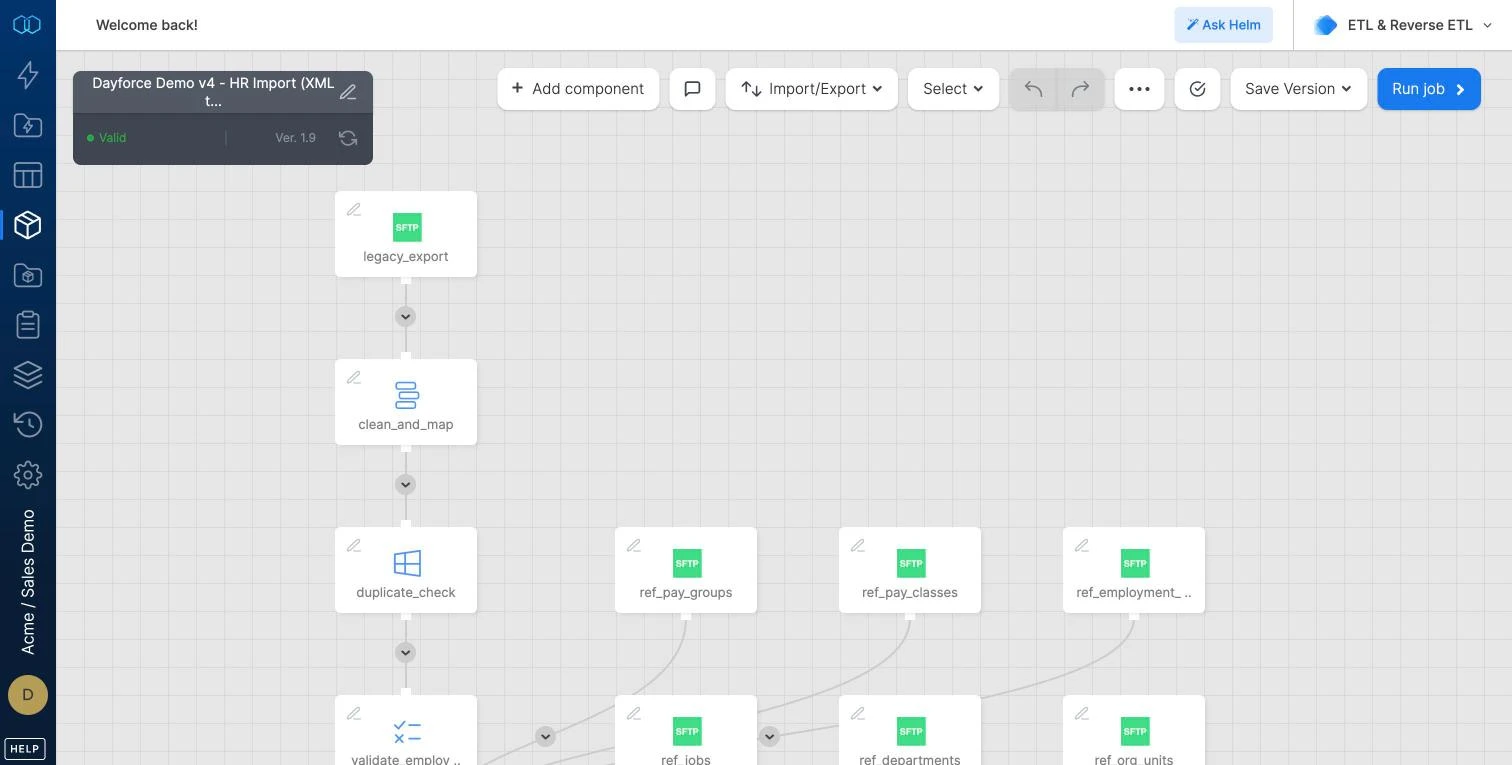
From legacy export to a clean load file

Clients send what they already have
No export spec for the client to follow. They hand over the file or export their legacy system already produces, in any format, and Integrate.io does the conversion and validation in between.

Clean and map
Trim names, convert dates, translate pay frequencies and employment types, and rename every column to the new system's field names.

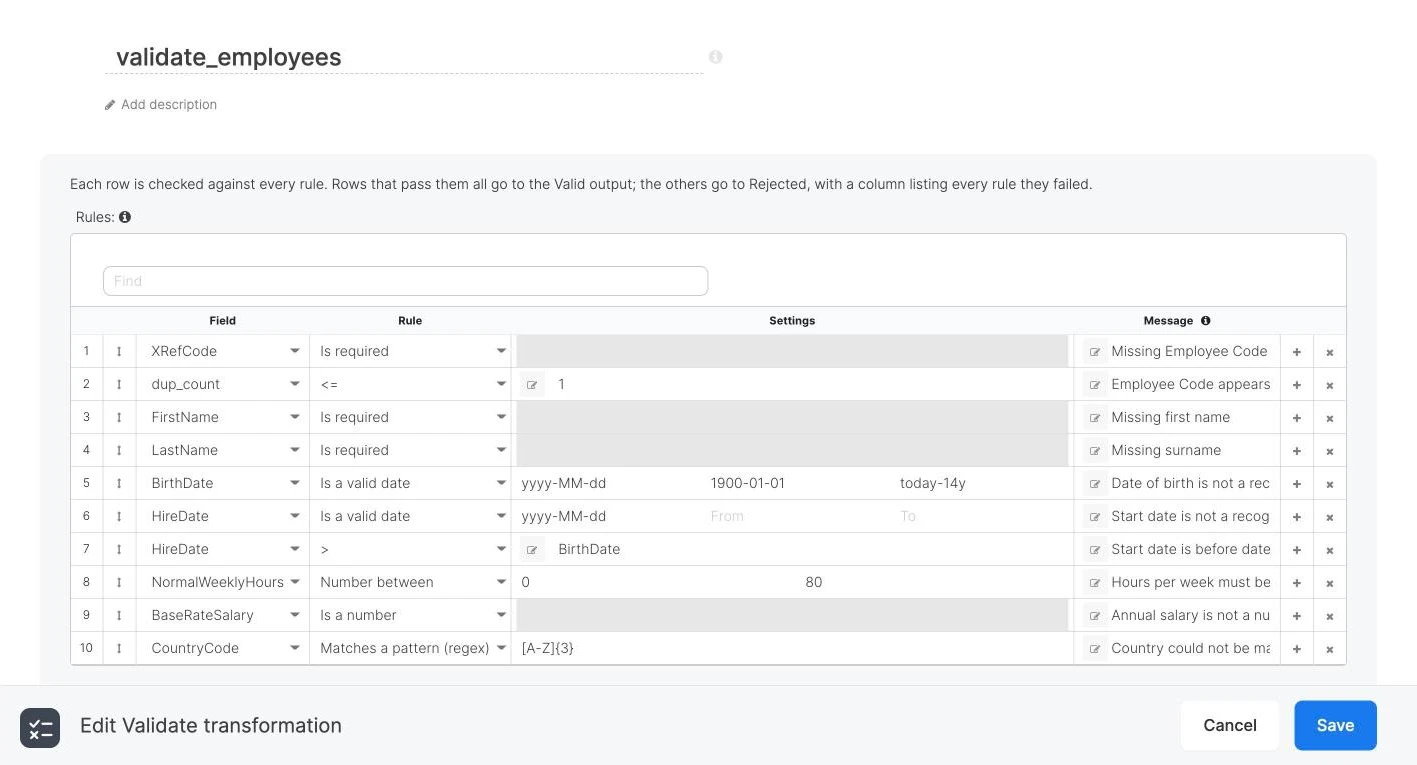
Validate before you load
Catch missing employee IDs, duplicates, impossible dates, and out-of-range hours before the file reaches the new system.

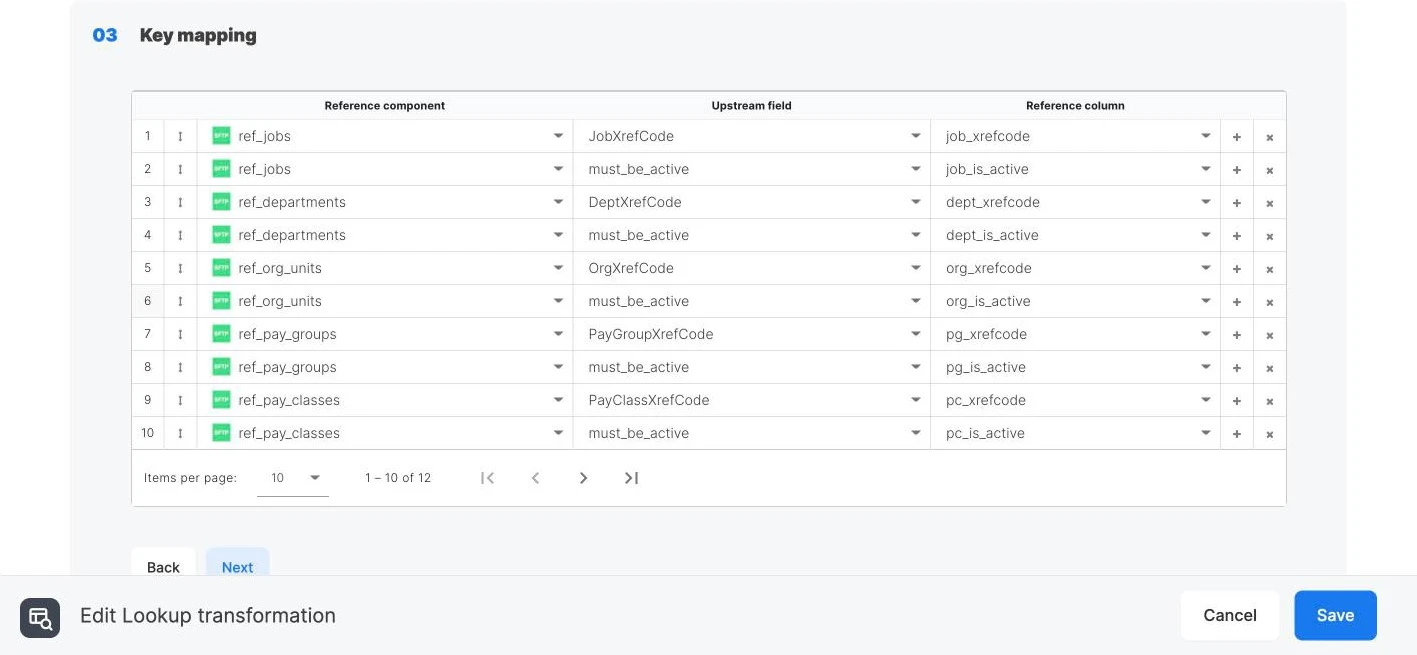
Match the new system's codes
Look up jobs, departments, locations, and pay groups against the codes configured in the new HCM, and flag any that don't exist or aren't active.

Write the load file and the error report
Produce the template or import file the HCM expects, plus an Excel report of every rejected row and why.
Built for implementation partners

Templates for every client
Save a conversion's mappings, validation rules, and code lookups as a template. Clone it for the next client and change only what differs.

AI-assisted builds
Smart Mapping and the Helm agent draft the mappings and the pipeline. Every run then executes the pipeline you approved, the same way each time.

SOC 2 and access controls
Encrypted transfers and custom roles, so each person sees only the pipelines and connections they work on.

Fixed-fee pricing
Add clients, test cycles, and feeds without a bigger bill.
The same pipeline after go-live

Re-run every test cycle
Run the full conversion again for each mock conversion and parallel payroll run, with the latest legacy data.

Ongoing loads into the HCM
Schedule the pipeline so new hires, changes, and terminations keep flowing in after cutover.

Data out to everyone else
Send HCM data on to payroll, benefits carriers, finance systems, and your data warehouse.

Alerts when a load fails
Get an email, Slack, or Teams alert when a file is late, missing, or fails validation.
Migration guides by HCM
How the initial migration and the ongoing loads work for each system.
-
Dayforce
Convert each client's legacy HR and payroll export into Dayforce Activate templates or HR Import files, with every row checked before it loads.
작동 방식 보기: Dayforce -
Workday
Convert each client's legacy HR and payroll export into Data Gathering Workbooks and EIB spreadsheets for every tenant build, with every row checked first.
작동 방식 보기: Workday
플랫폼 살펴보기
Integrate.io를 데이터 관리를 위한 엔드투엔드 데이터 파이프라인 플랫폼으로 사용하거나, 팀이 이미 선호하는 스택에 모듈형 구성 요소로 연결할 수 있습니다.
Bring a legacy export and see it converted
Book a demo with a sample client file. A Solution Engineer will map it to the new HCM's load format with you.
데모 예약
How do your team use Integrate.io?
To build, run, and monitor the data pipelines they depend on, across SaaS apps, databases, files, APIs, and warehouses, without waiting in an engineering queue for every change.
Do we need to write code to build pipelines?
Only if you want to. Build point-and-click with 220+ transformations, describe the pipeline to Helm, work through MCP, or drop into SQL and Python when the logic needs it.
How does IT stay in control?
Role-based access, version history, run logs, alerts, and audit trails let IT set the guardrails while the people closest to the data do the day-to-day work.
What support is included?
Every plan includes a dedicated Solution Engineer who helps design, build, and troubleshoot pipelines, plus 24/7 support.
How is Integrate.io priced?
A fixed fee, so costs stay predictable as you add pipelines, sources, and data volume.