
"当社の Salesforce チームは、データの準備とロードを行うパイプラインを自ら構築することで、Salesforce のデータ統合を完全に自動化できるようになりました。もう IT に頼る必要がなく、チームはそれをとても気に入っています。"

Adam Hooper
セントラルプラットフォーム責任者、DPD UK
Integrate.io takes your client's legacy HCM and payroll exports as they are and converts them into load-ready Workday data.

Failed rows come back to you or your client with a reason
Integrate.io で何百万もの IT チケットを削減する 1,100 以上のデータ・運用チームに信頼されています








Every tenant needs a fresh conversion of the client's data. When that work is done by hand, each rebuild takes weeks and comes out of a fixed-fee project's margin.
Supervisory organizations, job profiles, locations, and cost centers in the legacy data rarely match Workday's reference IDs.
Clients send raw exports in their own layouts, several files per object, with headers that change between extracts. Someone rebuilds them into the workbook by hand.
EIB errors surface one load at a time, after the spreadsheet has already been built by hand.
A Workday deployment converts the client's data into a series of tenants, with data validation and client review after each one. Every build runs through the same pipeline, so a fix made in one tenant carries into the next.
Organizations, jobs, locations, and workers load early so the team can configure with real client data.
A fresh extract and the full in-scope conversion, for testing business processes, integrations, and security.
When payroll is in scope, converted data supports parallel payroll runs compared against legacy results.
The final extract runs through the logic signed off in testing. Once the client approves the data, it moves to production.
After go-live, the same pipeline can keep ongoing loads running into Workday if the client needs them.
Build the conversion once, check it against Workday, and run it again for each tenant and each client.
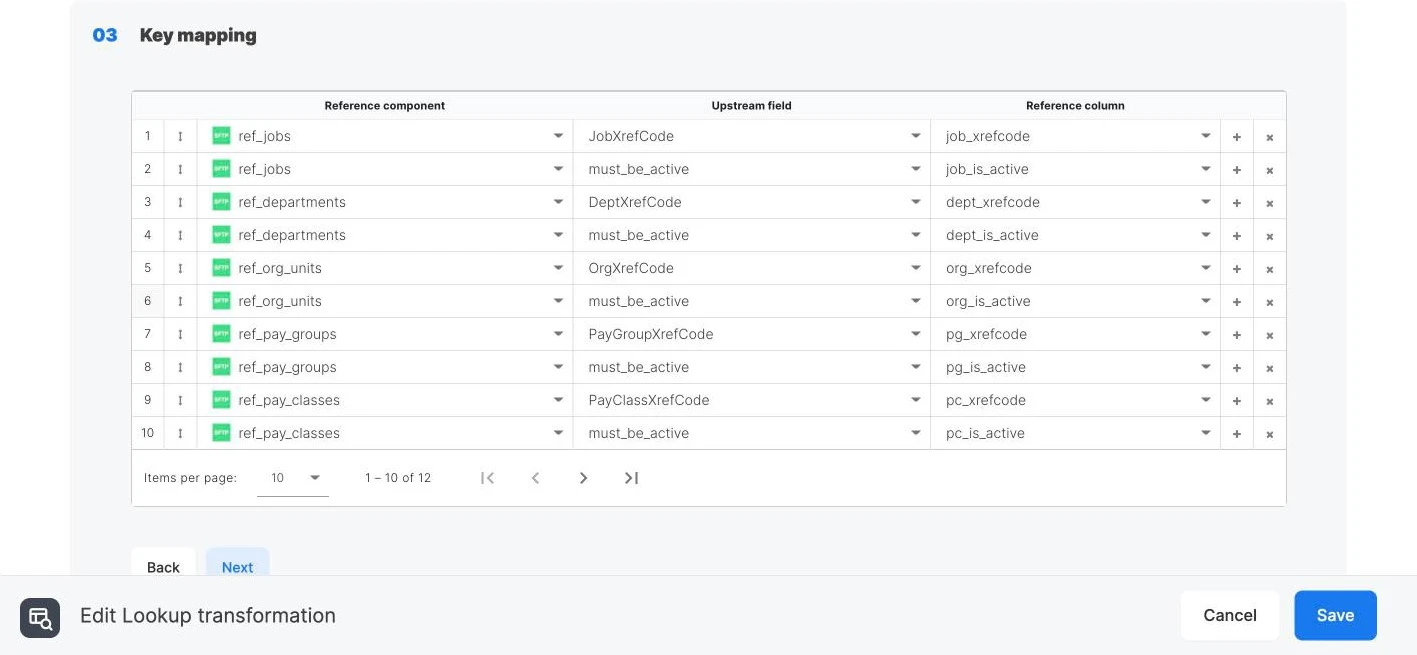

Save the mappings, rules, and lookups as a template. Clone it for the next Workday client and change only what differs.

Map legacy values to Workday reference IDs for organizations, job profiles, locations, and cost centers, and flag any with no match.

Catch missing IDs, duplicates, bad dates, and out-of-range pay. Every rejected row lands in a report with the reason.

Write Data Gathering Workbooks or EIB spreadsheets in the column layout of your existing templates, ready for each tenant build.
アナリスト、運用担当者、エンジニアが必要なパイプラインを構築でき、IT はアクセス、標準、可視性を保てます。
増え続けるデータ業務にも予測しやすい料金。行数、同期、コネクタ、クライアントごとに予算が左右されません。
どの方法で構築したパイプラインも、同じロールベースアクセスと監査証跡のもとで実行されるため、IT は誰が何を変更したかを確認できます。
専任のソリューションエンジニアが、24 時間 365 日のサポートとともに、実装と本番運用を支援します。
Integrate.io をデータ管理のためのエンドツーエンドのデータパイプラインプラットフォームとして使うことも、チームがすでに選んでいるスタックにモジュール式コンポーネントとして組み込むこともできます。
“Integrate.io プラットフォームは素晴らしい ETL・データ変換ソリューションです!Salesforce、HubSpot、Google アナリティクス、Facebook 広告などの接続が、かつてないほど簡単になりました。”

Meir Gold
グロース|アナリティクスマネージャー
“素晴らしい ELT ツール。ノーコードで、セットアップも使用も簡単、スケジュールも便利で、価格バランスも抜群です!”

Diego Polo
ビジネスインテリジェンスアーキテクト
“史上最高のカスタマーサービス!外部ベンダーの中で、これまでで最高のカスタマーサービスチームです。常に対応が早く、問題解決や製品の説明において期待以上の働きをしてくれます。”

Matthew Pratt
アナリティクスマネージャー
管理されたソースと宛先、カスタムシステム向けの汎用 API コネクター、さらにオンデマンドで 24 から 48 時間以内に構築できる新しいコネクター。
Book a demo and we'll run a sample client export through to a Workday EIB spreadsheet.
デモを予約FAQ
Clear answers to the questions teams ask when evaluating Integrate.io.
Still have questions?
デモを予約 →To build, run, and monitor the data pipelines they depend on, across SaaS apps, databases, files, APIs, and warehouses, without waiting in an engineering queue for every change.
Only if you want to. Build point-and-click with 220+ transformations, describe the pipeline to Helm, work through MCP, or drop into SQL and Python when the logic needs it.
Role-based access, version history, run logs, alerts, and audit trails let IT set the guardrails while the people closest to the data do the day-to-day work.
Every plan includes a dedicated Solution Engineer who helps design, build, and troubleshoot pipelines, plus 24/7 support.
A fixed fee, so costs stay predictable as you add pipelines, sources, and data volume.
本ウェブサイトの運営には必須 Cookie を使用しています。同意いただいた場合は、分析、広告、ソーシャルメディア、チャットなどの機能のためにも Cookie を使用します。選択内容は「Cookie設定」からいつでも変更できます。 Cookie ポリシーを読む