

SFTP vs. API: Quick Answer SFTP (Secure File Transfer Protocol) transfers encrypted files in bulk over a secure SSH connection, best for scheduled, high-volume, or regulated data transfers. An API (Application Programming Interface) enables real-time, request-based data exchange between software systems, best for live integrations, event-driven workflows, and modern SaaS connectivity. Bottom line: Use SFTP when you need secure bulk file delivery on a schedule. Use APIs when you need real-time data flow between systems. Most production pipelines use both.
Data integration methods are critical for maintaining operational efficiency and a competitive edge as the digital world evolves. Two popular methods, Secure File Transfer Protocol (SFTP) and Application Programming Interfaces (APIs), offer unique benefits depending on your needs.
Understanding the differences between these two can help you choose the best method for your data integration needs. In this guide, we'll compare SFTP vs. API so you have a clear picture of how each works, where each excels, and how to decide.
Key takeaways:
- SFTP (Secure File Transfer Protocol) is a method of transferring data using flat files over an encrypted SSH connection.
- An API (Application Programming Interface) allows apps or services to interact with one another and exchange data in real time.
- The key differences between SFTP and APIs involve data transfer method, latency, scalability, and use cases.
- For bulk, scheduled data transfers, especially in regulated industries, SFTP is often the better choice.
- For real-time data flow and modern SaaS integrations, APIs are typically the right option.
- SFTP and APIs are not mutually exclusive. Many production pipelines use both.
What Is SFTP?
SFTP (Secure File Transfer Protocol) is a network protocol that uses SSH encryption to transfer files securely between a client and a server.
Secure File Transfer Protocol leverages SSH (Secure Shell) to ensure data in transit remains private and intact. Unlike its predecessor FTP, which transmits data in plain text, SFTP encrypts data before sending, ensuring safety even if the connection is intercepted. It's the standard choice for bulk file transfers, particularly in industries with strict compliance requirements.
How Does SFTP Work?
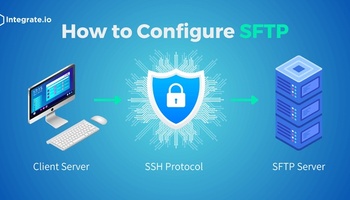
How SFTP works follows three stages:
- SSH establishes a secure, encrypted connection between the client (sender) and the server (recipient).
- Data is encrypted before transmission and decrypted upon receipt, protecting it throughout the transfer.
- The recipient server returns an acknowledgment confirming successful, unaltered delivery.
Benefits of SFTP
- Robust security: Strong SSH encryption protects data throughout transit.
- Data integrity: Built-in mechanisms detect and flag any alterations during transfer.
- Control: Supports precise file management, including resuming interrupted transfers.
- Automation: With the right tooling, SFTP workflows can be fully automated to reduce manual effort and errors.
Common Use Cases for SFTP
- B2B file sharing and EDI: Exchanging large data files with trading partners who require structured, scheduled delivery.
- Data backup and archival: Pushing files to secure remote servers on a defined schedule.
- Legacy system migration: Moving data from systems that predate API support and rely on flat-file exports.
- Regulated data exchange: Delivering HIPAA-compliant patient records in healthcare or audit-ready transaction files in financial services, where file-based audit trails are required.
SFTP Limitations
- No real-time access: SFTP is batch-only. Data moves on a schedule, not on demand.
- Limited scalability: Point-to-point architecture becomes difficult to manage as the number of integrations grows.
- File format restrictions: SFTP handles flat files (CSV, text). It is not suited for complex or nested data structures.
- Manual overhead: Without automation tooling, SFTP workflows require ongoing manual intervention to monitor and manage.
If you're looking for an SFTP/API integration tool that allows you to build data pipelines in minutes, you should try Integrate.io today.
"In the first eight months of using Integrate.io, we increased our inbound ticket inquiry conversions by 15%."
, Ben Nickerson, Senior Manager, CRM
You can read the full Boston Red Sox case study to see how they moved data 8x faster.
What Is an API?
An API (Application Programming Interface) is a set of rules and protocols that allows two software applications to communicate and exchange data in real time.
An Application Programming Interface defines the methods and data formats a program (the client) can use to communicate with another program (the server). It is not a database or a server. It is the code that governs access points between systems.
APIs establish the foundation for how software components interact, enabling everything from payment processing to live CRM sync.
How Does an API Work?
- A client sends a request to the API with specific instructions, formatted according to the API's defined structure (typically JSON or XML).
- The API receives the request, communicates with the relevant system or database, and retrieves the requested data.
- The API returns the data to the client as a structured response, completing the exchange in near real time.
Benefits of an API
- Real-time efficiency: APIs allow different software systems to communicate directly, delivering data on demand rather than on a schedule.
- Integration flexibility: APIs connect disparate systems and services, enabling seamless workflows across modern SaaS platforms.
- Automation: Event-driven API calls can replace manual data handoffs entirely.
- Customization: Developers can tailor API interactions to fit specific business logic and data requirements.
Common Use Cases for APIs
- CRM and marketing platform sync: Real-time data flow between Salesforce and marketing tools like Marketo, keeping records current across systems.
- E-commerce payment processing: Connecting checkout flows to payment gateways for instant transaction handling.
- Live inventory and order management: Syncing stock levels and order status across platforms as events occur.
- IoT device monitoring: Streaming sensor data from connected devices to analytics platforms in real time.
- Pipeline event triggers: Using real-time data replication to kick off downstream pipeline actions the moment data changes at the source.
API Limitations
- Resource intensity at scale: High-volume transfers via API require more compute and can introduce latency if not architected carefully.
- Connectivity dependency: APIs require stable internet access. Network interruptions break the integration.
- Setup complexity: Implementing an API requires reading documentation, handling authentication, and developer time.
- Rate limits: Third-party APIs often cap how many requests you can make per minute or day, which can throttle data flow during high-demand periods.
SFTP vs. API: Key Similarities
Before comparing differences, it's worth noting where SFTP and APIs overlap:
- Data transfer: Both move data between systems, just through different mechanisms.
- Security: Both support strong security controls, SSH encryption for SFTP and HTTPS/TLS with OAuth or API keys for APIs.
- Automation: Both can be automated to reduce manual effort and human error.
- Interoperability: Both enable communication between different software systems and platforms.
SFTP vs. API: Side-by-Side Comparison
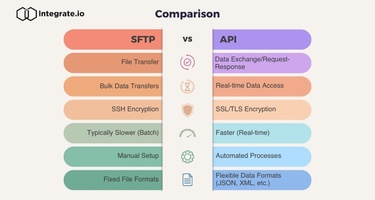
| Dimension | SFTP | API |
|---|---|---|
| Transfer method | File-based (flat files, CSV) | Request/response (JSON, XML) |
| Data latency | Batch / scheduled intervals | Real-time or near real-time |
| Data volume | High, optimized for bulk transfers | Lower per call; scales with frequency |
| Security | SSH encryption, access controls | HTTPS/TLS, OAuth, API keys |
| Setup complexity | Moderate, SSH key exchange required | Higher, requires API docs and developer work |
| Scalability | Limited (point-to-point) | High, connect multiple systems via one layer |
| Best for | Bulk file transfers, regulated industries, legacy systems | Real-time sync, event-driven workflows, modern SaaS |
| Typical industries | Healthcare, banking, manufacturing, logistics | E-commerce, SaaS, fintech, marketing tech |
SFTP vs. API: Which Integration Method Is Right for You?
Choosing between SFTP and API no-code data integration platforms depends on your specific needs, resources, and technical infrastructure.
Choose SFTP if:
- You need to transfer large volumes of data on a defined schedule.
- Your partners or systems rely on flat-file formats (CSV, text).
- You operate in a regulated industry where file-based audit trails are required.
- You're working with legacy systems that don't support API connections.
Choose APIs if:
- You need data to move between systems in real time or near real time.
- You're connecting modern SaaS platforms that publish API endpoints.
- Your workflows are event-driven, triggered by user actions or data changes.
- You need to build a scalable integration layer across multiple systems.
Your ETL and data pipeline platform should support both. Most mature data stacks use SFTP and APIs in parallel, not as competing choices.
You may also want to consider SFTP To Go, a fully managed service that bridges the gap by combining secure SFTP endpoints with webhook notifications. This lets you trigger ETL processes in real time as soon as a file is uploaded, streamlining data flows and reducing delays.
Can You Use SFTP and API Together?
Yes, and in most production environments, you should. SFTP and APIs are not competing choices; they solve different parts of the same data movement problem.
A common pattern: a retailer receives daily inventory files from a supplier via SFTP (bulk, scheduled, flat-file delivery), while simultaneously using APIs to sync real-time order status back to the supplier's system. The SFTP handles the historical load. The API handles the live updates.
Automated data pipelines built on a platform like Integrate.io can orchestrate both methods within a single workflow, so your team isn't managing two separate toolsets. You get the security and volume capacity of SFTP alongside the speed and flexibility of APIs, without having to choose.
SFTP vs. API in Regulated Industries
Regulated industries like healthcare and financial services continue to rely heavily on SFTP, and for good reason. HIPAA-compliant file delivery, audit trails, and independence from third-party API uptime are all easier to guarantee with SFTP. A hospital transmitting patient records to an insurance provider, or a bank sending end-of-day transaction files to a clearing house, needs a method that produces a verifiable, encrypted file record. SFTP delivers that.
Modern SaaS companies and e-commerce businesses default to APIs because speed and ecosystem flexibility matter more than batch delivery. Connecting a Shopify store to a marketing automation platform, or syncing a CRM to a data warehouse in real time, is an API-native workflow.
Healthcare data integration and financial services data pipelines often require both: SFTP for compliance-driven file exchange and APIs for operational data sync. Integrate.io supports both methods and is fully SOC 2 certified, HIPAA compliant, and GDPR compliant, so your integration strategy doesn't have to compromise on security.
How Integrate.io Can Help
At Integrate.io, our data pipeline platform is built to handle both SFTP and API integrations without forcing your team to choose one over the other.
- Connect to our SFTP connector to automate bulk file-based workflows, including scheduled transfers, file parsing, and delivery to your data warehouse.
- Use our API management and generation capabilities to build, publish, and manage REST APIs against your data sources in minutes.
- Orchestrate both within a single pipeline using our low-code visual interface, 220+ built-in transformations, and 24/7 expert support.
Our platform is SOC 2 certified, HIPAA compliant, GDPR compliant, and CCPA compliant. We don't store your data. We act as a pass-through layer between your source and destination systems.
Request a demo today and see how your team can automate SFTP and API workflows in a single platform.
Frequently Asked Questions: SFTP vs. API
Is SFTP more secure than an API?
Both SFTP and APIs can be highly secure when properly configured. SFTP uses SSH encryption and access controls to protect files in transit. APIs use HTTPS/TLS, OAuth, and API keys to secure requests and responses. Neither is inherently more secure than the other. Security depends on implementation, access management, and the sensitivity of the data being transferred.
When should I use SFTP instead of an API?
Use SFTP when you need to transfer large volumes of data on a schedule, when your partners or legacy systems require flat-file formats, or when your industry requires file-based audit trails for compliance. Healthcare organizations delivering HIPAA-regulated records and financial institutions sending batch transaction files are common examples where SFTP is the right choice.
Can SFTP and API be used together in the same pipeline?
Yes. Many production data pipelines use SFTP and APIs in parallel. A typical pattern is using SFTP for bulk historical loads (daily or weekly file drops) and APIs for real-time incremental updates triggered by data events. Platforms like Integrate.io let you orchestrate both within a single automated workflow.
What is the main disadvantage of SFTP compared to an API?
SFTP's biggest limitation is that it is batch-only. Data moves on a schedule, not on demand, so you cannot get real-time data access through SFTP alone. It also uses a point-to-point architecture that becomes difficult to scale as the number of integrations grows, and it is limited to flat-file formats like CSV, which cannot handle complex or nested data structures.
Which is faster, SFTP or API?
APIs are faster for real-time or on-demand data access. A well-configured API can return data in milliseconds. SFTP transfers run on scheduled intervals (hourly, daily, etc.), so the data is only as current as the last completed transfer. For time-sensitive workflows, APIs are the clear choice. For high-volume bulk transfers where latency is acceptable, SFTP is often more efficient.
Does Integrate.io support both SFTP and API integrations?
Yes. Integrate.io supports both through dedicated connectors and tooling. You can use the SFTP connector to automate file-based workflows and the API management and generation tools to build and manage REST APIs against your data sources. Both are available within the same low-code platform, with 24/7 expert support and enterprise-grade security built in.