



- What Are DISTKEY and SORTKEY in Amazon Redshift?
- Redshift Distribution Styles: AUTO, EVEN, KEY, and ALL
- Know The Data
- DISTKEY Redshift: Investigating The Query
- Adding DISTKEY and SORTKEY
- Solving The Puzzle
- What Is Data Skew in Redshift, and How to Detect It
- Trying a Different DISTKEY and SORTKEY
- How to Choose the Right DISTKEY: A Decision Framework
- Summary
- Frequently Asked Questions
- How Integrate.io Streamlines Your Redshift Data Pipeline
TL;DR: DISTKEY controls how Redshift distributes rows across compute nodes; SORTKEY controls how rows are sorted within each node. Choosing the wrong DISTKEY, especially one with low cardinality or high data skew, can make queries significantly slower than using no key at all. Start with DISTSTYLE AUTO for new tables, and only set a manual DISTKEY when you have a specific, high-frequency join pattern and have verified even data distribution.
Amazon Redshift's DISTKEY and SORTKEY are powerful tools for optimizing Amazon Redshift distribution key best practices. Because Amazon Redshift is a columnar database with compressed storage, it doesn't use indexes like transactional databases such as MySQL, Microsoft SQL, and PostgreSQL would. Instead, it uses DISTKEYs and SORTKEYs.
Key Takeaways
- DISTKEY controls which compute node stores a given row; SORTKEY controls the physical sort order of rows within each node.
- Redshift supports four distribution styles: AUTO, EVEN, KEY, and ALL. Each has distinct tradeoffs.
- Choosing a DISTKEY column with low cardinality or uneven data distribution causes skew, which can make queries 2-3x slower than using no key at all.
- DISTSTYLE AUTO is the recommended default for most tables. Manual DISTKEY selection is most valuable for specific, high-frequency join patterns.
- Always check for skew before committing to a DISTKEY by running a row count grouped by the candidate column.
What Are DISTKEY and SORTKEY in Amazon Redshift?
DISTKEY (distribution key) is a column designation in Amazon Redshift that controls how rows are distributed across compute nodes. When you define a DISTKEY on a column, Redshift places all rows that share the same value for that column on the same compute node. This colocation is what enables efficient joins and aggregations without moving data across the network.
SORTKEY is a column designation that controls the physical sort order of rows within each node's storage blocks. When Redshift knows rows are sorted by a particular column, it can skip entire blocks of storage that fall outside a query's filter range, a technique called zone map filtering. SORTKEY speeds up range queries and ORDER BY operations; it does not affect how rows are distributed.
Both differ from indexes in transactional databases. Traditional indexes are separate data structures that point to row locations. Redshift's DISTKEY and SORTKEY are physical storage decisions made at table creation time, baked into how data is laid out on disk.
Amazon Redshift also supports DISTSTYLE AUTO, which lets Redshift analyze your query patterns and automatically select the best distribution style. For most tables, especially new ones, DISTSTYLE AUTO is the right starting point. Manual DISTKEY selection is most valuable when you have a well-understood, high-frequency query pattern that benefits from explicit colocation.
Redshift Distribution Styles: AUTO, EVEN, KEY, and ALL
Before setting a DISTKEY, understand the four distribution styles Redshift supports and when each is appropriate.
| Distribution Style | How It Works | Best For | Avoid When |
|---|---|---|---|
| KEY (DISTKEY) | Rows with the same key value go to the same node | Large fact tables with frequent joins on the key column | Column has low cardinality or high skew |
| EVEN | Rows distributed round-robin across nodes | Tables with no clear join key; standalone aggregations | Frequent joins; causes data redistribution across nodes |
| ALL | Full copy of the table on every node | Small dimension tables joined frequently | Large tables; multiplies storage cost across all nodes |
| AUTO | Redshift chooses automatically based on query patterns | Most tables, especially new ones | You have specific, well-understood query patterns already optimized |
The KEY style is what you configure when you define a DISTKEY column. The tradeoff is straightforward: you gain join performance when the key column distributes rows evenly, but you pay a steep penalty if the column's values are skewed. Data latency and query time both suffer when one node handles a disproportionate share of rows.
Know The Data
This example uses a series of Redshift distribution examples called system_errors# where # is a series of numbers. Each record of the table consists of an error that happened on a system with its (1) timestamp, and (2) error code. Each table has 282 million rows. Here, there is a query that needs optimizing. The query gets the number of errors per error type for each time slice:
SELECT err_code, created_at, count(*) FROM system_errors1 GROUP BY created_at, err_code;
You can create a table without the DISTKEY before setting it and see how the query performs:
CREATE TABLE system_errors1 (
 err_code INTEGER,
 created_at timestamp
);
On this Redshift cluster (2-node dc1.large), the query took 20.52 seconds to execute. Both compute nodes were used up to 30% of CPU. That's a reasonable baseline, but there's room to improve.
DISTKEY Redshift: Investigating The Query
Now it's time to check query performance by analyzing the Amazon Redshift Console. It offers useful graphs and metrics to analyze query performance.
Below are the "Query Execution Details" for the query:

Look at the warning sign:

This warning occurred because rows that need to be aggregated (rows sharing the same err_code and created_at values) are spread across multiple compute nodes. Each node must aggregate its own rows first; then, the leader node has to aggregate the results again. That's why you see two "Aggregate" steps in the screenshot above. A large amount of data was sent to the leader node across the network, which became the performance bottleneck.
You can avoid this by putting all rows sharing the same err_code and created_at values on a single node. That's exactly what DISTKEY does.
Adding DISTKEY and SORTKEY
To collocate all relevant rows in a single node, you can use either the column err_code or created_at as the DISTKEY. If you want to run a query grouped by err_code without created_at, choose err_code as DISTKEY and SORTKEY.
CREATE TABLE system_errors2 (
 err_code INTEGER,
 created_at timestamp
) DISTKEY(err_code) SORTKEY(err_code);
Take a look at how the query performs against the new table:
SELECT err_code, created_at, count(*) FROM system_errors2 GROUP BY created_at, err_code;
This query took 54.9 seconds. That's 2.5 times slower than the first query against a table with no DISTKEY/SORTKEY. The new table puts all rows of an error code on the same node and stores them next to each other. Why would the query against this table be even slower?
Solving The Puzzle
After creating two tables with and without DISTKEY, the table with the DISTKEY was much slower:
no DISTKEY -> 20.52 seconds
err_code as DISTKEY -> 54.9 seconds
Why did this happen? The query's execution details provide the answer:
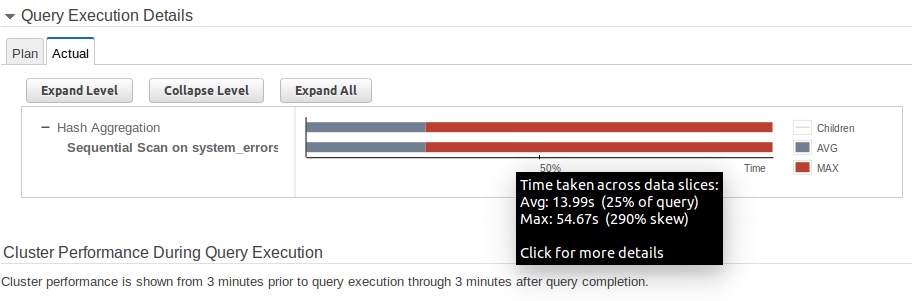
You'll notice the long red lines. The slowest node took significantly longer than the average processing time, approximately four times longer. Running the following query shows how many rows each err_code has:
SELECT err_code, count(*) FROM system_errors2 GROUP BY err_code;

err_code | count
----------+-----------
1210 | 22336
10010 | 252160
1205 | 517440
1207 | 1368576
1208 | 384
10009 | 1825856
1201 | 2162176
1206 | 1229824
1213 | 8960
10006 | 4960640
10007 | 67840
1204 | 269341760
1209 | 95488
10003 | 281856

(14 rows)
Error code 1204 has 95.5% of the rows in the table. Because err_code was the DISTKEY, at least 95.5% of the rows were placed on one particular node. This is data skew.
What Is Data Skew in Redshift, and How to Detect It
Data skew occurs when one compute node holds a disproportionate share of rows, causing that node to become a processing bottleneck. The total query time is capped by the slowest node; the other nodes sit idle while the overloaded node finishes. In the example above, the skew ratio was approximately 4x, which explains why the keyed table was 2.5x slower than the unkeyed baseline.
How to Check Skew Before Committing to a DISTKEY
Use SVV_TABLE_INFO to check the skew ratio of an existing table:
SELECT "table", skew_rows FROM svv_table_info WHERE "table" = 'your_table_name';
A skew ratio above 1.5 warrants investigation. A ratio above 4 is a serious performance problem and means your DISTKEY choice is actively hurting query time.
Before choosing a DISTKEY column, run a row count grouped by the candidate column:
SELECT candidate_column, count(*) FROM your_table GROUP BY candidate_column ORDER BY count(*) DESC;
If any single value accounts for more than 20-30% of total rows, that column is a poor DISTKEY candidate.
Trying a Different DISTKEY and SORTKEY
Since the values of the column err_code were too skewed to use as a DISTKEY, you can use the other column created_at instead.
CREATE TABLE system_errors3 (
 err_code INTEGER,
 created_at timestamp
) DISTKEY(created_at) SORTKEY(created_at);
The same query now takes only 8.32 seconds, more than six times faster than the skewed table, and more than twice as fast as the baseline with no DISTKEY.
CPU utilization is also much better: 10% vs. the previous 30%.

Query execution details look good as well. Skew is minimal, and there's no warning sign for a large data transfer across the network.

If you look at the details of Hash Aggregation, you'll notice the steps are much more simplified compared to the very first query. The double "Aggregate" step is gone.

How to Choose the Right DISTKEY: A Decision Framework
Use this framework when evaluating DISTKEY and SORTKEY options for a new or existing table.
- Start with DISTSTYLE AUTO unless you have a specific, well-understood query pattern. Redshift's Automatic Table Optimization (ATO) analyzes your query patterns and adjusts distribution styles automatically. It's the right default for most tables.
- If you're joining a large fact table to a dimension table frequently, set DISTKEY on the join column. Collocating rows by join key eliminates cross-node data movement.
- Choose a column with high cardinality (many distinct values). Timestamp columns are often a good starting point because they distribute rows evenly across nodes.
- Run a row count check before committing: SELECT column, COUNT(*) FROM table GROUP BY column. If one value dominates, pick a different column.
- If any single value accounts for more than 20-30% of rows, that column is a poor DISTKEY candidate regardless of how frequently it appears in queries.
- A table with no DISTKEY (EVEN distribution) is a safe default when you're unsure. It won't be the best performer for specific queries, but it avoids the skew trap entirely.
Summary
- Pick a small number of important queries to optimize for. You can't optimize a table for all queries simultaneously.
- To avoid large data transfers over the network, define a DISTKEY on the column used in your most frequent joins or aggregations.
- Choose a column that causes the least amount of skew. High-cardinality columns like timestamps are a good first choice. Avoid columns with few distinct values such as status flags, boolean fields, or error code columns where one value dominates.
- A table with no DISTKEY (EVEN distribution) is a decent all-around performer. Don't set a DISTKEY until you understand the nature of your data and queries.
- DISTSTYLE AUTO removes the guesswork for most tables. Use it unless you have a specific, proven reason to set keys manually.
Frequently Asked Questions
What is the difference between DISTKEY and SORTKEY in Redshift?
DISTKEY controls which compute node stores a given row; it determines data distribution across the cluster. SORTKEY controls the physical order of rows within each node's storage blocks; it speeds up range queries and ORDER BY operations. They solve different performance problems and can be set independently on the same table.
Can a Redshift table have both a DISTKEY and a SORTKEY?
Yes. You can define both on the same table. A common pattern is to set the same column as both DISTKEY and SORTKEY when your queries both join and filter on that column. This collocates rows by key value and stores them in sorted order, which benefits both join performance and range scans.
What happens if you choose the wrong DISTKEY?
If the DISTKEY column has low cardinality or is highly skewed, one compute node ends up processing a disproportionate share of rows. The query cannot finish until the slowest node completes. As the tutorial above demonstrates, this can make performance 2.5x worse than using no DISTKEY at all.
Should I use DISTSTYLE AUTO instead of setting a DISTKEY manually?
For most tables, yes. Amazon Redshift's Automatic Table Optimization (ATO) analyzes your query patterns and adjusts distribution styles automatically. Manual DISTKEY selection is most valuable when you have a specific, high-frequency query pattern that ATO hasn't yet optimized for, or when you need predictable, consistent performance for a known join pattern.
What is a good column to use as a DISTKEY?
Choose a column with high cardinality (many distinct values) that appears frequently in JOIN conditions and distributes rows evenly across nodes. Timestamp columns are often a good starting point. Avoid columns like status flags, boolean fields, or any column where a single value represents a large percentage of rows.
How Integrate.io Streamlines Your Redshift Data Pipeline
Integrate.io replicates data to Amazon Redshift in real time, with sub-60-second real-time CDC replication latency, auto-schema mapping, and no manual scripting required. Connect your sources, set your pipeline, and let your team focus on querying clean data instead of managing infrastructure.
Beyond data replication to Redshift, Integrate.io supports ELT pipelines, Reverse ETL, and a full library of ETL tools and connectors for moving data from sources like Oracle, AWS RDS, and Snowflake into your warehouse without worrying about schemas, primary keys, or APIs.
Talk to an Expert to see how Integrate.io handles the pipeline so your team can focus on the analysis.