

- What Is a Database Schema?
- What Is the Difference Between a Database Schema and a Database?
- 6 Types of Database Schemas
- What Is Database Schema Design?
- Why Is Database Schema Design Important?
- Key Components of a Database Schema
- How to Design a Database Schema: Step-by-Step
- Database Schema Normalization: 1NF, 2NF, and 3NF Explained
- Database Schema Design Examples by Use Case
- Best Practices for Database Schema Design
- Database Schema Design Tools
- FAQ
TL;DR: A database schema is a formal blueprint describing how data is organized in a database, including its tables, fields, relationships, and constraints. Good schema design reduces redundancy, improves query performance, and keeps data consistent. There are six main schema types: flat, hierarchical, network, relational, star, and snowflake. Best practices include consistent naming conventions, normalization, security-first design, and thorough documentation.
Key Takeaways:
- A database schema is a formal description of how data is structured or organized in a database.
- There are six common schema types: flat model, hierarchical model, network model, relational model, star schema, and snowflake schema.
- Database schema design refers to the strategies and practices for constructing that structure, covering naming conventions, normalization, security, and documentation.
- Good schema design reduces data redundancy, prevents inconsistencies, and enables faster query performance.
- Primary keys, foreign keys, indexes, and constraints are the core components that define how tables relate and how data stays accurate.
- Normalization (1NF, 2NF, 3NF) is the process of structuring tables to eliminate redundancy and dependency problems.
- After your schema is designed, tools like Integrate.io connect it to production-ready data pipelines across 150+ sources and destinations.
What Is a Database Schema?
A database schema is a formal description of the structure or organization of a particular database. It defines how data is stored, how tables relate to one another, and what constraints govern data entry and retrieval.
The term is most commonly used for relational databases, which organize information in tables and use the SQL query language. Non-relational ("NoSQL") databases also have an underlying structure, but they don't use a "schema" in the same way. (For a deeper comparison, see SQL vs. NoSQL: 5 Critical Differences.)
Every database schema has two fundamental components:
- Physical database schema: Describes how data is physically stored in a storage system, including the form of storage used (files, key-value pairs, indices, etc.).
- Logical database schema: Describes the logical constraints applied to data and defines fields, tables, relations, views, and integrity constraints. These rules determine how data in different tables relate to one another.
The physical table definitions in a schema derive from the logical data model. Entities become tables; entity attributes become table fields.
What Is the Difference Between a Database Schema and a Database?
This is one of the most common points of confusion, and it is worth addressing directly.
A database schema is the structure or blueprint. It defines the tables, fields, data types, relationships, and constraints, but it contains no actual data.
A database is the schema plus all the data it holds. Think of the schema as the architectural plan for a building and the database as the building itself, fully constructed and occupied.
When a developer says "I'm designing the schema," they mean they are defining the structure before any data is loaded. When they say "query the database," they mean they are retrieving actual records from that structure.
This distinction matters for data pipeline architecture: pipelines move data between databases, but they must respect the schema of each source and destination to map fields correctly.
6 Types of Database Schemas
Understanding the six most common schema types helps you choose the right structure for your use case.
- Flat model: Organizes data in a single, two-dimensional display, similar to a Microsoft Excel spreadsheet or a CSV file. Best for simple tables and databases without complex relationships between entities.
- Hierarchical model: Uses a "tree-like" structure, with child nodes branching out from a root data node. Ideal for storing nested data such as family trees or biological taxonomies.
- Network model: Like the hierarchical model, treats data as nodes connected to one another, but allows more complex connections including many-to-many relationships in relational databases and cycles. Useful for modeling the movement of goods between locations or multi-step workflows.
- Relational model: Organizes data in tables, rows, and columns, creating relationships between entities. The most widely used model for transactional and analytical systems.
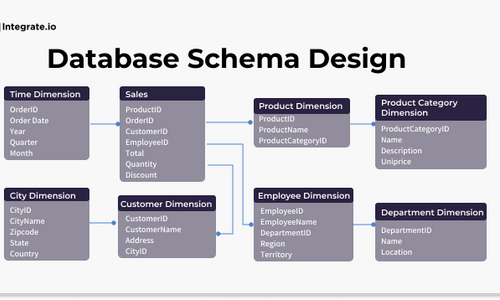
- Star schema: An evolution of the relational model that organizes data into facts (numerical, such as number of sales) and dimensions (descriptive, such as product color or price). Common in data warehouse and analytics environments.
- Snowflake schema: A further abstraction on top of the star schema. A fact table connects to dimensional tables, which in turn connect to sub-dimensional tables, expanding descriptiveness. The name comes from the intricate branching pattern of a snowflake. See snowflake schema vs. star schema for a detailed comparison.
Related Reading: 6 Database Schema Designs and How to Use Them
When to Use Each Schema Type
| Schema Type | Best For |
|---|---|
| Flat model | Simple, single-table data with no relationships |
| Hierarchical model | Nested, parent-child data structures |
| Network model | Complex many-to-many relationships |
| Relational model | Transactional systems, most business applications |
| Star schema | Analytics, BI dashboards, data warehouses |
| Snowflake schema | Large-scale analytics with high-cardinality dimensions |
What Is Database Schema Design?
Database schema design, sometimes called SQL schema design, refers to the practices and strategies for constructing a database schema. It is the process of deciding how to organize data into entities, how those entities relate to one another, and what rules govern data integrity.
You can think of it as an architectural blueprint for storing large amounts of information. The schema is an abstract structure representing the logical view of the database as a whole. Defining data types and the relationships between them makes data easier to retrieve, consume, manipulate, and interpret.
DB schema design organizes data into separate entities, determines how to create relationships between those entities, and applies constraints on data. Designers create schemas to give programmers and analysts a clear, logical understanding of how data is structured before they write a single query.
Why Is Database Schema Design Important?
Inefficiently organized databases consume excess resources, slow down queries, and are difficult to maintain. The right schema design removes duplicated and inconsistent data before it becomes a problem.
The goals of good schema design include:
- Reducing or eliminating data redundancy
- Preventing data inconsistencies and inaccuracies
- Ensuring data integrity and correctness
- Facilitating rapid data lookup, retrieval, and analysis
- Keeping sensitive and confidential data secure and accessible only to authorized users
Without a clean, consistent schema, you will struggle to get value from enterprise data, no matter how powerful your analytics tools are.
Key Components of a Database Schema
Before designing a schema, you need to understand the building blocks that make it work.
Primary Keys
A primary key is a column (or combination of columns) that uniquely identifies each row in a table. No two rows can share the same primary key value, and primary key columns cannot be NULL. Every table should have one.
Foreign Keys
A foreign key is a column in one table that references the primary key of another table. Foreign keys enforce referential integrity, meaning you cannot insert a record that references a non-existent parent record. They are the mechanism that creates relationships between tables.
Indexes
An index is a data structure that speeds up data retrieval on a column or set of columns. Without indexes, the database performs a full table scan for every query. Indexes improve read performance significantly, but they add overhead to write operations, so index selectively.
Constraints
Constraints enforce rules on the data in a table:
- NOT NULL: The column must have a value; it cannot be empty.
- UNIQUE: All values in the column must be distinct.
- CHECK: Values must satisfy a specific condition (for example, age > 0).
- DEFAULT: Assigns a default value when no value is provided.
Views
A view is a saved SQL query that presents data from one or more tables as if it were a single table. Views simplify complex queries, restrict access to sensitive columns, and provide a stable interface even when the underlying tables change.
A Simple SQL Example
Here is a CREATE TABLE statement that puts several of these components together:
CREATE TABLE customers (
 customer_id INT NOT NULL PRIMARY KEY,
 full_name VARCHAR(100) NOT NULL,
 email VARCHAR(150) NOT NULL UNIQUE,
 date_of_birth DATE,
 department_id INT,
 FOREIGN KEY (department_id) REFERENCES departments(department_id)
);
This single statement defines a primary key (customer_id), a unique constraint (email), a NOT NULL constraint (full_name, email), and a foreign key relationship to a departments table.
How to Design a Database Schema: Step-by-Step
The current page's prose walkthrough has been replaced with a numbered process structured for both human readers and AI extraction.
Step 1: Define the Purpose and Scope
Start by answering: what problem does this database solve? Who will use it, and what questions will they ask of the data? A database for an accounting department has different requirements than one for a healthcare provider or an e-commerce platform. Scope decisions made here affect every subsequent step.
Step 2: Identify Entities and Their Attributes
An entity is any object or concept you need to store data about, such as a customer, product, order, or employee. List every entity your database needs to track. For each entity, list its attributes (the fields that describe it). For example, a Customer entity might have attributes: customer_id, full_name, email, date_of_birth.
Step 3: Define Relationships Between Entities
Determine how entities relate to one another. Common relationship types:
- One-to-one: One customer has one billing address.
- One-to-many: One customer can place many orders.
- Many-to-many: Many orders can contain many products (requires a junction table).
For example, an accounting schema might link employees to their overtime records via a shared employee_id field:
| Table: Employees | Table: Overtime Pay |
|---|---|
| employee_id (PK) | overtime_id (PK) |
| full_name | employee_id (FK) |
| time_period | |
| date_of_birth | hours_billed |
| department_id |
Step 4: Choose the Appropriate Schema Type
Based on your use case, select the schema type that best fits your data structure and query patterns. Transactional systems typically use the relational model. Analytics and BI workloads often benefit from a star or snowflake schema.
Step 5: Apply Normalization Rules
Normalize your tables to eliminate redundancy and dependency problems. See the normalization section below for a full breakdown of 1NF, 2NF, and 3NF.
Step 6: Define Constraints and Indexes
Add primary keys, foreign keys, NOT NULL constraints, and UNIQUE constraints to enforce data integrity. Add indexes on columns that appear frequently in WHERE clauses or JOIN conditions.
Step 7: Document and Review the Schema
Document every table, field, relationship, and constraint with clear descriptions. Have at least one other developer or analyst review the schema before it goes into production. Schemas are difficult to restructure once data is loaded.
Leading database systems support the CREATE SCHEMA statement for formalizing your design. MySQL, Oracle Database, and Microsoft SQL Server each implement this standard.
Database Schema Normalization: 1NF, 2NF, and 3NF Explained
Normalization is the process of structuring a relational database to reduce data redundancy and improve data integrity. It works by decomposing tables into smaller, more focused tables and defining relationships between them.
First Normal Form (1NF)
A table is in 1NF when:
- Every column contains atomic (indivisible) values.
- There are no repeating groups or arrays within a single column.
Before 1NF (problematic):
| order_id | customer_name | products_ordered |
|---|---|---|
| 1001 | Jane Smith | Widget A, Widget B, Widget C |
After 1NF:
| order_id | customer_name | product |
|---|---|---|
| 1001 | Jane Smith | Widget A |
| 1001 | Jane Smith | Widget B |
| 1001 | Jane Smith | Widget C |
Second Normal Form (2NF)
A table is in 2NF when it is in 1NF and every non-key attribute is fully dependent on the entire primary key (no partial dependencies). This matters most for tables with composite primary keys.
If a table has a composite key of (order_id, product_id) and a column product_name depends only on product_id, that column should move to a separate Products table.
Third Normal Form (3NF)
A table is in 3NF when it is in 2NF and no non-key attribute depends on another non-key attribute (no transitive dependencies).
For example, if a table stores employee_id, department_id, and department_name, and department_name depends on department_id rather than employee_id, then department_name belongs in a separate Departments table.
When to Denormalize
Normalization is not always the right answer. In high-read analytical workloads (data warehouses, BI dashboards), denormalization can improve query performance by reducing the number of joins required. Star and snowflake schemas are intentionally denormalized for this reason. The key is to normalize by default and denormalize deliberately, with a clear performance justification.
Database Schema Design Examples by Use Case
Related Reading: 6 Database Schema Designs and How to Use Them
E-Commerce
An e-commerce schema typically needs at least three core tables:
| Customers | Orders | Products |
|---|---|---|
| customer_id (PK) | order_id (PK) | product_id (PK) |
| full_name | customer_id (FK) | product_name |
| order_date | price | |
| shipping_address | total_amount | inventory_count |
The Orders table links to Customers via a foreign key, and a junction table (Order_Items) handles the many-to-many relationship between orders and products.
Healthcare
A healthcare schema must account for patient privacy and regulatory requirements (such as HIPAA). Core tables typically include:
| Patients | Appointments | Providers |
|---|---|---|
| patient_id (PK) | appointment_id (PK) | provider_id (PK) |
| full_name | patient_id (FK) | full_name |
| date_of_birth | provider_id (FK) | specialty |
| insurance_id | appointment_date | license_number |
Sensitive fields like date_of_birth and insurance_id should be encrypted at rest. Access controls should restrict which roles can query the Patients table. For more on data security in regulated environments, see Integrate.io's complete security guide.
SaaS
A SaaS platform schema often uses a star schema variant for subscription analytics:
| Users | Subscriptions | Features |
|---|---|---|
| user_id (PK) | subscription_id (PK) | feature_id (PK) |
| user_id (FK) | feature_name | |
| created_at | plan_tier | is_active |
| account_status | renewal_date |
A junction table (Subscription_Features) maps which features are included in each plan tier, supporting flexible pricing logic without schema changes.
Best Practices for Database Schema Design
Naming Conventions
- Define and use consistent naming conventions across all tables and fields. Consistency matters more than any particular style.
- Avoid reserved words in table names, column names, and fields. They will cause syntax errors or require extra quoting.
- Do not use hyphens, quotes, spaces, or special characters in names.
- Use singular nouns for table names (Customer, not Customers). A table represents a collection; the name does not need to be plural.
- Omit unnecessary verbiage (Department, not DepartmentList or TableDepartments).
Security
Data security starts at the schema level. Encrypt sensitive fields such as personally identifiable information (PII) and passwords. Do not grant administrator roles to every user; require authentication for database access and apply role-based access controls at the table and column level.
Documentation
Schemas outlive the people who design them. Document every table, field, relationship, and constraint with clear descriptions. Write comment lines for scripts, triggers, and stored procedures. Future developers (and your future self) will thank you.
Normalization
Normalize tables to ensure independent entities and relationships are not grouped together, reducing redundancy and improving integrity. Both over-normalization (too many joins, slow queries) and under-normalization (duplicate data, update anomalies) create problems. Normalize by default; denormalize only when you have a clear performance reason.
Understand Your Data Before You Design
Understand each data attribute and its relationship to others before finalizing your schema. This prevents costly restructuring as your data grows.
Database Schema Design Tools
The SERP for "database schema design" is dominated by interactive tools, which tells you something about what users actually need: a way to visualize and build schemas, not just read about them.
Common tools in the ecosystem include:
- ER diagram tools: dbdiagram.io, DrawSQL, and Lucidchart let you visually design entity-relationship diagrams and export SQL. These are useful for the planning and documentation phases.
- Database-native editors: MySQL Workbench and pgAdmin provide schema design interfaces directly connected to your database instance, useful for iterating on a live schema.
- Code-first approaches: For teams that prefer version-controlled schema definitions, tools like Flyway and Liquibase manage schema migrations as code.
Once your schema is designed and your database is running, you need a way to move data into and out of it reliably. That is where Integrate.io fits into the workflow.
Integrate.io connects your designed database schemas to production-ready data pipelines, automating the movement, transformation, and replication of data across 150+ sources and destinations. Once your schema is in place, Integrate.io handles the rest: low-code ETL pipelines, ETL vs. ELT workflows, sub-60-second CDC replication, and reverse ETL to push clean data back into your operational tools.
Talk to an Expert to see how Integrate.io fits into your data stack.
FAQ
What is a database schema?
A database schema is a formal description of the structure or organization of a database. It defines the tables, fields, data types, relationships, and constraints that govern how data is stored and accessed. The schema is the blueprint; the database is the blueprint plus all the data it contains.
What is the difference between a logical and physical database schema?
A logical database schema describes the abstract structure of the data, defining entities, attributes, relationships, and constraints without specifying how data is physically stored. A physical database schema describes how data is actually stored on disk, including file formats, indexes, partitions, and storage engines. Developers design the logical schema first, then implement it as a physical schema in a specific database system.
Why is database schema design important?
Schema design determines how efficiently your database runs. A well-designed schema reduces data redundancy, prevents inconsistencies, enforces data integrity, and enables fast query performance. Without a clean schema, even powerful analytics tools will produce unreliable results.
What are the six types of database schemas?
The six common types are: flat model, hierarchical model, network model, relational model, star schema, and snowflake schema. Each is suited to different data structures and query patterns. The relational model is the most widely used for transactional systems; star and snowflake schemas are common in analytics and data warehouse environments.
When should I use a star schema vs. a snowflake schema?
Use a star schema when query performance is the priority and your dimension tables are relatively small. The star schema requires fewer joins, making queries faster. Use a snowflake schema when storage efficiency and data integrity matter more, or when your dimension tables are large and have high-cardinality sub-dimensions. Snowflake schemas normalize dimension tables further, reducing storage but increasing join complexity.
What is normalization and why does it matter?
Normalization is the process of structuring database tables to eliminate redundancy and dependency problems. First Normal Form (1NF) eliminates repeating groups. Second Normal Form (2NF) eliminates partial dependencies on composite keys. Third Normal Form (3NF) eliminates transitive dependencies between non-key columns. Normalized schemas are easier to maintain and less prone to update anomalies.
What are best practices for database schema design?
Key best practices include: use consistent naming conventions, apply normalization to reduce redundancy, encrypt sensitive fields and enforce access controls, document every table and relationship, define primary keys for every table, use foreign keys to enforce referential integrity, and add indexes on columns used frequently in queries and joins.
What are the types of database schemas?
There are six common types of database schemas: flat model, hierarchical model, network model, relational model, star schema, and snowflake schema. Each type has a unique structure suited to different data organization and retrieval needs.






