Learn how Integrate.io ELT & CDC performs initial sync using parallel chunking, Avro staging, and resumable transfers for large datasets.
When you create a new pipeline, Integrate.io ELT & CDC performs an initial sync to load the full historical data from your source tables into the destination. Once the initial sync completes, the pipeline switches to continuous sync mode and begins capturing ongoing changes.
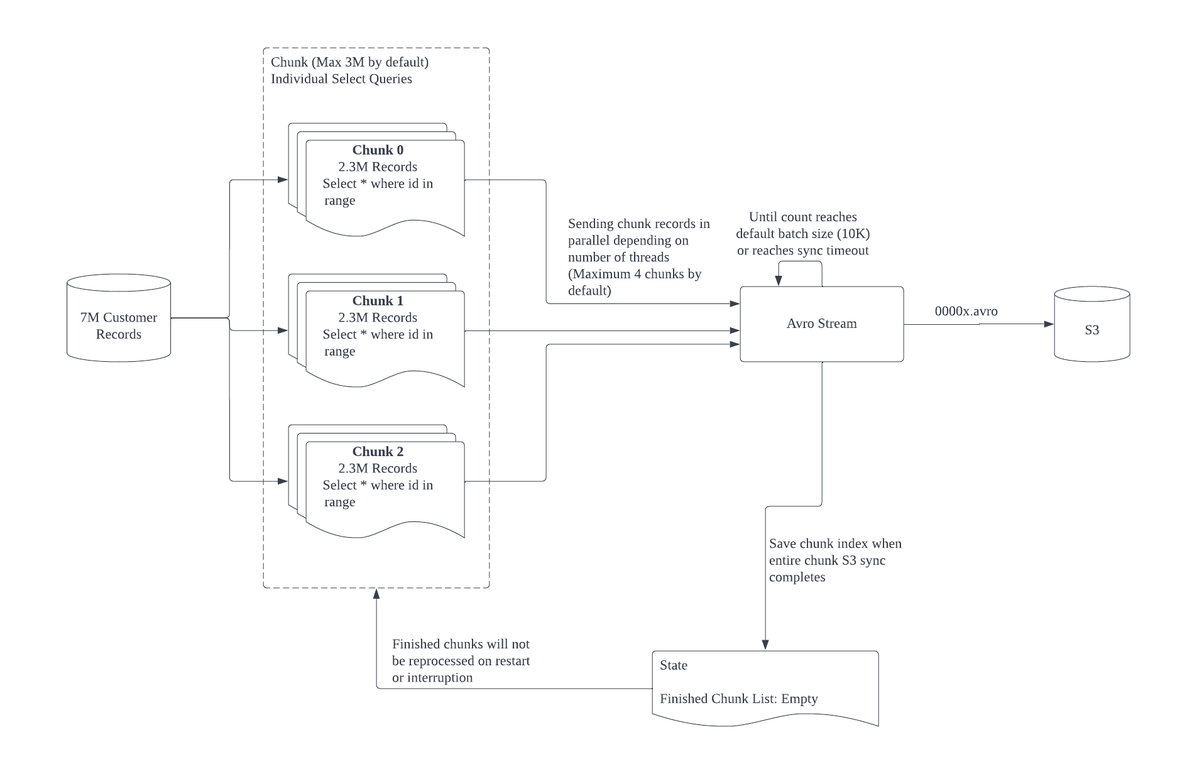
During initial sync, Integrate.io counts the number of records in a table and divides them into chunks of roughly equal size. Each chunk corresponds to a SELECT statement with a primary key range. Multiple chunks are processed in parallel, which allows large tables to sync faster than a single sequential read.Chunking is supported on tables with numeric primary keys (integer, big integer, medium integer). Tables with non-numeric primary keys are synced without chunking.
Initial sync is resumable. Once all records in a chunk have been transferred to S3, that chunk is marked as finished and will not be reprocessed if the pipeline is restarted or interrupted. This means that if a sync fails partway through a large table, it picks up from where it left off rather than starting over.
Once the initial sync completes for all selected tables, the pipeline transitions to continuous sync. For database sources (PostgreSQL, MySQL, SQL Server, Oracle), continuous sync uses log-based replication to capture inserts, updates, and deletes in near real-time. For SaaS/API sources, continuous sync uses scheduled polling.During continuous sync, the pipeline also handles schema changes automatically.