
Documentation Index

Fetch the complete documentation index at: https://www.integrate.io/docs/llms.txt

Use this file to discover all available pages before exploring further.

Create Read-Replica (optional)

We recommend syncing data using a read-replica of your database to ensure sync doesn’t affect your primary database instance. If you wish to sync against Primary, feel free to skip this step.Refer this documentation to create a read-replica

Create user

Create a sync user for Integrate.io by executing,
CREATE USER 'flydata'@'%' IDENTIFIED BY '<your_password>';
Grant necessary privileges,
GRANT SELECT, RELOAD, REPLICATION SLAVE, REPLICATION CLIENT, LOCK TABLES ON *.* TO 'flydata'@'%';
FLUSH PRIVILEGES;

Enable binary logging

1
Select your database instance in CloudSQL on Google Cloud Platform
2
Go to Backup
3
Enable Automated Backups by clicking on Edit and selecting Automate backups and Enable point-in-time recovery options.
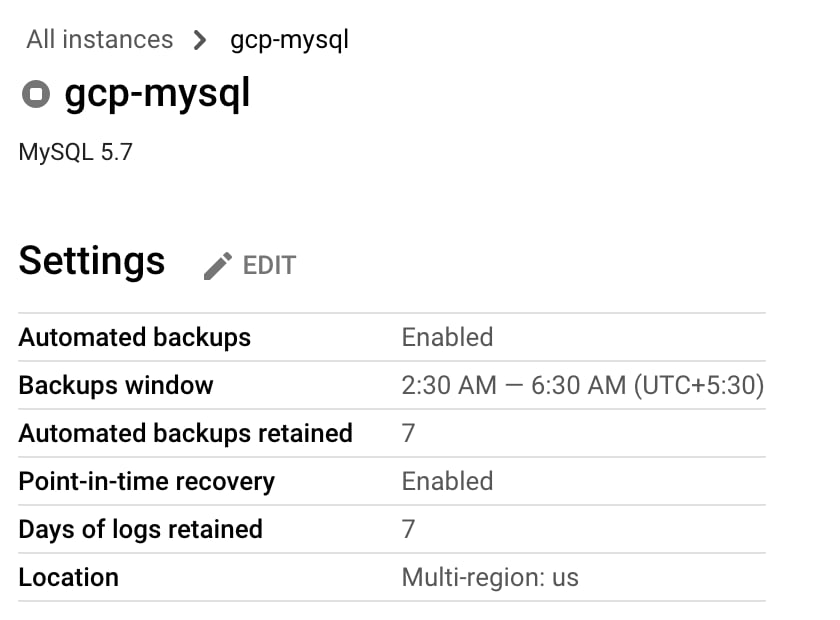
Google Cloud SQL backup settings with automated backups and point-in-time recovery enabled
Confirm your changes by checking the binlog status,
SHOW GLOBAL VARIABLES LIKE 'log_bin';
Last modified on April 15, 2026