

Collections
Dimensions, Metrics and Segments are read per report suite, using the report suites found in Projects. Every sync re-reads the full list for each collection.
Setting up Adobe Analytics for ELT & CDC
Overview
ELT & CDC uses the Adobe Analytics 2.0 API and authenticates with an Adobe OAuth Server-to-Server credential.Adobe Analytics 2.0 API Reference
Adobe no longer supports Service Account (JWT) credentials. If you created your Adobe Analytics connection with a private key and technical account ID, create an OAuth Server-to-Server credential as described below and update the source.
Requirements
- The Adobe user who creates the credential must have System Admin or Developer rights in your Adobe organization, so they can create projects in the Adobe Developer Console.
- Your Adobe organization must have access to Adobe Analytics, with a product profile that includes the report suites and components you want to replicate.
Create an OAuth Server-to-Server credential
1
Sign in to the Adobe Developer Console and select Create new project. If you already have a project for Integrate.io, open it.
2
Select Add API, choose Adobe Analytics, and select Next.
3
When prompted for an authentication type, choose OAuth Server-to-Server and select Next.
4
Select the Adobe Analytics product profile(s) the connector can read from, then select Save configured API.
5
In the project, open the OAuth Server-to-Server credential. Note the Client ID, select Retrieve client secret to get the Client Secret, and copy the Scopes list.
Find your Global Company ID
The Global Organization Id field takes your Adobe Analytics Global Company ID. This is not the IMS Organization ID (the value ending in@AdobeOrg). Use either method to find it:
- From Adobe Analytics: go to Admin > Company Settings > API Access and copy the Global Company ID for the company whose data you want to replicate.
- From the Discovery API: select Generate access token on your OAuth Server-to-Server credential page, then call
GET https://analytics.adobe.io/discovery/mewith the token in anAuthorization: Bearer <token>header and your Client ID in anx-api-keyheader. Copy theglobalCompanyIdvalue from the response.
Configure the source in Integrate.io
Enter the following values in the Adobe Analytics source form: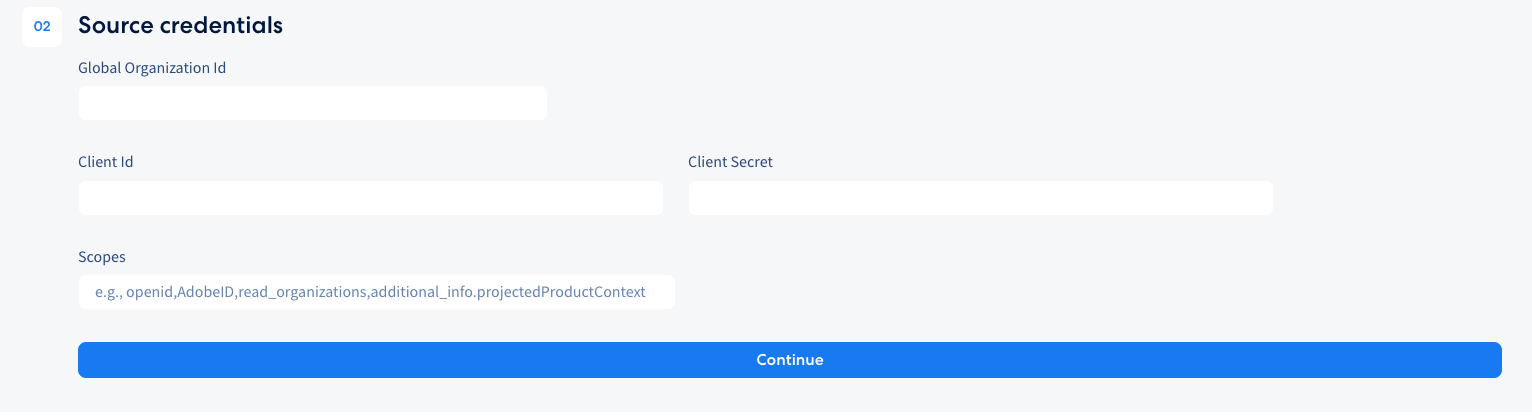
You don’t need to enter a separate API key. Integrate.io sends your Client Id as the
x-api-key header automatically.