

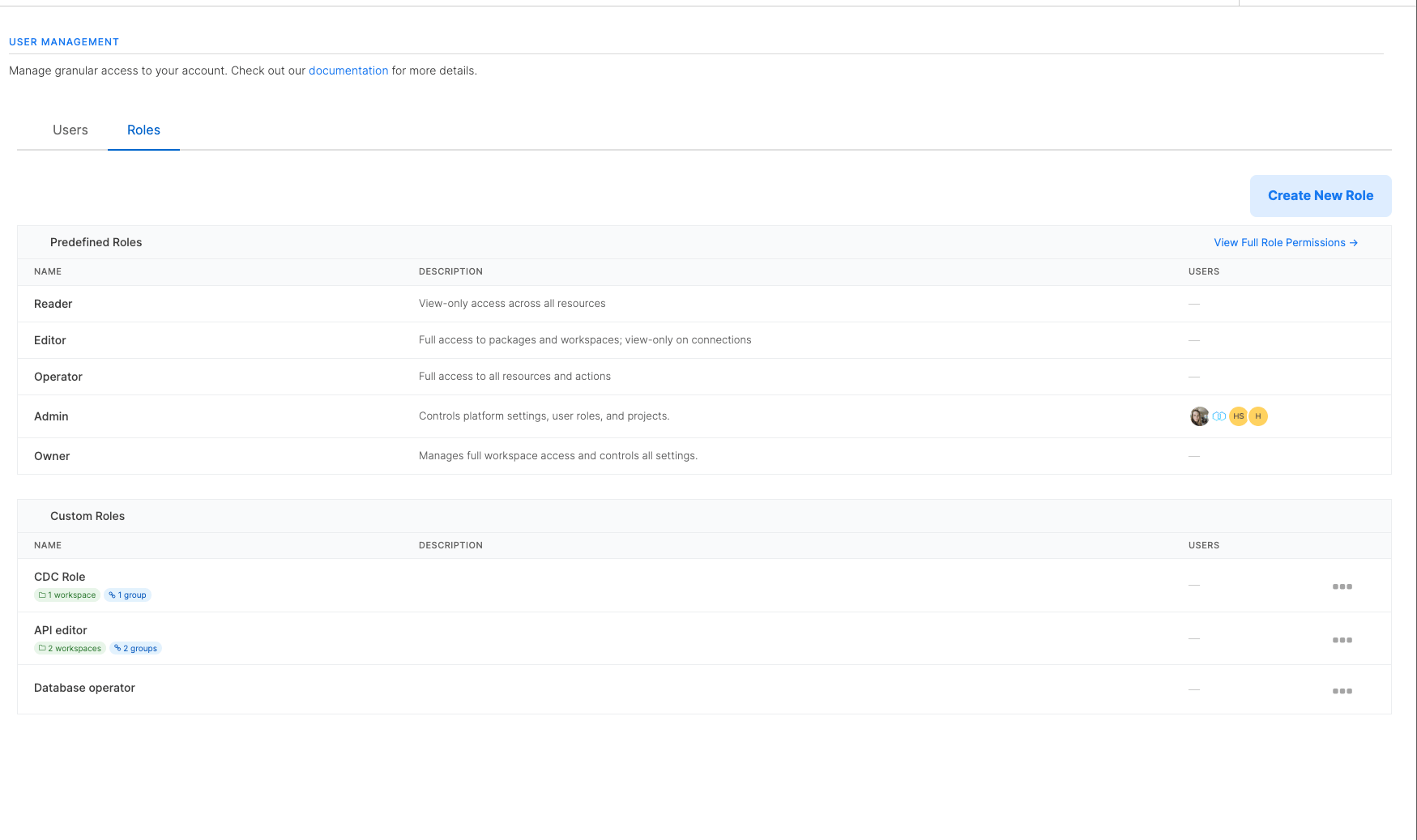
How custom roles work
A custom role has three parts:- Permissions: the list of actions members assigned to the role can perform (for example, view packages, create connections, run jobs).
- Package group scope: which package groups the role applies to.
- Connection group scope: which connection groups the role applies to.
Package groups were previously called workspaces. The role-creation form, the API field names (
workspace_scope, workspace_ids), and the workspace-domain permission keys (viewWorkspace, createWorkspace, and so on) still use the legacy term. They refer to the same thing.
Scopes are strict: choosing Specific means the role grants access to only those resources. Resources without a package group or connection group (orphans) are not included.
Package-group-scoped permissions cover package groups, packages, jobs, schedules, and package templates. Connection-group-scoped permissions cover connections and connection groups. Account-level permissions (clusters, hooks, members, billing, global variables) are not affected by resource scope and are configured under Global Permissions instead.
How scope affects related resources
The package group scope and connection group scope also control visibility of the resources that belong to those groups:- Packages: a package is visible only when it belongs to a package group the role allows. Packages outside the role’s scope are hidden from the packages list, designer, and search.
- Jobs: a job is visible only when its package belongs to a package group the role allows. Jobs whose package is outside the role’s scope are hidden, even from the jobs list.
- Schedules: a schedule is visible only when every package it triggers is in scope. If a schedule references at least one package the user cannot see, the entire schedule is hidden so the scope does not leak the existence of out-of-scope packages.
- Connections: a connection is visible only when it belongs to a connection group the role allows. Connections without a connection group are not visible to a scoped role.
How custom roles combine with predefined roles
A member can be assigned a predefined role, one or more custom roles, or both. The two interact as follows:
Use a custom role on its own when you want to restrict a member to a specific set of package groups or connection groups. Combine a predefined role with a custom role when you want the predefined role’s defaults plus some extra permissions (for example, an Editor who also needs to create clusters).
Access Level presets
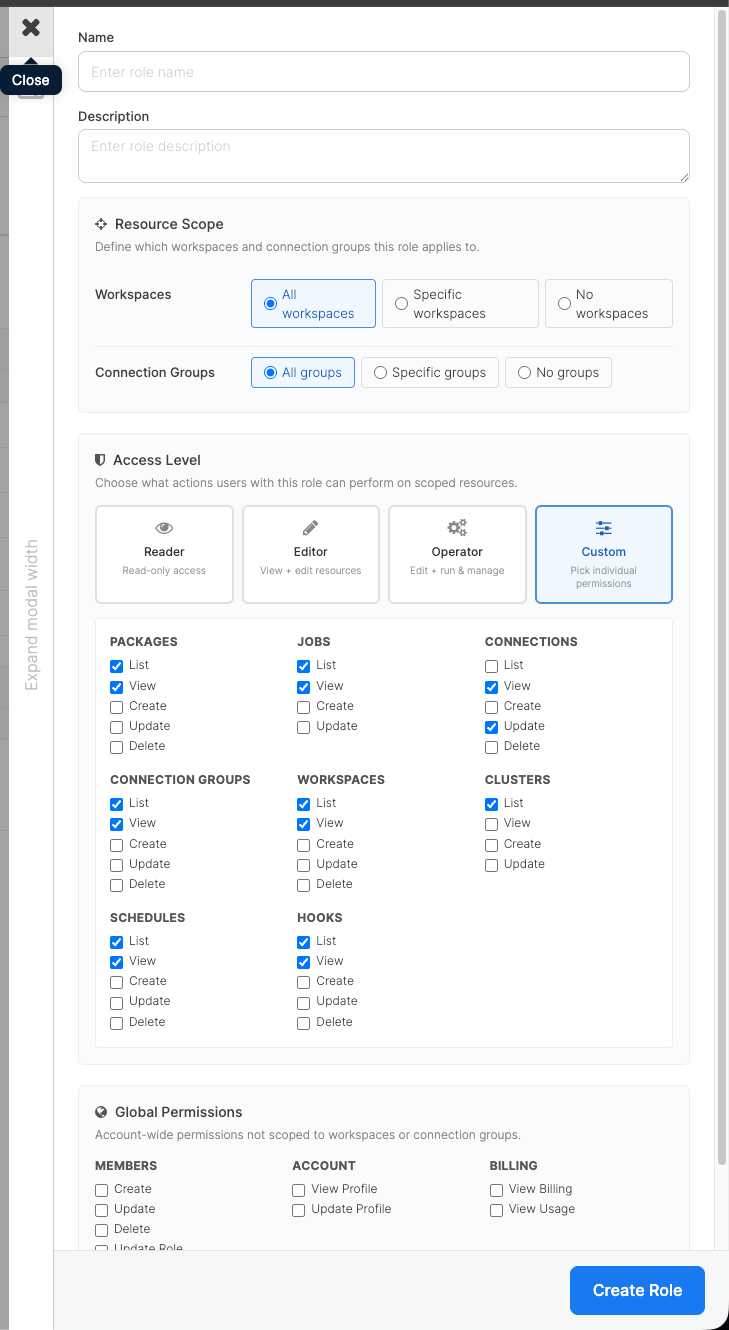
When you create a role, the Access Level section offers four presets that pre-fill the permission checkboxes:
Reader, Editor, and Operator presets lock the checkboxes to make the intent explicit. Switch to Custom to edit individual permissions.
Creating a custom role
Prerequisites:- You must be an Owner or Admin on the account.
- Custom roles must be enabled for your account.
1
On the left menu, open Settings, then User Management, and switch to the Roles tab.
2
Click Create New Role.
3
Enter a Name and an optional Description. Both appear in the Roles list and in the Assigned Roles picker when inviting members.
4
In Resource Scope, choose a package group scope and a connection group scope. Pick All, Specific (then add the package groups or connection groups), or No. The role-creation form labels the package group axis as “Workspaces” (legacy term), but the meaning is the same.
5
In Access Level, pick Reader, Editor, Operator, or Custom. With Custom, tick individual permissions in the resource grid below.
6
Optionally expand Global Permissions and grant account-wide capabilities (managing members, viewing the account profile, viewing billing).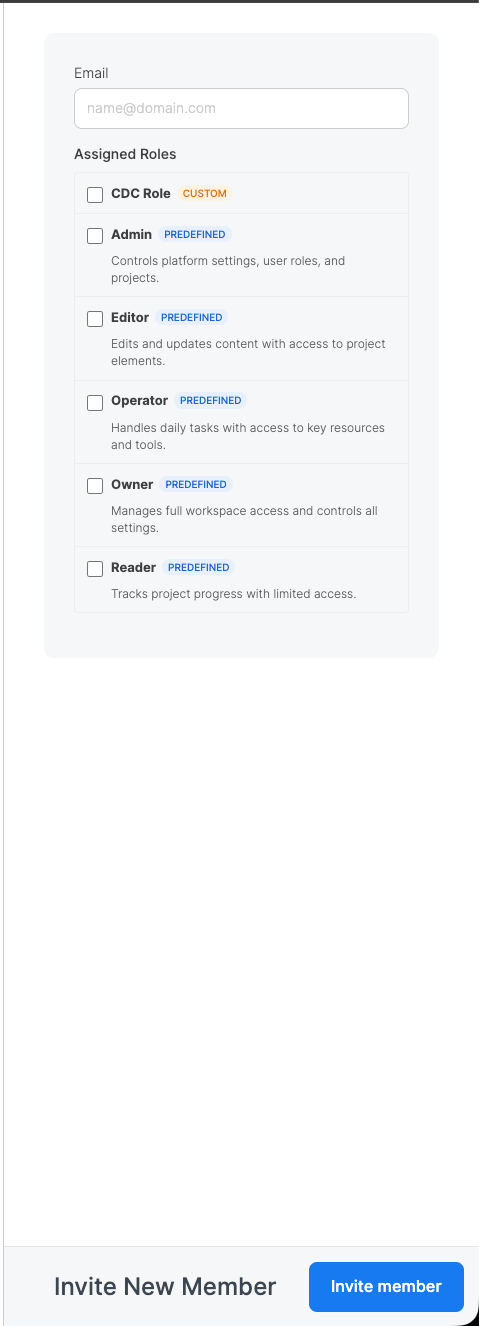
7
Click Create Role.
Assigning a custom role to a member
1
Go to Settings > User Management, then switch to the Users tab.
2
Open the member you want to update, or click Invite New Member to add a new one.
3
Under Assigned Roles, tick one or more roles. Each role is labeled PREDEFINED or CUSTOM so you can tell them apart at a glance. You can combine a predefined role with one or more custom roles, or assign multiple custom roles together.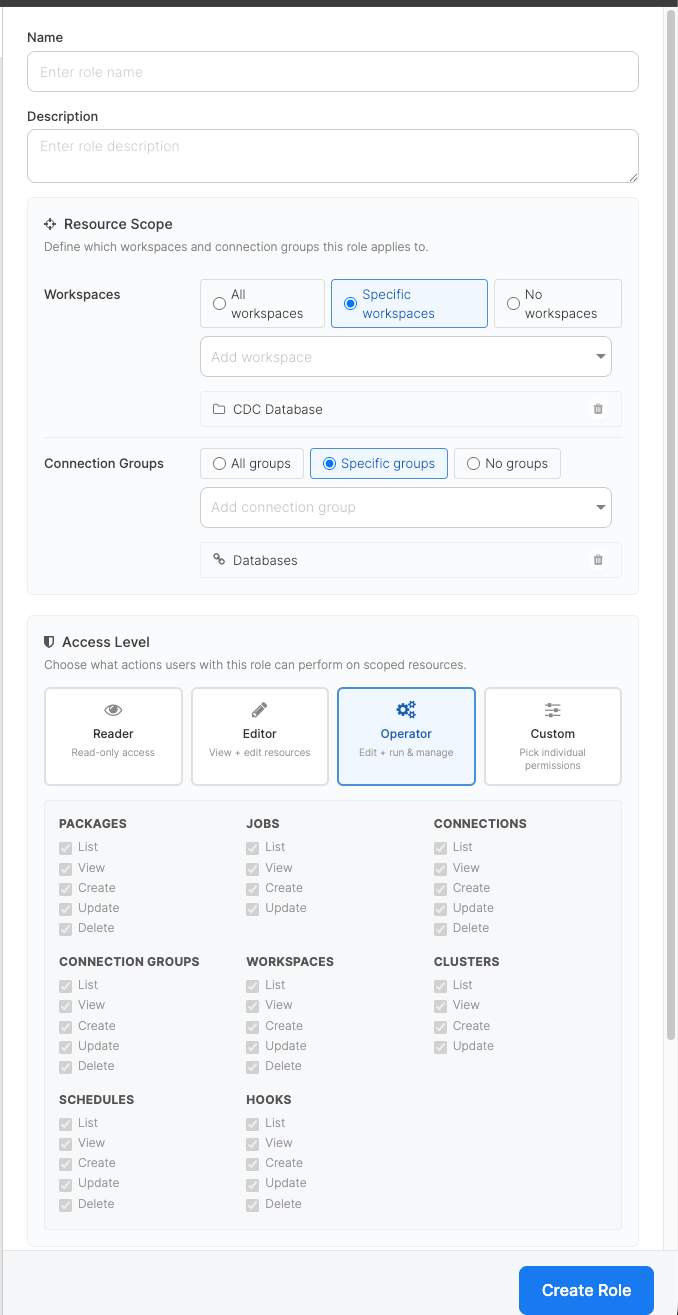
4
Click Invite member (or Save when editing an existing member).
Assigning users from the role
You can also manage a role’s assignees from the role itself instead of editing every member individually. Use this path when you need to add or remove several users on the same role in one step.1
Go to Settings > User Management, then switch to the Roles tab.
2
Open the Assign Users dialog for the role using any of these entry points:
- Click the role’s name.
- Click the Users column on the role’s row.
- Open the row’s action menu (⋮) and select Assign users.
3
Tick the members who should hold the role and untick anyone who should no longer hold it. Use the search box to filter by name or email.
4
Click Save. The role’s assignee list is replaced with your selection: newly ticked members are added, unticked members are removed.
Filtering users by role
On the Users tab, use the role dropdown next to Invite New Member to filter the list by role. The dropdown groups roles into Predefined and Custom. Selecting a role narrows the list to members assigned to it; selecting All roles clears the filter.Editing or deleting a role
- Predefined roles cannot be modified or deleted.
- Custom roles can be edited at any time. Changes apply immediately to every member assigned to the role; you do not need to re-invite anyone.
- A custom role can be deleted only after every member has been unassigned from it. If you try to delete a role that still has assignees, the UI returns an error listing how many members still use the role.
API reference
The custom roles API is exposed under/api/v2/custom_roles. All endpoints require an account-scoped API key for an Owner or Admin.
List roles
Create a custom role
This example creates a package-group-scoped editor for a single package group, with no connection access. The API still uses the legacyworkspace_scope / workspace_ids field names and the *Workspace permission keys:
all, specific, or none. When the scope is specific, the matching workspace_ids or connection_group_ids array lists the resource IDs to grant access to.
Update a custom role
Delete a custom role
Assign custom roles to a member
Passcustom_role_ids to the members endpoint when inviting or updating a member:
role: "base" alongside a non-empty custom_role_ids array. The invitee’s permissions come entirely from the assigned custom roles. No predefined-role grants apply.
Assign members to a role in bulk
Use the role-level members endpoint when you want to manage a role’s assignees from the role itself rather than editing every member individually. It replaces the role’s current assignees with the supplieduser_ids list. Missing IDs are added and IDs no longer in the list are removed.
- The request is idempotent. Sending the same
user_idslist twice is a no-op. - Passing an empty array unassigns every member from the role.
- IDs that do not belong to the account are silently ignored, so a stale ID cannot leak members from another account into the role.
- The endpoint is available only for account-scoped custom roles. Attempting to change the assignees of a predefined role returns 422.
- The caller needs the
manage_member_rolespermission (Owner or Admin, or a custom role that grants it).
Filter members by role
GET /api/v2/members accepts two optional filters that compose with AND semantics:
Send
custom_role_id on its own to list every member assigned to that custom role. Send both to list members who hold the given predefined role and the given custom role.
Permission reference
The permission keys you can include when building a custom role, grouped by domain:
A few permissions are easy to confuse:
createJobis the permission to run an existing package (start a new job run). It does not grant the ability to edit the package.updatePackageis the permission to edit a package’s flow. Grant bothcreateJobandupdatePackagewhen an editor also needs to trigger runs.createPackageis the permission to create a new package. It does not implyupdatePackageon packages someone else created.manageConnectionAccessis the account-level permission to bind a package group to specific connection groups (see Restricting a Package Group to specific Connection Groups).updateWorkspacealone does not grant it, so a package-group editor cannot change which connections the group’s members can reach.