

Overview
Global secrets are encrypted, account-level values (such as API keys, tokens, and passwords) that you define once and reuse across every package in your account. They behave like secret variables, but they are managed centrally in Account Settings instead of inside a single package. Use a global secret when the same sensitive value is needed by multiple packages and you do not want to re-enter or duplicate it in each one.How It Works
- Encrypted at rest. Values are stored with AES-256-GCM encryption and are never persisted in plaintext.
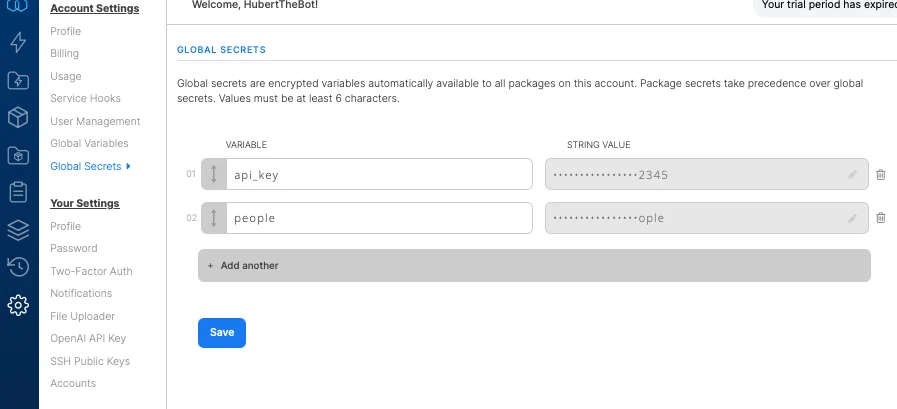
- Masked everywhere. After you save a secret, the value is masked in the UI and in API responses (the masked form shows bullet characters followed by the last 4 characters of the value). You cannot view the original value again.
- String values only. Unlike global variables, global secrets do not accept expressions. The value is treated as a literal string.
- Referenced like any other variable. Use
$secret_namein component fields and expressions, exactly as you would with a regular package variable or secret variable.
Global secrets are encrypted at rest and masked in the API, but at runtime their values are substituted into the job (for example into Pig scripts). Treat them like any other package secret value.
Permissions
Access to global secrets is role based:
The Global Secrets sidebar item only appears for users with view permission.
Configuration
Managing global secrets
1
Go to Account Settings -> Global Secrets (listed below Global Variables in the sidebar).
2
Enter a name and a value for the secret. Values must be at least 6 characters.
3
Click Save. The value is masked immediately after saving.
Using global secrets in packages
Reference a global secret in any component field or expression with$secret_name, the same way you reference a package variable. Because the value is substituted as a string, enclose it in single quotes where a string is expected, for example '$api_key'.
In the package variables editor, a read-only Global Secrets tab lists the secrets available to the package (masked). To edit them, follow the link to the Global Secrets settings page.