

- Raw X12 segments - one row per segment, with the envelope control numbers, segment id, and raw elements. Works for any X12 transaction set. You build the shape you need downstream.
- Enrollment (834) parsing - the source reads the 834 hierarchy (members and their coverages) and flattens it into tabular rows with named columns such as
member_id,last_name, andeligibility_begin. You do not need downstream transformations to get flat enrollment data.
Connection
Select an existing file storage connection or create a new one. For more information, see How to connect to your data sources.Source Properties
Source location
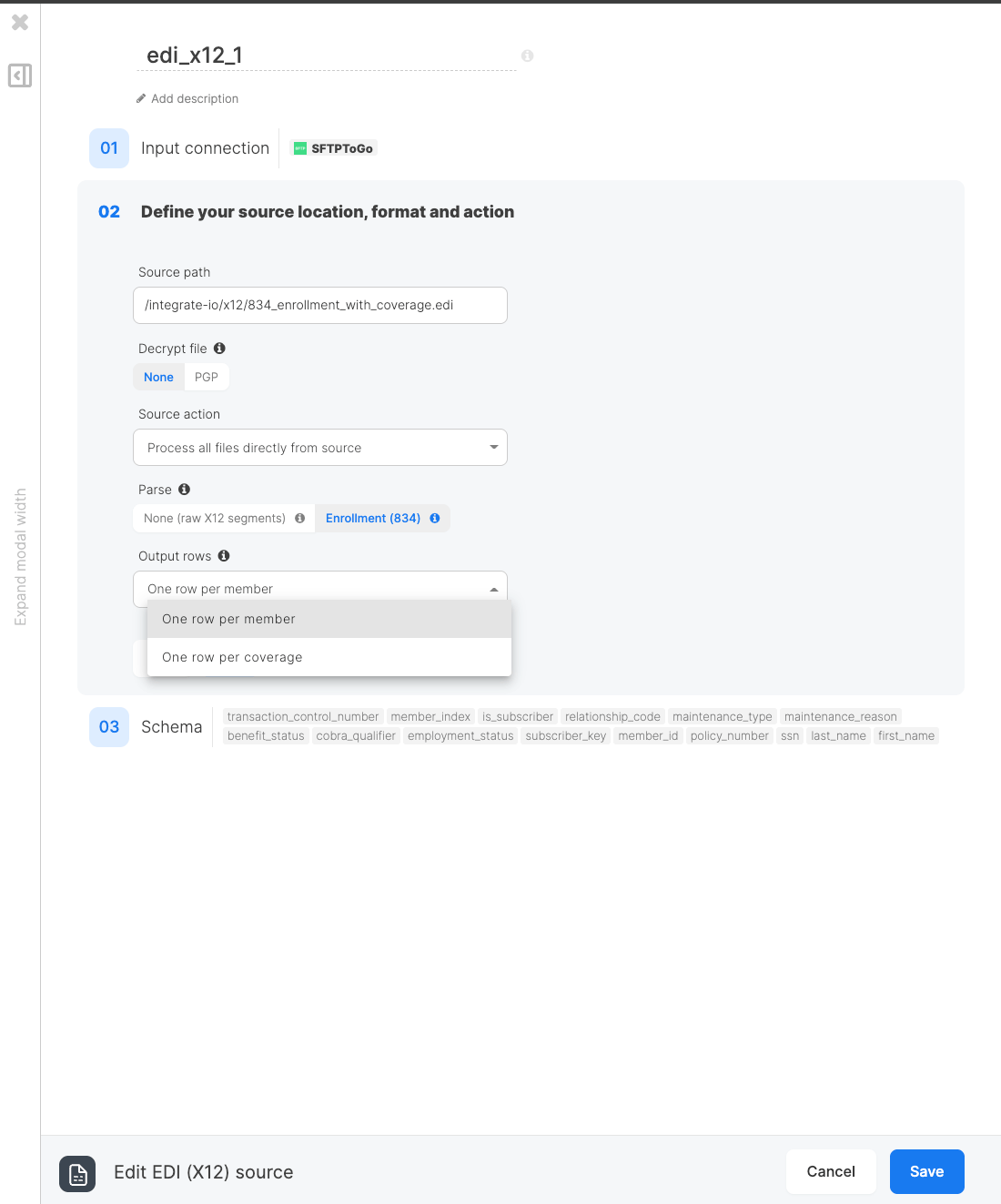
Define the source bucket and source path the same way as in the File Storage source. Pattern globbing is supported. X12 has no record delimiter setting. Segments are terminated by the character declared in each file’s ISA envelope, so the source reads the terminator from the file itself. The source path field option is not available for X12 sources. The interchange, group, and transaction control numbers in each row identify the file of origin instead. The record type and record settings shown on the File Storage source are hidden here. This component is the X12 format, so there is nothing to choose.Decrypt file
If your source files are encrypted with OpenPGP, choose PGP and select an active entry from the key dropdown. The entry must hold a private key. Integrate.io decrypts each matching file in memory before parsing it, so the plaintext is never written to storage. See PGP Keys for how to add and manage entries. Leave this on None for files that are not encrypted.Source action
Choose what happens to each file once it has been read. The options are the same as on the File Storage source:- Process all files directly from source - the default. Files are read in place and left where they are.
- Process only new files (Incremental load) - read only files that have not been processed before. See Reading File Storage Data Incrementally.
- Copy, merge and process all files - stage the matching files together before reading them.
- Move processed files to another folder - archive each file once the job has read it.
Parse
The Parse setting controls whether the source reads the file as raw segments or interprets its transaction sets first:- None (raw X12 segments) - the default. Each row is one X12 segment, in file order. Nothing is interpreted, so any transaction set reads the same way.
- Enrollment (834) - the source reads the 834 benefit enrollment hierarchy and flattens it to tabular rows at the grain you choose below. A file that holds a different transaction set fails the job rather than returning empty output.
Output rows
When Parse is set to Enrollment (834), choose what one output row means:- One row per member - the default. Every member in the file appears exactly once, dependents included. Rows carry the member keys, enrollment status, name, demographics, address, and eligibility window. The
is_subscribercolumn tells dependents from subscribers, andsubscriber_keylinks a dependent to its subscriber. - One row per coverage - a member enrolled in three plans becomes three rows, and a member enrolled in nothing drops out entirely. Rows carry the member keys plus the plan and its benefit window. Use this grain to count plans; use member rows to count people.
How an 834 is read
An 834 is hierarchical: a transaction set is a run of member loops (each opened by anINS segment), and each member can hold coverage loops (each opened by an HD segment). Dependents follow the subscriber they belong to rather than pointing at them. Flattening walks the file in order and applies these rules, which explain most surprises in the output.
Members and dependents. Every INS loop becomes a member, dependents included. is_subscriber is Y for a subscriber and N for a dependent, and subscriber_key carries the member_id of the most recent subscriber, which is how a dependent joins back to the person whose policy covers it. A dependent that appears before any subscriber gets an empty subscriber_key rather than being dropped.
Repeated segments. Real files repeat things, so:
- Dates take the last value. A corrected
DTP*356later in the loop wins. - Everything else takes the first: the first
REF*0F, the firstREF*1L, the firstNM1, the firstDMG, the firstN3, and the firstN4in a member loop are the ones kept. In 005010X220A1 the firstNM1is the member’s own name loop and the ones after it are the mailing address, employer, school, and custodial parent, so letting those win would overwrite the member’s real name, SSN, or address.
N3 and N4 anywhere in the member loop, not the address inside the member’s own NM1 loop. A member whose own name loop carries no address but is followed by a mailing-address loop therefore reports the mailing address, which is the only address that member has.
Missing values are kept, not hidden. A member with no REF*0F still produces a row with an empty member_id, because a member with a missing identifier is exactly what a validation step downstream needs to see.
Segments this component does not model - HD before any INS, and loops outside the member and coverage hierarchy - are skipped, and the job log records a warning counter for each kind so you can tell a benign file from an alarming one.
The source reshapes the file; it does not judge it. There is no code-set translation, no plan crosswalk, and no EDI validation. Use downstream transformations for business rules.
Source Schema
The output schema is fixed by the parse mode and grain. You do not define fields yourself. The schema step runs the same flattening the job runs, over the same file, so the columns and the sample rows you see while designing are the ones the job produces. Switching Parse or Output rows changes that shape, so re-run the schema step after changing either.Very large files are read only as far as the preview needs. The schema step stops once it has enough sample rows, so a multi-gigabyte audit file previews without being read end to end.
Raw segment columns
With Parse set to None, each row is one segment with these columns:Member grain columns
With Enrollment (834) parsing and One row per member:Coverage grain columns
With Enrollment (834) parsing and One row per coverage. A member’s coverages are capped at 1000 loops; beyond that the extra loops are not emitted and the job log records a warning. No real enrollment file approaches this, but a truncated or malformed one can. With Enrollment (834) parsing and One row per coverage:Date columns such as
dob, eligibility_begin, and benefit_end stay strings in the X12 CCYYMMDD format. The source reshapes the file rather than interpreting values, so convert dates downstream with ToDate if you need date types.Example
Given an 834 file containing one subscriber with dental coverage:eligibility_begin comes from the DTP*356 before the HD segment, which belongs to the member. The DTP*348 after the HD belongs to the coverage and has no column at this grain, so it does not appear here.
With One row per coverage, the same file emits one row per HD loop instead (selected columns shown):
Here
benefit_begin is the DTP*348 inside the HD loop. The member’s own DTP*356 has no column at this grain. A member with no HD loop at all produces no row here, which is why the two grains can return different row counts for the same file.